All posts by Vikas Shitole

About Vikas Shitole

Vikas Shitole is a Senior Tech Lead at VMware by Broadcom, VCF division, India, where he leads system test efforts—including scale, stress, and resiliency testing—and drives product quality across VMware Cloud Foundation (VCF), Broadcom’s flagship private cloud platform. He is an AI and Kubernetes enthusiast, and is passionate about VMware customers and automation around vSphere and VCF. Vikas has been honoured as a vExpert for 13 consecutive years (2014–2026) for his sustained technical contributions and community leadership. He is the author of two VMware Flings, holds multiple industry certifications including VCF admin 9.0, and is one of the top contributors to the VMware API Sample Exchange, where his automation scripts have been downloaded over 50,000 times. Vikas has shared his expertise as a speaker at international conferences such as VMworld Europe and VMworld USA, and was selected as an official VMworld 2018 blogger. He also served as lead technical reviewer for the Packt-published books vSphere Design and VMware Virtual SAN Essentials. Beyond tech, Vikas is a dedicated cricketer, cycling enthusiast, and a lifelong learner in fitness and nutrition, with the personal goal of completing an Ironman 70.3

VCF100: Can We Help 100 Community Members Get VCF Certified?

In an AI era where answers are available in seconds, why spend weeks preparing for a certification?

I believe the answer is context.

AI is getting better at an incredible pace. At the same time, the technology landscape we work with is becoming broader and changing faster.

That creates an interesting challenge for us as engineers: how do we build our own technical context just as deliberately and efficiently?

AI can certainly help us learn faster. But having access to answers is not the same as having the context to understand them, connect technologies, challenge what AI gives us and make the right engineering decisions.

We need ways to make our learning broader, faster and structured.

For me, certification is one such mechanism. It gives us a defined scope, forces us to explore areas beyond our day-to-day work, and gives that learning a measurable goal.

I started writing certifications when I started with VMware as an intern and continued throughout my career across vSphere, VMC, Kubernetes and VCF technologies.

Even after working directly on these technologies for many years, preparing for an exam still does something valuable:

It exposes gaps in what I thought I already knew.

That learning — not just the certificate — is why certifications have remained relevant to me.

I have shared more about this separately in Why I Write Certification Exams in the AI Era.

Why VCF100?

With VCF 9.0, we are looking at a re-architected, more unified private cloud platform. It is an important opportunity for those of us in the VMware community to step beyond our immediate areas of expertise and build a broader & deeper understanding of the private cloud platform.

I started closer to home by encouraging engineers within my organization to take up VCF certifications.

Along the way, I shared my certification experience, created a VCF 9.x Administrator Preparation Guide, conducted a preparation walkthrough, and started experimenting with how AI can accelerate preparation without bypassing the underlying learning.

As engineers started taking up the journey and becoming certified, I began thinking:

Why limit this to our internal community?

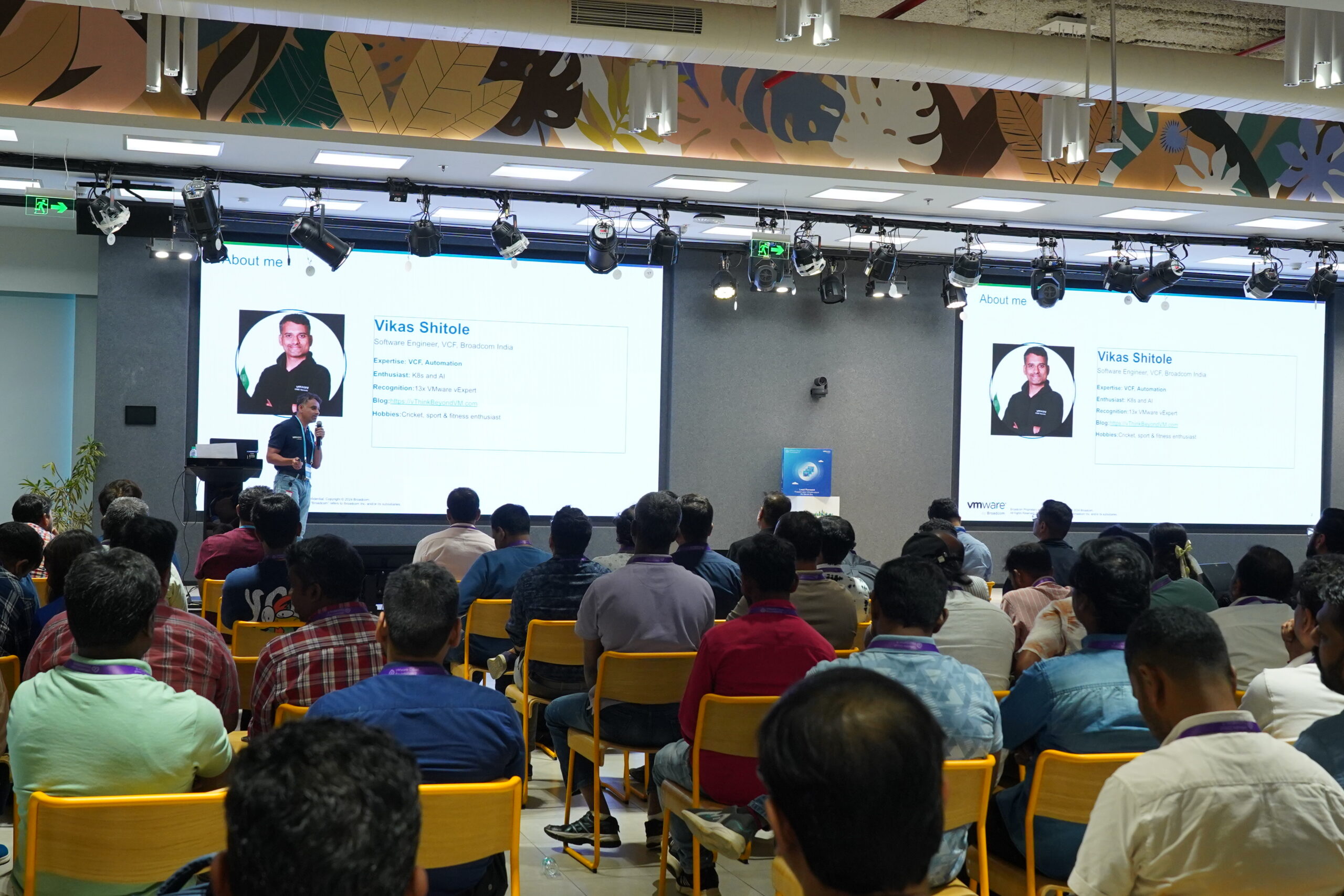
I have been part of the vExpert community for 13 years and have had the opportunity to learn and contribute through blogging, VMUG, VMware Explore and many community interactions.

Recently, while sharing my certification journey at VMUG Bengaluru, a simple idea came to mind:

Can we help 100 community members become VCF certified?

That is VCF100.
One certification doesn’t have to be the end

VCF100 isn’t about one particular exam.

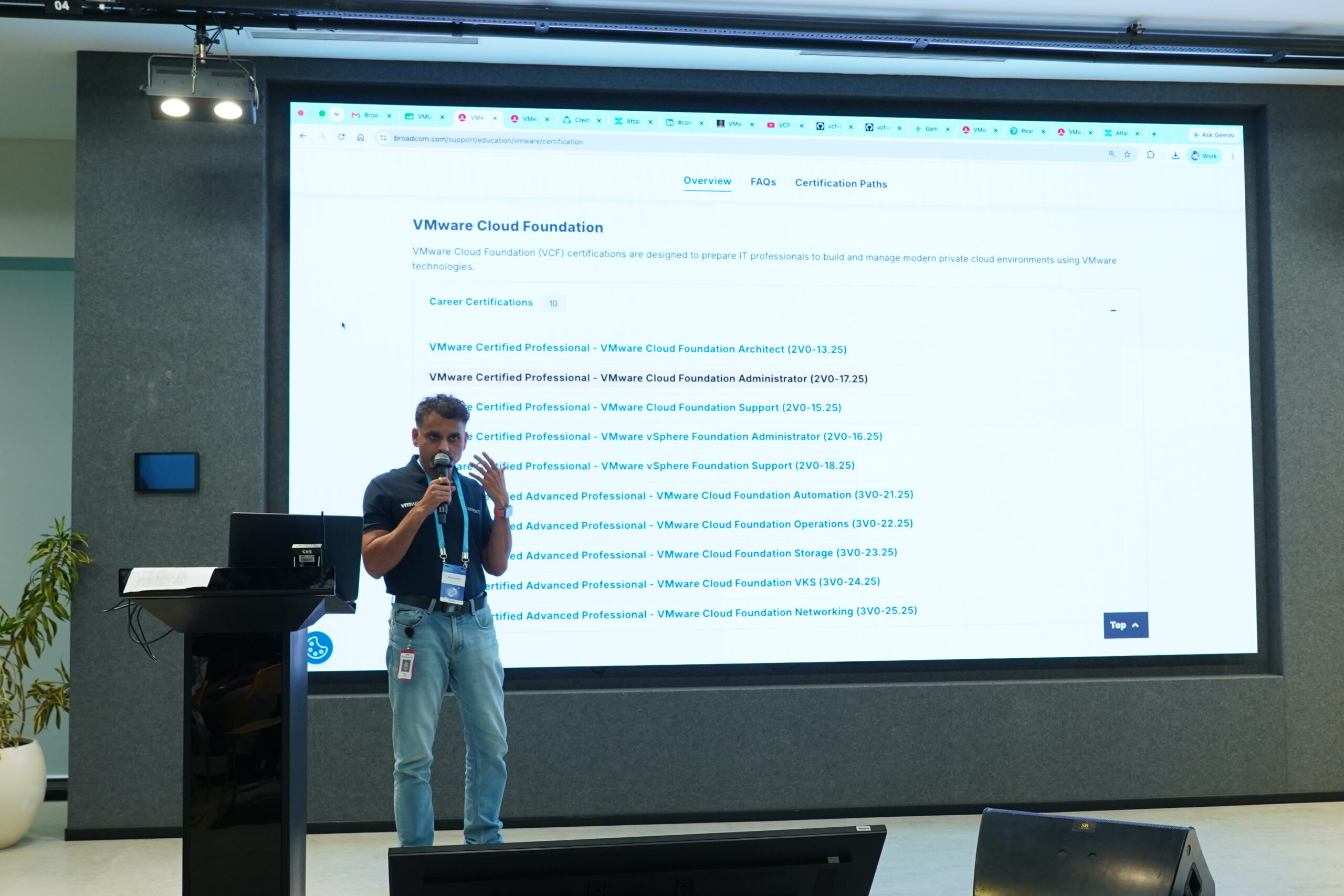
Someone may start with VCF Administrator to build a broad foundation and then choose the next step based on their role and interests.

Interested in Kubernetes? VKS could be the next step.

Working more deeply with automation? Explore VCF Automation.

Others may choose networking, operations or another VCF specialization.

There is no single path everyone needs to follow.

Start where you are. Build the foundation. Then create your own path.

How does VCF100 work?

The idea is simple:

Learn → Get Certified → Go Deeper → Share → Help the Next Person

I have started consolidating the resources I create and use under the VCF Certifications section of this blog, including preparation guides, walkthroughs and certification experiences.

Over time, as more people take different certification paths, I hope we can contribute back what we learn and make the journey easier for the next person.

This is not about shortcuts to passing an exam.

Use AI. Use documentation. Use courses. Use community knowledge. But use the certification journey to actually learn the technology.

Who is part of VCF100?

If this initiative, its resources, a VMUG session or someone in the community helps or motivates you — and you achieve a VCF certification — you are part of VCF100.

Already certified?

Don’t stop because you already have the badge.

Choose the next certification that makes sense for your journey — and help someone else start theirs.

Share your experience. Answer a question. Contribute a useful resource. Present what you learned. Or simply encourage someone who has been postponing that exam.

Got VCF Certified?

If #VCF100, one of these resources, a VMUG session, or someone in the community helped or motivated you on your VCF certification journey, we’d love to hear about it.

Share your achievement on LinkedIn with #VCF100 or let us know through this short form.

And once you’re certified — help the next person

Why 100?

I have always liked the number 100.

100 runs in cricket. 100 km on a cycle. A 100-day meditation streak. There is something about reaching 100 that makes a challenge feel meaningful. 🙂

So when I thought about setting a first milestone for this initiative, 100 felt natural.

But the real opportunity is bigger than the number.

If 100 people build stronger VCF knowledge, some go deeper into their areas of interest, and they start helping others learn, the impact can go well beyond 100.

So, where are you today?

Thinking about your first VCF certification? Start.

Already preparing? Keep going.

Already certified? Choose your next path.

Already experienced? Help someone else.

100 people. Learn. Certify. Go deeper. Give back.

Can we get there? Let’s find out. #VCF100

VCF100 is a community-led learning initiative and is not an official VMware by Broadcom initiative or certification program

Have a question, feedback, or want to contribute to #VCF100? please feel free to DM me on LinkedIn

VMware Cloud Foundation 9.0 Administrator (2V0-17.25) Certification Preparation Guide

Target Audience: VMware by Broadcom Community
Last Updated: February 2026

Why Write Certification Exams?

Yes, being certified and earning the badge is one of the drivers. However, what truly matters is what we do between deciding to write the exam and actually attempting it.

Use exams as motivation for your learning journey, not just to pass. The preparation journey should be the focus.

Read more:
Why I write certification exams – LinkedIn post (including AI aligned perspective)

Key Benefits

  • Exam objectives help streamline and direct learning
  • Forces hands-on practice with real scenarios
  • Builds comprehensive understanding of the product
  • Creates a structured learning path with clear goals
  • Certifications count as contributions to vExpert applications, which can potentially get you VMUG Advantage membership

Preparation Timeline

Plan for 8–12 weeks of solid hands-on preparation for best results.
Depending on how much time you dedicate, it can be done in a couple of weeks as well.


Getting Exam Vouchers & Discounts

VMUG Advantage Program

VMUG Advantage membership provides significant benefits:

  • $125 USD off VMware certifications

Learn more:
https://www.vmug.com/membership/membership-benefits/

Cost: $210 USD/year

VMware vExpert Program

If you are a VMware vExpert, you automatically receive:

  • VMUG Advantage membership (complimentary) – includes $125 USD off certifications
  • 50% off certification exams

Learn more:
https://vexpert.vmware.com/

Important: Certifications are considered as contributions to vExpert applications and may help you earn vExpert status.

Note: VMUG and vExpert discounts are subject to current terms and conditions.

Other Opportunities for Free Vouchers

  • Local VMUG events – Some events may provide free VCF certification vouchers
  • VMware Explore – Attendees may receive free certification vouchers
  • Broadcom employees – Internal prep guide available with free voucher process (contact Vikas Shitole)

Scheduling Your Exam

⚠️ Important: Use a personal laptop for scheduling and exam.
Corporate laptops may fail due to firewall restrictions.

Step 1: Login to Certification Portal

Step 2: Schedule Exam

  • From dashboard → Click Schedule Your Exam
  • Click SSO to VUE
  • Redirects to Pearson VUE

Step 3: Select Exam

  • Search for “VMware exams” or click VMware Professional Level Exams
  • Choose your exam
    Example: 2V0-17.25 – VMware Cloud Foundation 9.0 Administrator

Step 4: Choose Exam Format

  • OnVUE Online – Take exam from home (Recommended)
  • In-Person – Pearson VUE testing center

Step 5: Select Date & Time

  • Accept terms and conditions
  • Select language: English
  • Time zone auto-detected
  • Choose date and time slot

Recommendation: Early morning slot (5 AM) — quiet and distraction-free.

Step 6: Payment & Voucher

  • Enter your voucher number at checkout
  • Voucher may waive entire amount or provide discount

Exam Day Checklist

Before Exam Day

  • Test your laptop using the system test link (10–15 min)
  • Use personal laptop
  • Copy exam email links to personal device
  • Prepare distraction-free room
  • Keep government-issued ID ready

On Exam Day

  • Check-in link works only 30 minutes before exam
  • Keep ID ready for verification
  • Take webcam photos (face, sides, ID)
  • Ensure no one else is in the room
  • Close all other applications

Environment Requirements

  • Quiet, private room
  • Clean desk (no papers, books, phones)
  • Good lighting
  • Stable WiFi (exclusive connection preferred)

VCF Administrator Exam (2V0-17.25) core guidelines

Exam Details

DetailInformation
Exam ID2V0-17.25
NameVMware Cloud Foundation 9.0 Administrator
Questions60 multiple choice (many multi-answer, scenario-based)
Time135 minutes
Passing Score300/500 (scaled)
Official Pagehttps://www.broadcom.com/support/education/vmware/certification/vcp-vcf-administrator

Official Courses

VMware courses are NOT mandatory unlike in the past, but helpful for structured learning.

Broadcom provides complimentary access to VCF digital training libraries for eligible customers and partners.

Broadcom Learning Portal:
https://www.broadcom.com/support/education/vmware


Course 1: VMware Cloud Foundation – Build, Manage and Secure [V9.0] ⭐ Recommended

DetailInformation
Course IDVCFBMS9
Duration~24 hours (self-paced)
AccessSearch “VCFBMS9” on Broadcom Learning Portal

Includes:

  • Video lectures
  • Recorded lab demonstrations
  • Course materials

Course 2: VMware Cloud Foundation – Automate and Operate [V9.0]

  • Instructor-led training only
  • Not available as self-paced

Note Course 1 + hands-on is sufficient for exam preparation.


Video Resources I used for my preparation

This exam is based on VCF 9.0 only.

Recommended Playlists

TopicPlaylist Link
VCF Automationhttps://www.youtube.com/playlist?list=PL8_k3uUCO39ukTT0IPWtoI8ksL-19Bkfp
What’s New in VCF 9https://www.youtube.com/playlist?list=PL8_k3uUCO39ueFJmiyuNID9UoYIshSsFr
VCF Upgrade & Converge (Supercool!)https://www.youtube.com/playlist?list=PL8_k3uUCO39uoKObELZjKzx72lDwjF9ul

VMware Explore 2025 Sessions

ResourceLink
VCF Automation & Networkinghttps://www.youtube.com/watch?v=IEaf8QvnuCQ
VCF Explore Playlisthttps://www.youtube.com/playlist?list=PL8_k3uUCO39uSbMqSq70pHirEPoU3QzXt

All VMware Explore 2025 Sessions:
https://github.com/lamw/vmware-explore-2025-session-urls (For deeper exploration across tracks and years.)

Official VCF YouTube Channel https://www.youtube.com/@VMwareCloudFoundation


Hands-On Labs

Practical experience is crucial.

Option 1: VMware Hands-On Labs (HOL)

https://labs.hol.vmware.com/HOL/catalog

Access: Use your credentials – No dependencies – fully hosted, ready to use – Note: Course content has recorded labs that are the same as HOL

Option 2: Holodeck Deployment

https://vmware.github.io/Holodeck

Use Case: Deploy nested VCF on your own hardware

Option 3: Home Lab Setup

Lab setup video available on YouTube

Lab Setup Video: https://www.youtube.com/watch?v=HvYGrKlBkNE


AI-Assisted Preparation

Status: Initial version I am experiementing in my spare time, will post once ready. If you are interested, please DM


Study Groups

Preparing in small groups (2–3 engineers) using divide-and-conquer approach can help.

Solo preparation is also perfectly fine.


Questions & Contact

For questions, contact Vikas Shitole via LinkedIn DM:

https://www.linkedin.com/in/vikasshitole


VMware India vExpert Community

  • Curating list of VMware India vExperts who passed this exam
  • Upcoming panel discussion session as part of VMware vExpert Tech Talks in India (early March 2026)
  • Contact Vikas Shitole or local VMUG India leaders for details

Guide for Broadcom Employees

Broadcom employees: Internal prep guide including free voucher process available.
Contact Vikas Shitole for access.

Quick Reference

Key Links Summary

ResourceLink
Certification Portalhttps://www.broadcom.com/support/education/vmware/certification
VCF Administrator Exam (2V0-17.25)https://www.broadcom.com/support/education/vmware/certification/vcp-vcf-administrator
VMUG Advantagehttps://www.vmug.com/membership/membership-benefits/
VMware vExpert Programhttps://vexpert.vmware.com/
VMware Learning Portalhttps://www.broadcom.com/support/education/vmware
VCF Official YouTube Channelhttps://www.youtube.com/@VMwareCloudFoundation
VMware Hands-On Labs (HOL)https://labs.hol.vmware.com/HOL/catalog
Holodeck Deployment Guidehttps://vmware.github.io/Holodeck/
VMware Explore Sessions (Archive)https://github.com/lamw/vmware-explore-2025-session-urls

𝐅𝐫𝐨𝐦 𝐈𝐏𝐋 𝐀𝐮𝐜𝐭𝐢𝐨𝐧 𝐕𝐢𝐛𝐞𝐬 𝐭𝐨 𝐒𝐞𝐭𝐛𝐚𝐜𝐤 𝐭𝐨 𝐂𝐨𝐦𝐞𝐛𝐚𝐜𝐤 — 𝐇𝐨𝐰 𝐂𝐫𝐢𝐜𝐤𝐞𝐭 𝐊𝐞𝐞𝐩𝐬 𝐒𝐡𝐚𝐩𝐢𝐧𝐠 𝐌𝐞

A few months ago, I got a taste of what every cricket lover dreams of — IPL auction vibes in real life.

Our South City community in Bangalore hosted its first-ever 𝐒𝐨𝐮𝐭𝐡 𝐂𝐢𝐭𝐲 𝐏𝐫𝐞𝐦𝐢𝐞𝐫 𝐋𝐞𝐚𝐠𝐮𝐞 (𝐒𝐏𝐋) — complete with a live player auction, team franchises, and bidding drama.

Each franchise was given 𝟐 𝐥𝐚𝐤𝐡𝐬 (virtual money), and I was sold for 𝟏.𝟎𝟐 𝐥𝐚𝐤𝐡𝐬 — not real money, but the feeling was priceless as it was highest bid of the SPL

I watched the auction live on Instagram with my son 𝐕𝐢𝐫𝐚𝐭, and it felt exactly like watching an IPL auction — except this time, it was my name being called and bid for.

The energy and joy were unforgettable.

Screenshot

Screenshot

But just days before the SPL tournament, during an advanced workout, I suffered a 𝐧𝐞𝐰 𝐦𝐞𝐧𝐢𝐬𝐜𝐮𝐬 𝐢𝐧𝐣𝐮𝐫𝐲.

The pain was sharp, and I had to rush for an MRI.

Two doctors independently suggested 𝐬𝐮𝐫𝐠𝐞𝐫𝐲 — a tough moment to process for someone who has lived and breathed cricket for years, especially after all the build-up leading to the tournament

Since the team was built around me, I still participated — wearing a knee cap, hoping to contribute at-least with the bat.

But the injury was on my 𝐥𝐞𝐟𝐭 𝐤𝐧𝐞𝐞 — my front foot — which blocked my natural flow of shots.

There was guilt that I couldn’t be fully available for my team.

After that, I paused, focused on healing, and took a holistic recovery path — working with an expert on knee correction and body alignment.

Progress was slow but steady.

And four months later came the real test —

🏆 𝐊𝐚𝐫𝐧𝐚𝐭𝐚𝐤𝐚 𝐑𝐚𝐣𝐲𝐨𝐭𝐬𝐚𝐯𝐚 𝐓𝐨𝐮𝐫𝐧𝐚𝐦𝐞𝐧𝐭 𝟐𝟎𝟐𝟓 (𝐀𝐩𝐚𝐫𝐭𝐦𝐞𝐧𝐭 𝐋𝐞𝐯𝐞𝐥 𝐓𝐨𝐮𝐫𝐧𝐚𝐦𝐞𝐧𝐭)

An 𝟖-𝐭𝐞𝐚𝐦 𝐞𝐯𝐞𝐧𝐭 with an ICC Champions Trophy–like format — 2 groups of 4 teams.

This wasn’t about trophies — it was about testing my 𝐞𝐧𝐝𝐮𝐫𝐚𝐧𝐜𝐞 𝐚𝐧𝐝 𝐩𝐚𝐭𝐢𝐞𝐧𝐜𝐞, also just wanted to be part of the tournament.

I avoided running (requested a runner) and bowling, took the wicket-keeper role.

We fought our way to the 𝐟𝐢𝐧𝐚𝐥𝐬 but lost a close low-scoring thriller 💔

Still, the results were deeply satisfying & I was awarded for:

🏅 𝐁𝐞𝐬𝐭 𝐁𝐚𝐭𝐬𝐦𝐚𝐧 (𝐚𝐬 𝐨𝐩𝐞𝐧𝐞𝐫) – 152 runs in 5 matches (Avg 38, SR 183.13)

🧤 𝐁𝐞𝐬𝐭 𝐖𝐢𝐜𝐤𝐞𝐭-𝐊𝐞𝐞𝐩𝐞𝐫 – 12 dismissals (11 catches – all taken!)

⭐ 𝐎𝐯𝐞𝐫𝐚𝐥𝐥 𝐓𝐨𝐩 𝟒 𝐌𝐕𝐏 of the tournament

Recovery is still in progress — and holistically, it may take another six months or more to regain full strength. But the key is to keep showing up — one step (and one stretch) at a time

Cricket keeps teaching me lessons that apply everywhere — even in the corporate world:

🏏 𝐑𝐞𝐬𝐢𝐥𝐢𝐞𝐧𝐜𝐞 when things don’t go as planned.

🏏 𝐀𝐝𝐚𝐩𝐭𝐚𝐛𝐢𝐥𝐢𝐭𝐲 when conditions change.

🏏 𝐏𝐞𝐫𝐬𝐩𝐞𝐜𝐭𝐢𝐯𝐞 when you give everything and still end up on the losing side.

🏏 𝐏𝐚𝐭𝐢𝐞𝐧𝐜𝐞 when recovery takes longer than expected.

From getting IPL auction vibes to facing injury, rebuilding strength, and returning to the field — this journey reminded me why I always say:

“𝐶𝑟𝑖𝑐𝑘𝑒𝑡 𝑖𝑠𝑛’𝑡 𝑗𝑢𝑠𝑡 𝑎 𝑠𝑝𝑜𝑟𝑡 𝑓𝑜𝑟 𝑚𝑒. 𝐼𝑡’𝑠 𝑚𝑦 𝑤𝑎𝑦 𝑜𝑓 𝑙𝑖𝑓𝑒.”

Looking forward to how things pan out in next 3-6 months.

Why Cricket Is More Than Just a Sport

Five months ago, I took a small step to give back to cricket.
As I look back today, I realize how much that moment still inspires me, and I felt it deserved a place here on my personal blog.

Cricket has always been a big and special part of my life. That’s why I often say — cricket is not just a sport for me, it’s much more than that.

Whether as a captain, a player, a mentor, or a leader — every lesson I’ve learned on the field has shaped me. From winning and losing, sharing laughs, building friendships, handling criticism, performing under pressure, staying fit, to helping build cricket communities, spreading positivity, and even resolving conflicts — all of it came through cricket. And I’ve been fortunate to carry these lessons into both my personal and professional life.

As a small gesture of gratitude to the sport, I was fortunate to donate cricket kits — 2–3 bats, 2 sets of stumps, a pack of balls, and a kit bag with a lock for each kit — to the schools in my village. The same village where I played countless matches growing up.

It was by watching Ravi Dada (my elder brother) that I picked up the bat for the very first time. I remain truly grateful to him for being such a big inspiration in my cricketing journey.

My hope is simple — that some boys and girls from the village will be inspired to pick up the bat or ball and experience the same joy, discipline, and camaraderie that cricket gave me.

To all of you who continue to be part of my cricket ecosystem — thank you. Your presence makes the journey even more meaningful

Mastering Deep Learning VMs: Expert Answers to Your key Questions

My last post was an ultimate introduction to VMware Private AI. If you haven’t read that post, I highly recommend you do it. As a natural extension of my last post, I thought I would write FAQs in this post about one of the key components of vPAIF (VMware Private AI Foundation), i.e., Deep Learning VMs

Note: Though starting with basic FAQs, I plan to keep this blog post updated with deeper questions over time until all key aspects (including advanced ones) of Deep Learning VMs are covered

1. What is preconfigured in DL VM?

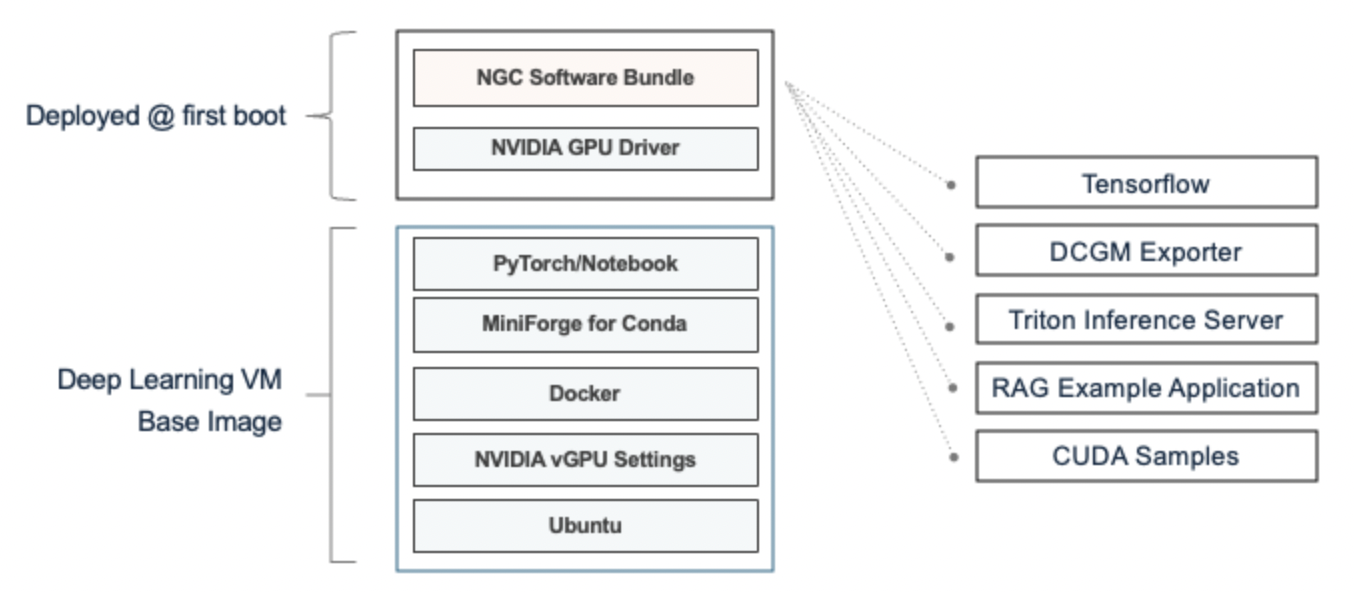
  1. Deep Learning VMs (DL VMs): These are specialized VMs (Ubuntu guest OS) preconfigured with AI/ML libraries, frameworks, tools, and drivers, all validated and optimized by NVIDIA and VMware for deployment within the VCF environment. Since these VMs are preconfigured, data scientists or AI developers can immediately focus on their AI app development, including LLM fine-tuning and inference, without the need to spend significant time deploying and installing compatible tools and frameworks, thus saving considerable time.
Source: VMware official blog

As you see in above diagram, VMware delivered base image has few components preconfigured and there are few things get deployed at first boot time. First one is NVIDIA GPU driver : It is a guest vGPU driver associated with underlying host vGPU driver already installed on the ESXi as part of setting up the Private AI foundation workload domain. Another key thing is NGC i.e. NVIDIA GPU cloud and this is where all validated GPU-optimized software bundles (those are microservices based) are available such as CUDA samples, DCGM exporter etc and based on the cloud-init script passed as part of DL VM deployment, it would be fetched at first boot.

Note: With Miniforge for conda, now DL VM will have pyTorch and Tensorflow environment embedded in the base image itself. In addition, with every DL VM release, new features are getting added. Above diagram is based on VCF 5.2 associated DL VM version 1.1. There is another super cool feature integrated with VCF 5.2.1 associated DL VM version 1.2 i.e. VMware PAIS (Private AI Services) CLI directly integrated into DL VM, which allows MLOps /Data scientist to pull and push LLM models into VMware harbor registry backed model store . Learn more here. I will also write separate blog post for the same.

2. How are they delivered/released?

These validated Deep learning VM images are available for consumption from this content delivery network (CDN) URL i.e. https://packages.vmware.com/dl-vm/lib.json (This is similar to the TKG/guest cluster images). As a vSphere admin, you need to create a subscribed content library using above URL to make it available for consumption. In case, there is air-gapped environment, admin needs to manually download these images from this URL https://packages.vmware.com/dl-vm/ (latest version recommended) and create a local content library with downloaded deep learning VM images. While each VCF release will have associated Deep learning VM but it is expected to have async releases periodically. Refer deep learning VM release notes for more details

3. What are the different ways to deploy deep learning VM?

These Deep Learning VMs can be deployed in one of ways below. It is assumed that content library is configured as mentioned in last question.

  1. Directly from the vSphere client UI using the standard “Deploy from content library template” workflow. This does not require you to have vSphere IaaS control plane (aka WCP or supervisor cluster) enabled on the cluster. Refer official documentation here
  2. If you have vSphere IaaS control plane enabled, you can use regular kubectl k8s interface to deploy VM-service based DL VM. Refer official documentation here
  3. One of the compelling value of the vPAIF VCF Add on is ability for users to deploy DL VMs as a AI workstations using the VCF automation (aka Aria automation) self-service catalog. This drastically simplifies the consumption of AI workstations with just a few clicks. Note that VCF automation eventually interface with underlying supervisor cluster in vSphere IaaS control plane and deploys the DL VM using VM service construct. Refer official documentation here

If you see official documentation for #1 and #2, user has to pass several properties, inputs needed to deploy a DL VM. This is where option #3 is super cool, where everything is self service with few clicks.

4. Can we customize DL VMs?

Yes, as shown in the diagram above, while DL VM comes preconfigured with few stuffs, user can customize the way they want using industry standard cloud-init mechanism as per their requirement. Refer for more details on how should you customize DL VMs

5. How the life cycle of the DL VM works?

As specified above, deep learning VMs are delivered by VMware by Broadcom through content library. Each of the DL VM release is versioned and as of VCF 5.2.1, DL VM 1.2 was released. Users are recommended to deploy latest version. Since these VMs are meant as development environment for MLOPs or AI developers to kick start their work, it is not supported to upgrade from a version to new version. While older version of the DL VM should continue to work, user must re-deploy new DL VM with latest image from content library. I will update on the DL VM compatibility with underlying VCF version soon.

6. Who are the consumers of the DL VM?

DL VM can be deployed by various user personas such as cloud admin & devops for ML Ops or data scientist. Even MLOps/data scientist can deploy it using VCF automation self service. DL VM is meant for data scientist or ML Ops engineer for their AI app development, including LLM fine-tuning and inference, without the need to spend significant time deploying and installing compatible tools and frameworks, thus saving considerable time.

Hope you got the quick value out of this post, please stay tuned for new questions those will deep dive into various key aspects of deep learning VMs.

Further learning

  1. My first post an ultimate introduction to VMware Private AI foundation
  2. Official documentation here