Earlier, I discussed my involvement with private AI at VMware Explore Singapore 2023 here and and later, when the first release of ‘VMware Private AI Foundation with NVIDIA’ became generally available here. Today, I am starting a series of blog posts on various aspects of VMware Private AI Foundation with NVIDIA. I will begin with an easy-to-understand introduction to the platform.
Basics
VMware Private AI Foundation with NVIDIA is also known as vPAIF-N, PAIF-N, PAIF, or simply VMware Private AI. I will refer to it as PAIF-N going forward
As the name indicates, it is a jointly engineered solution by VMware by Broadcom (a Private cloud leader) and NVIDIA (a leader in GPU-accelerated computing).
PAIF-N primarily focuses on Generative AI (GenAI) use cases. It enables enterprises to quickly start building Generative AI capabilities around their business. It has been generally available since the VCF 5.1.1 release.
It is sold as an add-on (one of the advanced services) on top of the flagship VMware Cloud Foundation (VCF).
In fact, customers need to have a PAIF-N add-on license from VMware by Broadcom, as well as a separate license from NVIDIA for the NVIDIA AI Enterprise (NVAIE) suite.
Most importantly, customers must separately purchase supported GPU cards (such as H100 or A100) for certified servers/hosts
PAIF-N caters to key user personas such as cloud administrators, data scientists, and DevOps/developers.
While we are focusing on PAIF with NVIDIA, there are different such partnership with Intel and AMD (may be more in future) respectively as well.
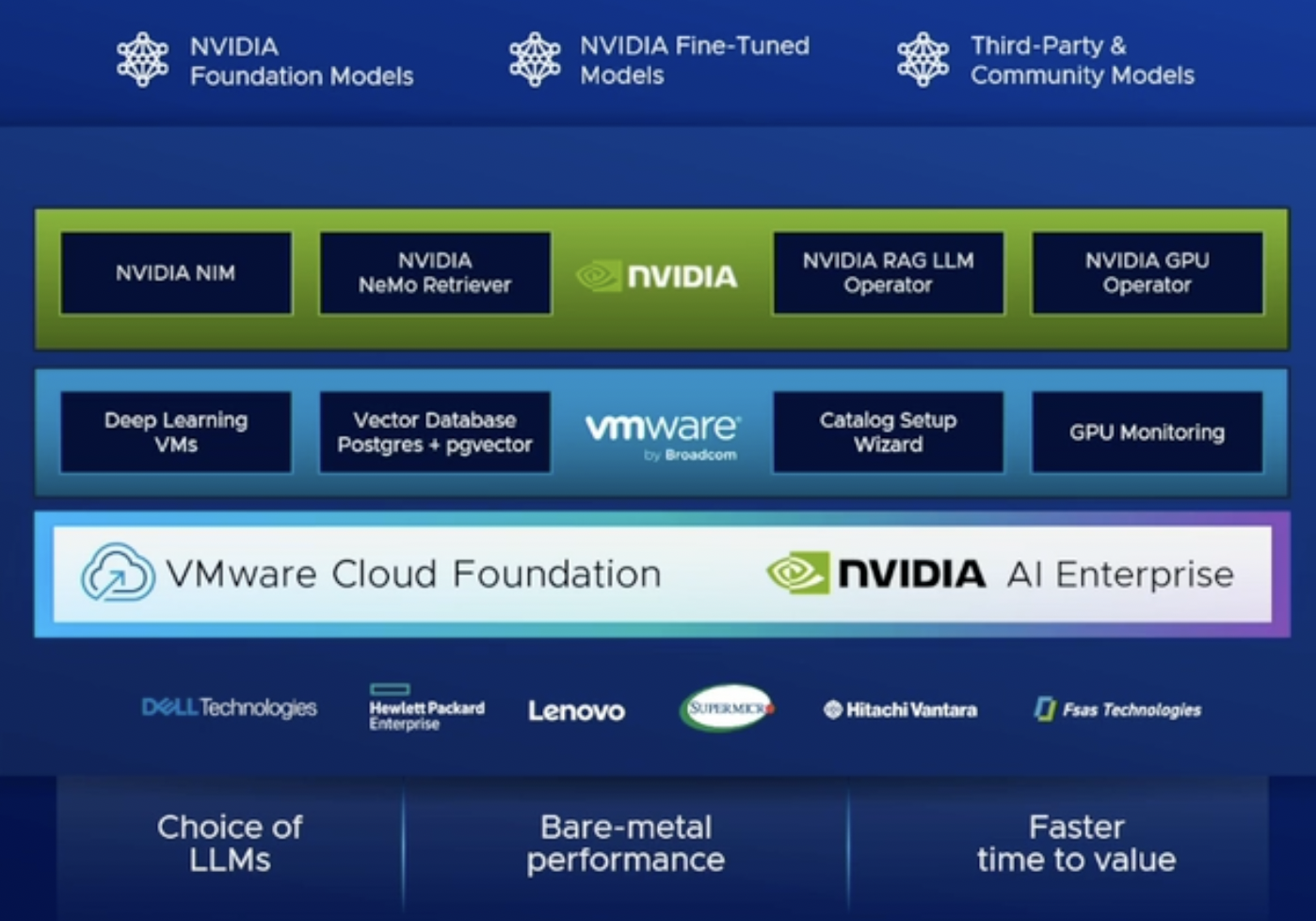
High level architecture
Source/Credit: VMware Explore 2024 session
What are the key components from VMware by Broadcom?
Since PAIF-N is an add-on to VCF, customers benefit from all the strengths of the underlying platform (compute, storage, networking, and management—each of which has been a leader in its respective category for many years).
VCF can be deployed as a private cloud in your own data centers, through VMware cloud providers, or via certified hyperscalers with solutions such as Google Cloud VMware Engine. This flexibility allows PAIF-N to be deployed based on the customer’s choice, closer to their domain-specific data
With each release, new capabilities are continuously being developed within VCF to maximize the value of PAIF-N. Examples include:
Virtualizing GPUs in much the same way that compute, storage, and networking are virtualized.
Bringing all the goodness of DRS (Distributed Resource Scheduler) to effectively manage GPU resources.
Fine-tuning the amazing VMware vMotion capability specifically for GPU workloads,
Extending the goodness of vSphere IaaS platform to GPU workloads using constructs such as
VM-class with GPU,
VM-service with GPU, TKG/Guest clusters with GPU,
Harbor as a LLM store (Harbor capability announced in VMware Explore 2024, session link at the end) and so on…
Unified vCenter UI for standing up the entire GenAI infrastructure on VCF
VMware Data Service Manager (DSM), which supports vector databases for Retrieval-Augmented Generation (RAG), a popular GenAI use case. DSM, available as an advanced service within VCF, also caters to non-PAIF-N use cases
and so on..hopefully you get the idea.
Deep Learning VMs (DL VMs): These are specialized VMs (Ubuntu guest OS) preconfigured with AI/ML libraries, frameworks, tools, and drivers, all validated and optimized by NVIDIA and VMware for deployment within the VCF environment. These validated VM images are released by VMware by Broadcom through a content delivery network (CDN), similar to TKG/Guest cluster images. This allows customers to subscribe to the CDN via the well-known content library construct in vSphere
These Deep Learning VMs can be deployed either directly from the vSphere UI using the standard “Deploy from content library template” workflow or through the kubectl interface as part of the VM service construct on top of the vSphere IaaS platform (also known as WCP or Supervisor cluster). Since these VMs are preconfigured, data scientists or AI developers can immediately focus on their AI app development, including LLM fine-tuning and inference, without the need to spend significant time deploying and installing compatible tools and frameworks, thus saving considerable time.
If a user prefers a Kubernetes cluster (instead of DL VMs) with preconfigured tools and libraries, it is easily achievable by deploying TKG clusters (also known as Guest clusters) and installing NVIDIA-specific operators such as the GPU-operator and RAG operator. Of course, these Kubernetes clusters can be customized with a choice of AI tools and libraries.
Importantly, data scientists or DevOps users can deploy DL VMs or Kubernetes clusters (TKG/Guest clusters) as AI workstations using the Aria Automation (formerly known as vRealize Automation) self-service catalog. This drastically simplifies the consumption of AI workstations with just a few clicks. Even though these catalog items (including RAG-based AI workstations) are preconfigured, users can still customize them to meet their specific needs.
From a GPU monitoring perspective, vCenter Server’s H5C client offers basic performance charts, while Aria Operations provides advanced dashboards specifically designed for GPU monitoring.
Although obvious, it’s important to note that all NVIDIA components (more on it below) are seamlessly integrated with PAIF-N.
As per VMware Explore 2024 announcements, vRA/Aria automation will be called as VCF automation and vRops/Aria Ops will be called as VCF Operations. I am hoping this is the last naming ceremony (lol).
Disclaimer : VMware Explore 2024 also announced new capabilities in VCF 5.2.1 and VCF 9.0. The list above is not exhaustive, as new capabilities are being rapidly added with each release to maximize the value of this jointly engineered solution
Why the term “Private-AI”?
An architectural approach that balances the business gains from AI with privacy and compliance needs of the organisation
There are multiple challenges in the GenAI space today, but the most critical ones are privacy, compliance, and security.
Privacy: Customers are concerned about the privacy of their domain-specific data and IP assets, how proprietary LLMs process or handle them, who gets access to it, etc. There is fear about how their data is being used by LLMs for inferencing or training.
Compliance: Many enterprise customers operate in highly regulated industries, so they must be 100% compliant with GDPR, HIPAA, and other regional rules and laws.
Security: With the advent of Gen AI, new security threats are emerging. Data leaks and unauthorized access can lead to significant breaches unless proper guardrails, secure APIs, encrypted data sources, and secure AI infrastructure are in place. Security is a major concern
PAIF-N resolves all these challenges. In fact, it not only addresses these critical issues but also tackles other challenges such as the choice of open LLMs, cost, and even performance (equal to or better than bare metal).
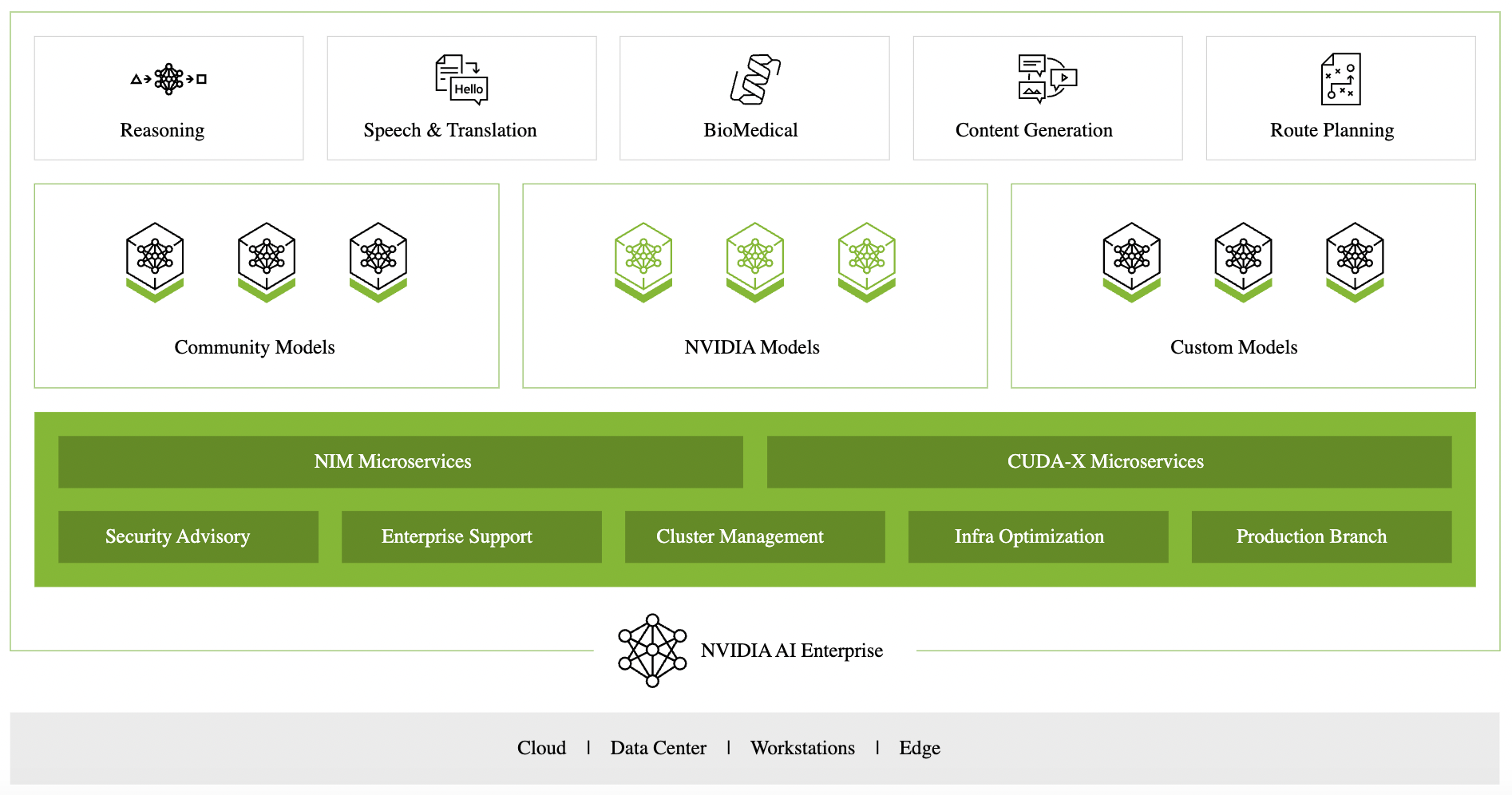
What are the key components from NVIDIA?
Credit/source: NVIDIA’s official website
In short, NVIDIA defines it as the “Operating System” for enterprise AI
It brings a lots of goodness from data-scientist, AI developer perspective with various tooling, frameworks, libraries & drivers around GenAI application development, model inferencing, model fine tuning, pretrained models etc.
Examples:
NVIDIA vGPU technology (joint engineering between VMware and NVIDIA to virtualize GPUs)
vGPU drivers for guest OS (DL VM or K8s worker node) compatible with VMware ESXi GPU host drivers
NIM microservices with AI frameworks like pyTorch, Tensorflow, CUDA, sample chatbots and so on. NVIDIA NIM microservices are fastest way to AI interference
Validated and optimized pre-trained LLMs (Community i.e. open source LLMs, NVIDIA’s custom models etc)
Recently announced, NVIDIA NIM agent blueprints for various enterprise GenAI use cases
GPU-operator and Network operator for K8s clusters making GPU as a first class citizen in K8s world.
RAG operator for RAG use case
and so on…I hope you get the idea
Note: Reading the names above might feel overwhelming, but don’t worry! You don’t need to set up or deploy any of this individually. The VMware capabilities I mentioned earlier make everything seamlessly integrated out of the box—how cool is that?
Disclaimer: Just like VMware, NVIDIA is also keep improving/adding their capabilities as we speak, so above list goes on.
How it fits together: an example
Imagine you are a multinational bank named ABC Inc., and you are already a VMware customer (or decided to go for it) with your own data center (though you had a choice to get this VCF stack on hyperscalers or providers) running at scale on an industry-leading VCF stack.
As a bank, you offer a wide range of products and services to millions of customers. All these services are developed, deployed, and managed on top of your VCF infrastructure.
With the rise of amazing GenAI technology, and to stay ahead in your industry, you have developed a GenAI strategy to integrate AI into every aspect of your operations. A couple of simple examples might include improving customer service or deploying a code assistant for your internal developer teams
As a multinational bank operating in a highly regulated industry, you are concerned about critical challenges like privacy, compliance, and security. You want to move quickly but still retain full control over your data, intellectual property (IP), and costs.
Given your focus on the banking sector, building your own proprietary LLM (like OpenAI’s GPT) is not feasible due to the high cost and complexity. Instead, your strategy is to embrace open LLMs that are pre-trained for specific use cases (such as text, code, or video) to accelerate your AI journey and solve your business-specific AI challenges.
You want to leverage existing VMware investments, skillset and reduce the learning curve around GenAI for these new set of workloads
With above constraints and concerns you are wondering how to go about enabling your internal teams to move forward in order to quickly integrate Gen AI into all facets of your business.
By now, it should be clear that PAIF-N is the perfect solution for you! 🙂
Further learning
If you want to see how it looks like in action with cool demos, this VMware Explore 2024 session is must watch
Glimpse into VMware Private AI future state and PAIF-N with VCF 9.0, another session from VMware Explore 2024
If you think this blog post added value to your time, please share with others as appropriate. Please feel free to connect with me on linkedIn or Twitter for all such posts.
Vikas Shitole is a Senior Tech Lead at VMware by Broadcom, VCF division, India, where he leads system test efforts—including scale, stress, and resiliency testing—and drives product quality across VMware Cloud Foundation (VCF), Broadcom’s flagship private cloud platform. He is an AI and Kubernetes enthusiast, and is passionate about VMware customers and automation around vSphere and VCF. Vikas has been honoured as a vExpert for 13 consecutive years (2014–2026) for his sustained technical contributions and community leadership. He is the author of two VMware Flings, holds multiple industry certifications including VCF admin 9.0, and is one of the top contributors to the VMware API Sample Exchange, where his automation scripts have been downloaded over 50,000 times. Vikas has shared his expertise as a speaker at international conferences such as VMworld Europe and VMworld USA, and was selected as an official VMworld 2018 blogger. He also served as lead technical reviewer for the Packt-published books vSphere Design and VMware Virtual SAN Essentials. Beyond tech, Vikas is a dedicated cricketer, cycling enthusiast, and a lifelong learner in fitness and nutrition, with the personal goal of completing an Ironman 70.3
Towards the end of last year, I had passed VMware Certified Professional (VCP DV 2021) exam. As I shared my experience on other 2 exams I had passed i.e. VCF specialist and vSphere with Tanzu specialist, I wanted to even share my experience around VCP certification exam as well but due to various reasons my blog post focused on it got delayed. Today I thought let me complete this series with this post. Lets get going!
As I did for other 2 posts in this series, first thing you must be clear in your mind is that why do you want to write this exam? As I posted in my earlier posts, I love going through learning journey and exam/certifications are just one of the milestones in that journey. Of course, I align them with my short term or long term goals. I had written about Why I choose to target exams. I highly recommend you read that 7 line section. Let us now focus on VCP certification.
While I was forced to write VCP exam (I chose to go with VCP DCV track as that is what I have been more experienced), I am 100% glad that I did. Since my earlier VCP was on vSphere 5.0 release, going through official courses on vSphere 7.0, I realized that so much is changed over the years.
As per the VCP DCV certification criteria posted on official site, we are required to undergo one of the trainings but since official site recommended 2 courses (while one is enough), I decided to complete 2 courses i.e. VMware vSphere: Install, Configure, Manage [V7] – On Demand and VMware vSphere: Optimize and Scale [V7] – On Demand . As vSphere has been one of the primary products I work on, I thought let me deep dive on the few areas of the vSphere those I did not get enough on the job experience. If you are new to vSphere, joining live class is better over on demand class as you can focus 100% all the time over 5 days but if you have time constraints, then on demand works well.
Since I completed both the courses, it was quite comprehensive preparation. Both of these courses have many modules and lessons, going through them required lot of patience but I enjoyed. In fact, it was very close to how I run half marathon or 100 km cycle ride, I think its same mindset and resiliency required during such learning journey. If you are already familiar with particular modules, at times you can speed up with 1.5x or 2.0x speed.
I was fascinated by the amount of details each module around vSphere. In fact, being one of the senior engineers in my team, it has been helping me lot as more often than not I now need to think vSphere as a complete product and not few components within it as it was the case in the past as a junior engineer. Comprehensive preparation helping me when I work on other integrated solutions/offerings such as VCF, vSphere with Tanzu, VMC as well.
Apart from going through 2 courses I mentioned, solving small mock tests at the end of each module and my existing experience working on vSphere platform, I need not have to go through anything else.
If you have read my blog post series on VCF, Tanzu exam, tips posted there could be handy as well. I would suggest to skim through them as both of these posts are very well received by VMware community i.e. VCF specialist and vSphere with Tanzu specialist
When I passed VCP DCV exam, within few days VMware issued all the badges i.e. VCP DCV, VCF specialist & vSphere with Tanzu in one go and it was great feeling to have these badges. You can view all the VMware badges I have received so far.
Happy learning ! I hope this post was helpful, please share with others as appropriate and you can follow me on Twitter for upcoming posts or feel free to DM me for any queries.
Vikas Shitole is a Senior Tech Lead at VMware by Broadcom, VCF division, India, where he leads system test efforts—including scale, stress, and resiliency testing—and drives product quality across VMware Cloud Foundation (VCF), Broadcom’s flagship private cloud platform. He is an AI and Kubernetes enthusiast, and is passionate about VMware customers and automation around vSphere and VCF. Vikas has been honoured as a vExpert for 13 consecutive years (2014–2026) for his sustained technical contributions and community leadership. He is the author of two VMware Flings, holds multiple industry certifications including VCF admin 9.0, and is one of the top contributors to the VMware API Sample Exchange, where his automation scripts have been downloaded over 50,000 times. Vikas has shared his expertise as a speaker at international conferences such as VMworld Europe and VMworld USA, and was selected as an official VMworld 2018 blogger. He also served as lead technical reviewer for the Packt-published books vSphere Design and VMware Virtual SAN Essentials. Beyond tech, Vikas is a dedicated cricketer, cycling enthusiast, and a lifelong learner in fitness and nutrition, with the personal goal of completing an Ironman 70.3
In the past, I had shared preparation tips/guidance on VMware cloud foundation (VCF) and VMware Cloud on AWS specialist exams. In this post, I am going to share preparation guidance for passing vSphere with Tanzu specialist exam. In fact, recently couple of VMware community friends reached out to me to understand what it takes to be “vSphere with Tanzu” specialist, I thought same would be useful to larger VMware community, hence this post. Let’s get going..
Below is what VMware official statement says about specialist badge holders, how cool is that !
The VMware vSphere with Tanzu 2021 specialist badge holder knows about how vSphere with Tanzu can be used to orchestrate the delivery of Kubernetes clusters and containerized applications in a vSphere environment. This badge holder possesses extensive knowledge on deploying and managing VMware vSphere® with Tanzu.
First thing you must be clear in your mind is that why do you want to write this exam. For me, getting comprehensive view of the vSphere with Tanzu from customer/user perspective was important as it is directly aligned with one of the key focus areas in my day to day office work . Also, vSphere with Tanzu is one of key foundational areas under bigger Tanzu portfolio. As I posted in my earlier posts, I love going through learning journey and exam/certifications are just one of the milestones in that journey. I had written about Why I choose to target exams. I highly recommend you read that 7 line section. Let us now focus on vSphere with Tanzu specialist exam.
There is a 3 day official course on “vSphere with Tanzu” available on demand or live as well. On demand course is available on customer connect portal.
If you are working at VMware, I think you have free access to customer connect portal. In addition, course and lab material is available on internal vault portal. Please reach out to me if you need help on the same.
One important thing to note that passing this exam itself does not require you to undergo the official course. If you have enough hands on experience configuring vSphere with Tanzu with NSX-T & also with vSphere Networking (with AVI LB or HAproxy), you can go ahead and write this exam.
When I say hands-on experience, it is about deploying & configuring from scratch and have performed all day 1 and day 2 operations as a vSphere admin as well as Dev/Devops persona.
Since my focus at job was also on vSphere with Tanzu, I had enough hands on experience but I chose to undergo 3 days training as well, which definitely helped me connecting all the dots in my overall understanding of the solution. However, if you could not undergo the course due to various reasons, it is all right to directly write the exam as long as you already have gained enough hands on experience
While writing exam itself does not require you to undergo course but in order to achieve the certification “VMware Certified Specialist – vSphere with Tanzu 2022” , you must be done with course as well as you must be VCP-DCV certified.
In my case, I first completed the on demand course & passed this exam. Since my existing VCP was expired, I got re-certified on VCP 2021 (Last time I had passed VCP was whopping 9 years back when I was intern) to satisfy certification requirement.
Since I completed my certification requirements in late last year, my certification was vSphere with Tanzu 2021 but there is no difference between 2021 and 2022 from course content perspective at the moment.
Finally one fine day schedule the exam through PearsonVue portal, you should be good. I usually prefer scheduling exams early in the morning to avoid any distractions during exam time. All the best !
What is next?
If you already passed vSphere with Tanzu specialist and now looking for next learning milestone around VMware Tanzu or Kubernetes in general , I would suggest below 2 certifications.
Vikas Shitole is a Senior Tech Lead at VMware by Broadcom, VCF division, India, where he leads system test efforts—including scale, stress, and resiliency testing—and drives product quality across VMware Cloud Foundation (VCF), Broadcom’s flagship private cloud platform. He is an AI and Kubernetes enthusiast, and is passionate about VMware customers and automation around vSphere and VCF. Vikas has been honoured as a vExpert for 13 consecutive years (2014–2026) for his sustained technical contributions and community leadership. He is the author of two VMware Flings, holds multiple industry certifications including VCF admin 9.0, and is one of the top contributors to the VMware API Sample Exchange, where his automation scripts have been downloaded over 50,000 times. Vikas has shared his expertise as a speaker at international conferences such as VMworld Europe and VMworld USA, and was selected as an official VMworld 2018 blogger. He also served as lead technical reviewer for the Packt-published books vSphere Design and VMware Virtual SAN Essentials. Beyond tech, Vikas is a dedicated cricketer, cycling enthusiast, and a lifelong learner in fitness and nutrition, with the personal goal of completing an Ironman 70.3
Couple of weeks back vCenter server 7.0 U2a (a monthly patch focused on vSphere with Tanzu) released with 2 super cool features. In this post, I would like to take you through new REST APIs introduced as part of these features & key notes around how these features/APIs behave.
Virtual Machine Service
As per me, this feature is one of the key features (like vMotion) in the history of vSphere. In brief, it enables managing virtual machines using Kubernetes control plane. With this feature, user can define desired state of VMs, virtual networks, virtual storage device. How cool is that if you can create vms (with customization) using simple kubectl command like “kubectl apply -f vm.yaml” ! To learn more about it, I highly recommend you to read this official deep dive blog and associated video.
Namespace Self-Service
Prior to this release, Supervisor namespace life cycle was completely managed by the vSphere admin. It was limiting the flexibility that k8s user had. With this feature, k8s user has ability to manage the life cycle (create/delete) of their own Supervisor namespaces while the resource constraints wrt cpu, mem, storage policy are still controlled by vSphere admin. Simply k8s user can run ” kubectl create ns ” to create their own namespaces in order to deploy k8s objects such as vSphere pods, guest clusters (aka Tanzu kubernetes cluster/TKC ) and now with this release VMs as well. Note that if this feature is not activated in your environment, vSphere admin can continue to manage Supervisor namespaces as it was prior to this release. To learn more about this feature, please go through this quick and cool blog post.
New vSphere with Tanzu APIs in action
If you are completely new to vSphere with Tanzu (specifically Supervisor cluster APIs exposed by wcpsvc service running on vCenter server) REST APIs, I highly recommend you to first read “Introduction to Supervisor cluster REST APIs ” post.
VM-class
VM-class is nothing but t-shirt sizes available for deploying vSphere pods/TKC/VMs under namespace created by k8s user or the traditional Supervisor namespaces (the ones created from H5C or REST API) created by vSphere admin. K8s user needs to pass these classes as part of TKC or VM creation yaml manifest file. Below is how we create custom VM class.
POST: https://{api_host}/api/vcenter/namespace-management/virtual-machine-classes
{
"cpu_count": 2,
"cpu_reservation": 0,
"description": "my vm class",
"id": "custom-class",
"memory_MB": 1024,
"memory_reservation": 0
}
Here is REST API super cool documentation for managing VM-class.
Associating VM-class and Content library to namespace
This is one of the super important operations must be performed by vSphere admin i.e. Every Supervisor namespace created either by k8s user through namespace self-service or namespace created by vSphere admin must have associated VM-class and Content library configured. In order to configure this association, existing create namespace API is modified. Let’s see how to update existing namespace with a VM-class we created above and couple of existing content libraries that I had created already.
“vm_classes”: They are simply the name (id) of the vm class. I have passed one custom vm-class and one default vm-class. “namespace”: It is name of the existing Supervisor namespace to be updated. “content_libraries” : These are content library ids that we can fetch using content library GET API. I have passed 2 content libraries one for VM service OVA images and another is for TKC/guest cluster OVA images
Here is REST API super cool documentation for managing supervisor namespaces
Key notes on VM-class/CL association
VM class & Content library association with new supervisor namespaces is required for both TKC/Guest clusters as well as VMs created through VM service. However, TKC/Guest clusters content library can be configured at Supervisor cluster level as well (as it is from beginning)
If Supervisor namespace is created prior to this release, all such namespaces will have all default VM-classes configured automatically, hence it will not impact any new or old TKC/Guest clusters. This automatic association happens as part of first k8s version upgrade at Supervisor cluster level
In future releases, I personally expect associating VM-classes and content library gets further simplified so that vSphere admin is not forced to monitor new namespaces getting created and associate these mandatory constructs accordingly.
Namespace self-service workflows
As shown in this post, we need to activate this feature with setting controls such as cpu, mem, storage policy & users/groups. Let’s take a look at how to configure this using API. This is API doc for same i.e. Create a self-service template and further activate it.
“permissions”: Here we need to configure SSO users and groups. User/Group can come from vsphere.local or any custom identity source. Note that administrators group is configured by default, we do not explicitly need to configure any administrator. “resource_spec”: These are the resource limits for all the namespace self service created by configured k8s users “storage_specs”: The storage policies that namespace self service will get storage from. “template”: Name of the template. Note that it must not have any space the string.
There is new Supervisor namespace role is introduced i.e. OWNER. Earlier, we had only “EDIT” and “VIEW” roles. Note that this role is specifically introduced as part of Namespace self service feature. Users are not expected use it directly from H5C and even if they do, it will behave same as “EDIT” role from user standpoint.
When k8s user creates supervisor namespace from kubectl after activating Namespace self service feature, every namespace by default will get this role. This enables create/delete these namespaces from kubectl itself.
Key notes on namespace self service APIs
Currently H5C UI supports only one storage policy but using API you can configure multiple storage policies, so namespaces get multiple storage policies get configured automatically though Self-service template might show only one policy.
If you see closely, there is storage storage “limit” param under “resource_spec” as well “storage_specs”. The limit in storage_specs applies to individual storage policy while limit in “resource_spec” is storage limit on all the namespace self service created by k8s user.
Another important behavior is: above API can be used for 2 operations. One for initially creating the template and activating it. Second is updating the same template (only exception I see is we can not change the name of the template once created initially). Usually update operation is done via PATCH API but this API is an exception as both operations are done via POST API.
Note that there are few more separate APIs for managing self-service namespace templates , here you can update the template with PATCH API.
Currently, per supervisor cluster only one template is supported. This could be the reason name of the template need not be changed once its created. UI also does not provide an option for setting the name. If you activate this feature for the first time from H5C UI, template name would be “default”. In future release, we can expect support for multiple templates.
One more important factor is that since currently only one template is supported, once you create template for the first time, there is no way you can delete the template but user can only update its configuration or simply deactivate this feature it.
How do we know whether given namespace is created by k8s user or vSphere admin? When we make GET call on given namespace, it provides one Boolean property i.e. self_service_namespace
When supervisor cluster is not in running state, user is not expected to activate/deactivate or update the template. Cluster may not be in running state when Supervisor cluster upgrade is is in progress or cluster is not in good state due to some issue. Even if you do, these ops will be will keep waiting for cluster to get into running state and the proceed as expected.
Automating above ops using SDKs
It is important to notice that probably 70U2a release is first vSphere patch release, which introduces new APIs or modification to the existing API (specially vSphere with Tanzu REST APIs). Usually only major or update release had such changes.
In order to write automation around above workflows, you must upgrade your SDK to the latest available on github.
You can simply refer my post on Automating supervisor cluster operations through Java SDK. I highly encourage you contribute more samples around these features. Java SDK documentation for these ops are here: VM-class , Self-service namespace & templates
Apart from Java, there is official python SDK as well.
VM operator
The VM service (even Namespace self-service) we explored above is specifically driven by wcpsvc service running on vCenter server. There is another key VM service kubernetes side component (runs as part of Supervisor cluster) as well i.e. VM operator. Beauty is that this critical component is completely open sourced. How cool is that!
Further learning
You can learn more around vSphere with Tanzu & its APIs here Detailed post on VM service by Frank and Cormac here and here Cool post by William here on how VM service capabilities can be used for cool use-case like Nested-ESXi.
If you have any query or comment, please feel free to post me on Twitter
Vikas Shitole is a Senior Tech Lead at VMware by Broadcom, VCF division, India, where he leads system test efforts—including scale, stress, and resiliency testing—and drives product quality across VMware Cloud Foundation (VCF), Broadcom’s flagship private cloud platform. He is an AI and Kubernetes enthusiast, and is passionate about VMware customers and automation around vSphere and VCF. Vikas has been honoured as a vExpert for 13 consecutive years (2014–2026) for his sustained technical contributions and community leadership. He is the author of two VMware Flings, holds multiple industry certifications including VCF admin 9.0, and is one of the top contributors to the VMware API Sample Exchange, where his automation scripts have been downloaded over 50,000 times. Vikas has shared his expertise as a speaker at international conferences such as VMworld Europe and VMworld USA, and was selected as an official VMworld 2018 blogger. He also served as lead technical reviewer for the Packt-published books vSphere Design and VMware Virtual SAN Essentials. Beyond tech, Vikas is a dedicated cricketer, cycling enthusiast, and a lifelong learner in fitness and nutrition, with the personal goal of completing an Ironman 70.3
Recently I got this question i.e. Why wcpsvc (Workload Control Plane) service is running even when Supervisor cluster is not enabled on vSphere cluster? I thought it is worth to share the answer with a quick post. Before we jump on to the list of reasons, let me share my understanding of what is the wcpsvc and what is its primary role. It is one of the services among several services running on vCenter server. It is primarily responsible for managing/orchestrating Supervisor cluster (which is key part of vSphere with Tanzu) workflows and functionality. In other words, it implements all the CRUD REST APIs for Supervisor cluster i.e. Enabling Supervisor cluster on vSphere cluster, updating Supervisor cluster to next available kubernetes version etc.
Now let us look at reasons why it should be up before enabling Supervisor cluster
Since it orchestrates API for enabling Supervisor cluster, it has to be running before we call enable API.
When you put host inside the cluster into maintenance mode, it has to check whether host being put into maintenance mode is part of Supervisor cluster (as one of the worker nodes). To understand what happens when we put host into maintenance mode, please have a look at my other article i.e. How to gracefully remove host from Supervisor cluster.
Before enabling Supervisor cluster, there is REST API exposed by wcpsvc service to know whether given cluster is compatible or not (both Supervisor cluster with NSX-T and vSphere networking stack)
If user wants to know how many distributed switches are compatible with NSX-T and in-turn wants to know whether NSX-T edge cluster is compatible with given distributed switch. There is API for the same as well.
User wants to know what are the kubernetes versions supported by given vCenter server before enabling it.
User wants to get an idea on sizing for the Supervisor cluster i.e. TINY, SMALL, MEDIUM, LARGE and network CIDR default sizes.
H5C has some vSphere with Tanzu UI workflows and for it to dynamically showcase them, it has to make some API calls exposed by wcpsvc irrespective of whether Supervisor cluster is enabled or not
I hope you now got insight into why wcpsvc has to be running without even Supervisor cluster is not up. It might happen there are few more reasons wcpsvc has to be running, I will update this post as I understand more.
Further reading
1. Official documentation for vSphere with Tanzu is here 2. Automating supervisor cluster workflows using Java 3. Automation around Supervisor cluster
Vikas Shitole is a Senior Tech Lead at VMware by Broadcom, VCF division, India, where he leads system test efforts—including scale, stress, and resiliency testing—and drives product quality across VMware Cloud Foundation (VCF), Broadcom’s flagship private cloud platform. He is an AI and Kubernetes enthusiast, and is passionate about VMware customers and automation around vSphere and VCF. Vikas has been honoured as a vExpert for 13 consecutive years (2014–2026) for his sustained technical contributions and community leadership. He is the author of two VMware Flings, holds multiple industry certifications including VCF admin 9.0, and is one of the top contributors to the VMware API Sample Exchange, where his automation scripts have been downloaded over 50,000 times. Vikas has shared his expertise as a speaker at international conferences such as VMworld Europe and VMworld USA, and was selected as an official VMworld 2018 blogger. He also served as lead technical reviewer for the Packt-published books vSphere Design and VMware Virtual SAN Essentials. Beyond tech, Vikas is a dedicated cricketer, cycling enthusiast, and a lifelong learner in fitness and nutrition, with the personal goal of completing an Ironman 70.3