Category Archives: Vmware private AI and IaaS platform

Blog posts on VMware vSphere Kubernetes Service (VKS) and Private AI foundation

Automating key vSphere Supervisor cluster operations using Java SDK

Recently I got an opportunity to work as technical reviewer of the programming guide wrt vSphere with Kubernetes Configuration and Management (pdf here). As part of that, I had contributed few key Java API samples around vSphere Supervisor cluster into open source vSphere Automation Java SDK. I thought it is good to brief you about the same and also share key getting started tips around vSphere Automation Java SDK. If you are new to vSphere with Tanzu (aka vSphere with K8s) capability, I suggest you to go through below articles.

1. Introduction to vSphere Supervisor Cluster REST APIs
2. Python scripts to configure Supervisor cluster & create namespaces

Basically there are 4 Java API samples. If you are just looking for samples, just refer below links.

  1. Enable Supervisor cluster,
  2. Create Supervisor namespace and
  3. upgrading Supervisor cluster to next available kubernetes version.
  4. Disabling Supervisor cluster

Getting started tips : Enabling Supervisor Cluster with vSphere Automation java SDK

  1. It is assumed that you already have a base environment with NSX-T stack as specified here . Note that there is vSphere with Tanzu through vSphere network stack introduced with vSphere 70U1 as well. It is just that the sample I had contributed around enabling workload management feature (i.e. Configuring your vSphere cluster as Supervisor cluster) is applicable to NSX-T stack. I will contribute vSphere network stack based sample as well.
  2. Before you start, please understand this general REST API doc around Supervisor cluster enable operation. I love using this brand new developer portal. As a beginner, I would just spend around few minutes. It is fine if you did not understand few things, just move on.
  3. Now it is time to build your vSphere automation Java SDK environment in Eclipse. Steps for building it are explained here
  4. Once your eclipse environment is ready and added all samples into your eclipse project, you would also get all Supervisor cluster related samples I contributed into your eclipse project under “namespace_management” package. You can optionally spend few minutes, its fine if you could not, lets move on.
  5. In order to automate anything using vSphere automation Java SDK , it is important that you understand Java specific vSphere Automation doc. Note that this doc is different from the one mentioned in step 2 above. Again just spend few minutes understanding how it is organized and move on. As you spend more time, you will be comfortable referring it.
  6. Once you got fair idea around java specific doc as mentioned in step 5, now you can start looking at Java specific API doc for enabling workload platform i.e. Enabling vSphere cluster as Supervisor cluster. This is the doc I used to write this sample, just spend 1-2 min on this and move on.
  7. While you are going through doc in step 6, start co-relating it in parallel with actual java code sample around the same. Co-relating with doc and code will make your understanding better.
  8. Please closely look at what params are passed and EnableSpec is built.

Creating Supervisor namespace

  1. Most of the steps mentioned above applies here also. You can simply move to next step and take a look at this sample directly.
  2. This is the sample you need to understand for creating Supervisor namespace. Good thing is that same sample applies to creating namespace with either NSX-T or vSphere networking stack. With vSphere networking stack, there is one new param introduced i.e. networks on which you want to create this Supervisor namespace. Here is the Java Specific documentation around this API

Upgrading Supervisor cluster to next available kubernetes version.

  1. Upgrading Supervisor cluster deserves one separate post, which I will do as I get time but meanwhile you can learn more about it here
  2. Java sample for the same is here.
  3. Good thing is that same sample applies to upgrading Supervisor cluster with either NSX-T or vSphere networking stack.
  4. Note that we have REST API for upgrading multiple clusters in single API call as well. Refer doc here (upgradeMultiple method)

Disabling Supervisor cluster.

  1. Disabling supervisor cluster does lot more than usual disabling as it removes/deletes vSphere pods, Guest clusters/TKG also. Basically it makes cluster in a state that was just before enabling it. Hence be careful before calling this API.
  2. Java sample for the same is here
  3. Good thing is that same sample applies to disabling/removing Supervisor cluster with either NSX-T or vSphere networking stack.

This is all I have in this post. I hope it was useful post. If Java SDK is not your thing, you can simply automate Supervisor cluster ops using either python as I did or use official vSphere Automation python SDK or go for DCLI also. In addition, it is important to note that VMware has decided to deprecate vSphere Automation .NET and Perl SDK (VMware KB) to more focus on Java, python and Go SDKs.

How to gracefully remove host from NSX-T based Supervisor Cluster?

Recently got this question couple of times on how to gracefully remove host from existing Supervisor cluster, which is configured with NSX-T. I thought it is worth to write a quick post with detailed steps. Removal of the host from existing Supervisor cluster can be for multiple reasons, it can be for some maintenance or adding host into other supervisor cluster etc.

If you are still not aware of what is this Supervisor cluster, I would highly recommend you read this blog post.

Below steps are written assuming you have NSX-T based Supervisor cluster configured. In NSX-T based supervisor cluster, ESXi hosts are also working as kubernetes worker nodes, hence it is important they are properly removed from cluster. In new 70 U1 capability vSphere with Tanzu with vSphere (VDS) networking, ESXi hosts are no more worker nodes as there it is all about Tanzu kubernetes clusters (aka Guest clusters), hence removing host from VDS based Supervisor cluster is same as earlier.

Steps :

  1. Identify the host you would like to remove.
  2. Put the host in maintenance mode
  3. Since host is now going into maintenance mode, all the vSphere pods running on this node/host will be re-created on the other available hosts (DRS will take care of recommending proper host).
  4. VMs running on this host such as Supervisor control plane VMs or Guest Cluster VMs or any other normal VMs will be migrated to other available hosts as usual.
  5. Once host goes into maintenance mode, spherelet service on the host will be stopped but spherelet vib pushed to ESXi host will be still there. you can check spherelet vib and service status using below commands. SSH to host for running below commands.
  6. “esxcli software vib list | grep spherelet” & “/etc/init.d/spherelet status”
  7. When host goes into maintenance mode, in kubernetes term, it is called node is drained. i.e. this host is no more ready for taking any k8s workloads. When you run “kubectl get nodes”, it should be shown as “not ready”.
  8. NSX-T host transport node will be still as it is in configured state. You can confirm it from NSX-T UI or you can also check “nsx” vibs on host in maintenance mode.
  9. Now instead of removing this directly from inventory, move this host as standalone host into datacenter.
  10. As soon as you move this host as standalone host, spherelet vib on the host will be removed as well i.e. no spherelet service will be on it as well.
  11. Also, NSX-T host transport node will be un-configured as well automatically. i.e. All NSX-T vibs are removed at this stage. You can check it from NSX-T UI, it should be shown as “Not Configured”. This happens because while configuring NSX-T, we had applied host transport node profile on vSphere cluster level.
  12. “kubectl get nodes” or H5C UI (Cluster >> Monitor >> Namespaces >> Overview) should not show this host as worker node.
  13. Only reference now pending is, this host is still part of Distributed switch (DVS/VDS) you configured as part of Supervisor Cluster. You can remove it from usual DVS UI workflow.
  14. At this stage, this host is completely free to go for maintenance or add into another Supervisor cluster. You can remove it now from vCenter server inventory as needed.
  15. To add host back into same Supervisor cluster again, it is better to have host in maintenance mode, make sure you add this host back to DVS/VDS configured. Move this host into cluster, exit from maintenance mode and it will automatically install spherelet and NSX-T vibs and after few min, it will be ready for taking k8s workloads.

Further reading:
1. vSphere with Kubernetes (now vSphere with Tanzu) 101 is here
2. Official documentation for vSphere with Kubernetes is here
3. Automation around Supervisor cluster
4. Read about new 70 U1 capability vSphere with Tanzu with vSphere (VDS) networking
5. Automating supervisor cluster workflows using Java

Script to Configure vSphere Supervisor Cluster using REST APIs

Last week I introduced you to vSphere Supervisor cluster APIs and also had a post on how to use DCLI for managing vSphere Supervisor cluster. In this post, I am going to show you how to enable/configure vSphere Supervisor cluster and also create namespace on the top of vSphere Supervisor cluster.
These key APIs are demonstrated using couple of python scripts. This time I thought let me try little different style of writing. I am sure you will enjoy learning.

1. Enable/configure vSphere Supervisor cluster :

What/Where/HowLink/Info
Where to refer REST
API documentation?
Official API documentation
or H5C –> Developer Center –> API Explorer
How do I land from VCF 4.0 on to vSphere for configuring this key workflow? Refer this cool short video
VCF 4.0 SDDC manager by Cormac
How do I create base setup for
labs, learning purpose?
Refer this cool deployment script
by William
My python script to configure Supervisor cluster on base setup configure_supervisor_cluster.py script.
Used python library “requests” to call APIs. We can use other “vSphere Automation SDKs” as well

or

Automating supervisor cluster workflows using Java SDK
Enable vSphere Supervisor cluster API POST https://{server}/api/vcenter/namespace-management/clusters/{cluster} ?action=enable
Complete API Spec/payload for above POST call API Spec
Enable API Spec/Payload I passed in my scriptGithub link for spec
you can use the same for postman call
How did I fetched inputs needed to be passed into POST Call? Refer line 139 through 178 in script
Sample runShown below
How it looks in UI before & after ?Shown below

How to run script :
C:\vThinkBeyondVM\vcpy>python configure_supervisor_cluster.py -s “10.x.x.x” -u “Administrator@vsphere.local” -cl “WCP-cluster-1” -mnw “VM Network” -sip “10.x.x.x” -sm “255.255.x.x” -gw “10.x.x.x” -dns “10.x.x.x” -ntp “10.x.x.x” -sp “k8s-gc-policy” -egress “10.x.x.x” -ingress “10.x.x.x”

Password will be asked on CLI. You might wonder, am I not passing VDS and Edge cluster? please refer the line 161 through 170. REST APIs allowed me to use some trick.

Which UI workflow is automated?
This python script automates below UI worklow, where user will configure workload network, management network, storage etc.


How it looks from UI
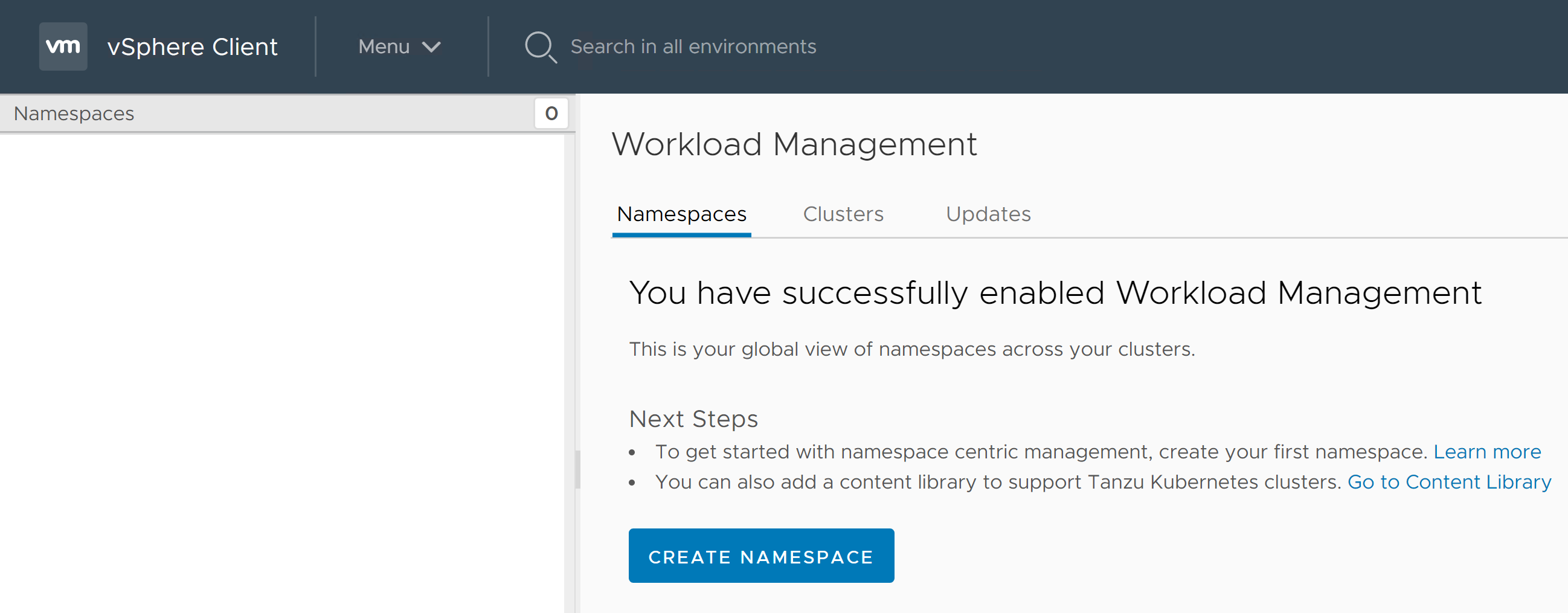
once Super visor cluster is enabled, this is how it looks (H5C > Menu > Workload Management)

2. Creating your first namespace using script

Create namespace URL POST https://{server}/api/vcenter/namespaces/instances
API payload/specpayload
Python scriptcreate_namespace.py
How to runShown below
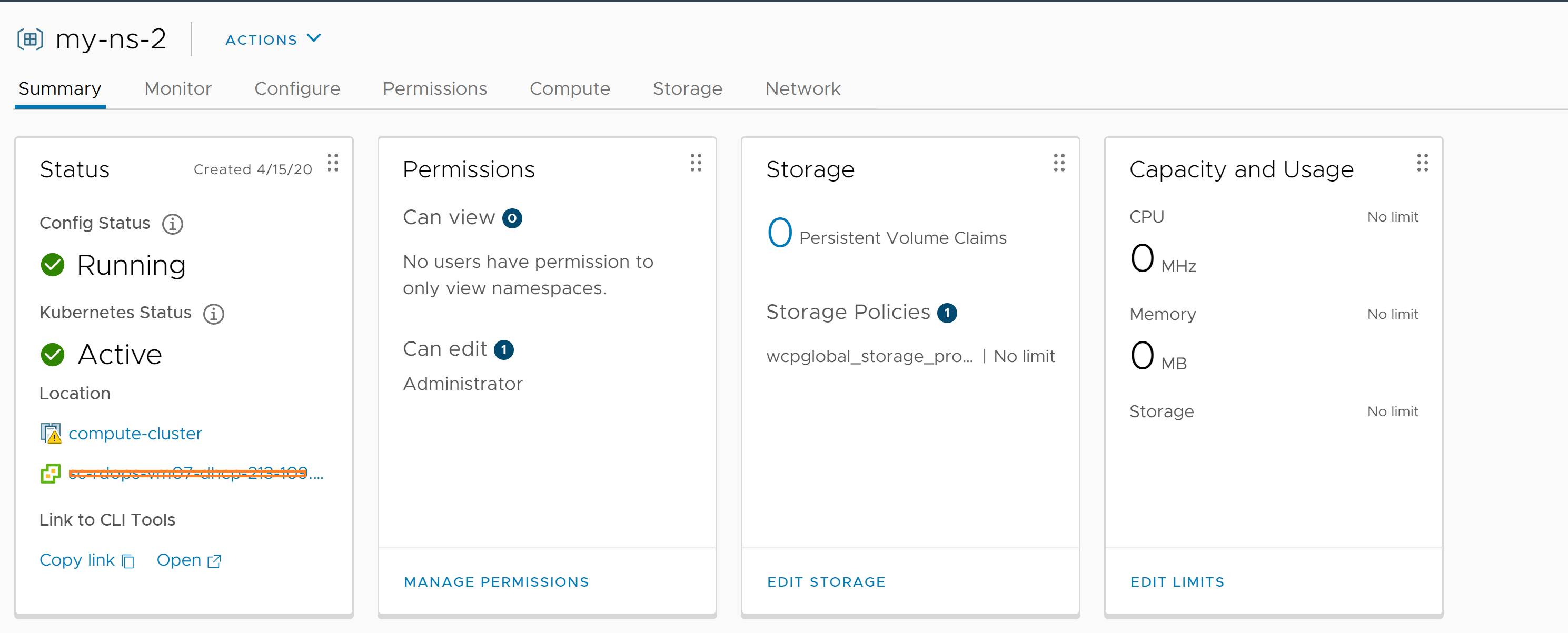
How it looks from UIShown below

How to run script:
C:\vThinkBeyondVM\vcpy>python create_namespace.py -s 10.x.x.x -u Administrator@vsphere.local -cl WCP-cluster-1 -role EDIT -st USER -subject Administrator -domain vsphere.local -sp k8s-gc-policy -ns my-ns-2

How it looks from UI ?

I hope you enjoyed learning. Please stay tuned for upcoming posts around vSphere with K8s and other vSphere 7.0 functionality. Let me know if you have any queries, feedback.

Further reading:
1. REST API documentation
2. How to get vSphere with Kubernetes?
3. Introduction to manage vSphere Supervisor Cluster using API
4. Automating supervisor cluster workflows using Java SDK
5. vSphere with Kubernetes 101 is here
6. Official documentation for vSphere with Kubernetes is here

Introduction to managing vSphere Supervisor Cluster using DCLI

My last post was about introduction to vSphere Supervisor Cluster Kubernetes REST APIs, where I briefed about key constructs such as “vSphere Supervisor Cluster” and “Tanzu Kubernetes cluster” but major focus was to introduce REST APIs around it and how to execute these APIs using H5C built-in API Explorer. As per me, it is must to read that post before you proceed. This post is about how to manage vSphere Supervisor Cluster using DCLI (Datacenter CLI). As you might already know that DCLI is a CLI exclusively for REST APIs and it supports vSphere Automation APIs (REST APIs for vSphere), VMware cloud on AWS and even NSX as well. Beauty of the DCLI is that it comes by-default as part of VCSA installation though we can install it in other Guest OSes also.

As I mentioned in the last post , “vSphere Supervisor Cluster” REST APIs are exposed by vCenter server i.e. every DCLI command we execute would be executed against vCenter server, where vSphere Supervisor cluster is configured or going to be configured. Let’s dive into it. In my case, I am going to access DCLI that comes automatically with VCSA.

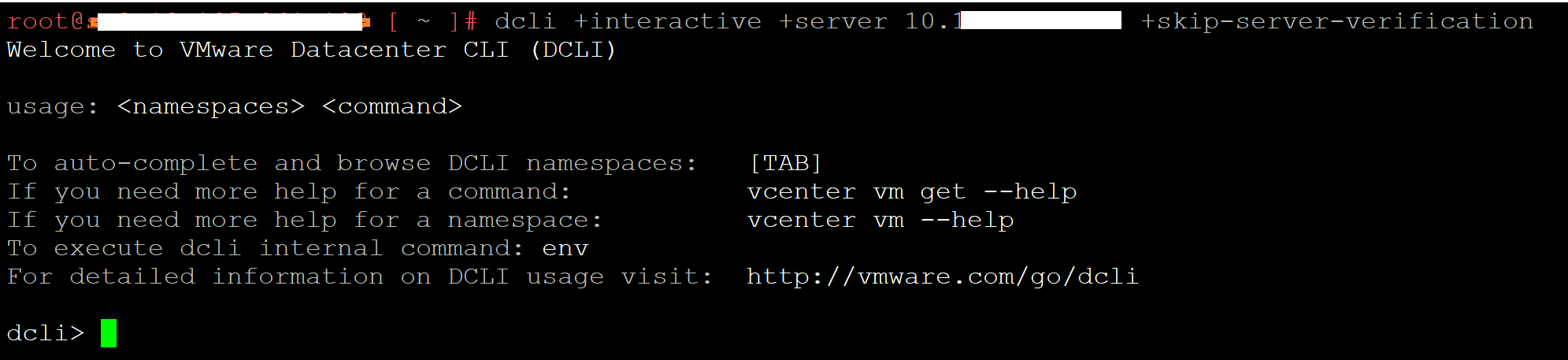
First step is to SSH VCSA 7.0 and run below command

dcli +interactive +server 10.20.30.40 +skip-server-verification

We need to pass vCenter server IP as a server. I will be running DCLI in interactive mode so that we get automatic help on available options with press of space or it gets showed as you type. This is very useful if you do not know where to start for new APIs as this.


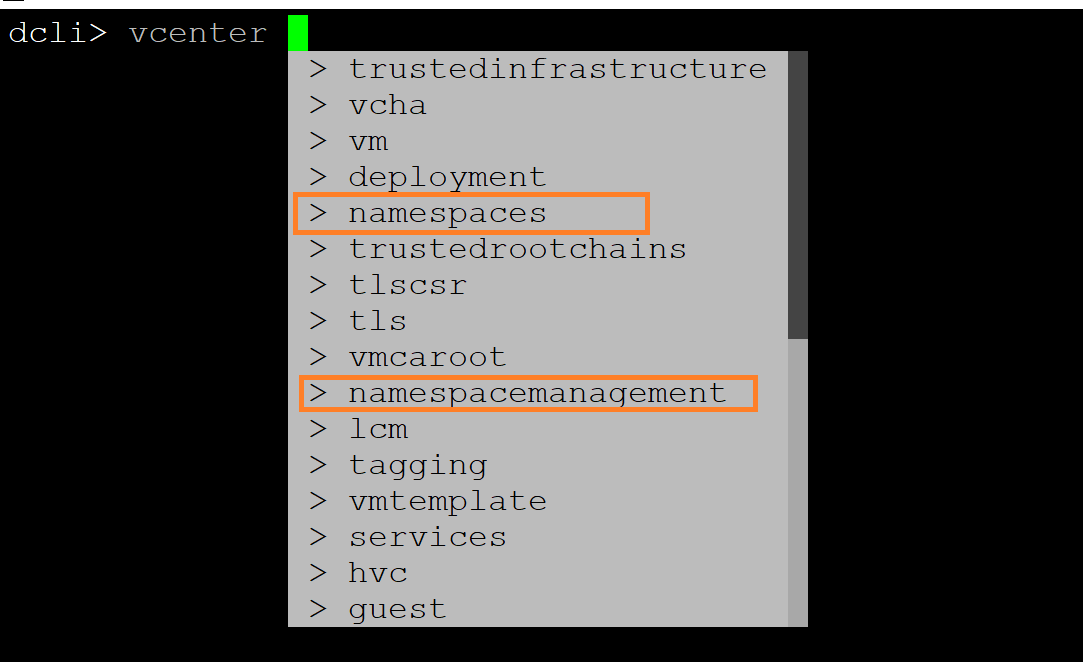
We are now in DCLI console. As I showed in my last post, these REST APIs are identified as “namespace management” & “namespaces”. Since these are “vcenter” APIs, when we just type “vcenter” and press “space”, you will get auto-populated list of options available as shown below, is not that cool ?

As in my last post, let’s check the compatibility of the cluster to confirm whether key requirements are met or not on given cluster

dcli> vcenter namespacemanagement clustercompatibility list

You can see cluster “domain-c9” (its moid) is compatible but cluster “cluster-c19” does not meet any basic requirements.

Below are few more basic commands (mostly GET calls)

Command #1: Disabling “vSphere with K8s” on given cluster

dcli> vcenter namespacemanagement clusters disable --cluster <cluster moid>

cluster moid/identifier looks like “domain-cx”. You can get it from UI (click on cluster and just check URL in browser or REST API/SOAP/MOB can help as well)

Command #2: Know compatible VDS on given cluster

dcli> vcenter namespacemanagement distributedswitchcompatibility list --cluster domain-c9

Command #3: Get compatible NSX-T edge cluster on given cluster and VDS

dcli> vcenter namespacemanagement edgeclustercompatibility list --cluster domain-c9 --distributed-switch "50 13 e2 3b 7d 5e 59 4b-63 1c c5 d9 ab 25 cd 7e"

VDS uuid you get from command #2 above.

Command #4: Get list of namespaces available

dcli> vcenter namespaces instances list

Command #5: Get available Kubernetes versions

dcli> vcenter namespacemanagement clusteravailableversions list
or
dcli> vcenter namespacemanagement software clusters get --cluster <cluster-identifier/moid>
or
dcli> vcenter namespacemanagement software clusters list

Command #6: Know what are sizes and resources requirements (TINY, SMALL, MEDIUM, LARGE )

dcli> vcenter namespacemanagement clustersizeinfo get

I hope this article was good head start for you on how to manage vSphere Supervisor cluster using DCLI. There are more advanced operations like enable, update, create (POST calls) etc that I will have deep dive into my future posts. Please stay tuned.

Further reading:
1. REST API documentation and my new post on automating Supervisor cluster configuration or Automating supervisor cluster workflows using Java SDK
2. How to get vSphere with Kubernetes?
3. vSphere with Kubernetes 101 is here
4. Introduction to vSphere Supervisor Cluster REST APIs
5. Official documentation for vSphere with Kubernetes is here


vSphere with Kubernetes: Introduction to vSphere Supervisor cluster REST APIs

vSphere 7.0 is now generally available and without a doubt “vSphere with Kubernetes” (former project pacific) is biggest highlights of the release. I think, this will have similar or even bigger impact on IT landscape since the launch of ESXi or vMotion in the past. Coolest thing is that VMs and containers can co-exist and no tools to manage them are changing. I am personally very happy that vSphere is now just not about VMs but also containers & beyond (read “vThinkBeyondVM”) as well.

Note: As you already might know “vSphere with Kubernetes” is available through VMware Cloud Foundation(VCF). I highly recommend you to read this quick post on how to get “vSphere with Kubernetes”? Post is written by none other than Kit Colbert . Very straight and simplified post if you ask me.

Before I discuss about REST APIs, I would like to provide brief about 2 important constructs below i.e. ” Supervisor cluster” and “Tanzu Kubernetes Cluster” (aka Guest cluster). Please refer vSphere with Kubernetes 101 white paper for more details.

Supervisor cluster : It is a special kind of Kubernetes cluster, where ESXi hosts inside vSphere Cluster become worker nodes and K8s Control VMs/Master VMs will run on the top same vSphere cluster. In this cluster, user creates a namespace and triggers “vSphere Pods” to run container workloads using same “kubectl” CLI. (vSphere admin manages it)

Here is a blog post demonstrating how to automate Supervisor cluster configuration

Tanzu Kubernetes Cluster” (aka Guest cluster): This is upstream-compliant Kubernetes cluster, which runs on the top of “Supervisor cluster” under the “namespace” created in Supervisor layer. This cluster uses open source Cluster API for life-cycle management (Devloper/DevOps manages it from familiar kubectl itself)


As usual I enjoy exploring new APIs got introduced as part of new vSphere release . In this post, my focus is on REST APIs exposed to manage life-cycle of ” Supervisor cluster”. As I run through vCenter API explorer (H5C -> Menu -> Devloper center -> API Explorer), I see this release has more REST APIs compared to SOAP APIs unlike any earlier vSphere releases. You can refer REST API documentation here as well. In this post, I will introduce you to new APIs got exposed as part of Supervisor cluster. I am pleased to see that 100% of the APIs are REST based. How cool is that !

First things to note that “API-endpoint” to call these APIs is “vCenter server”. i.e. we will be calling Supervisor cluster APIs against vCenter server.

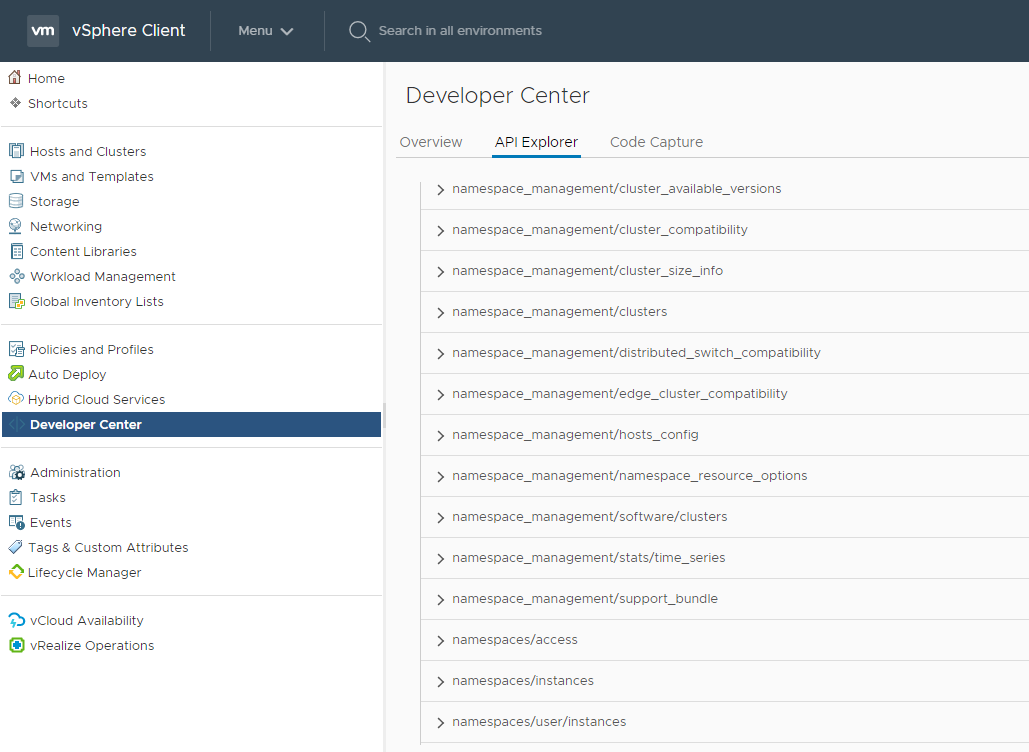
Lets take look at below screenshot for how these APIs look like.


As you can see these APIs are identified under name “namespace_management” and “namespaces”
namespace_management : APIs under this section help manage all the aspect of managing “Supervisor cluster”.
namespaces : APIs under this section help manage “namespaces” created on the top of Supervisor cluster. Tanzu Kubernetes clusters are also created under namespaces created in Supervisor layer.

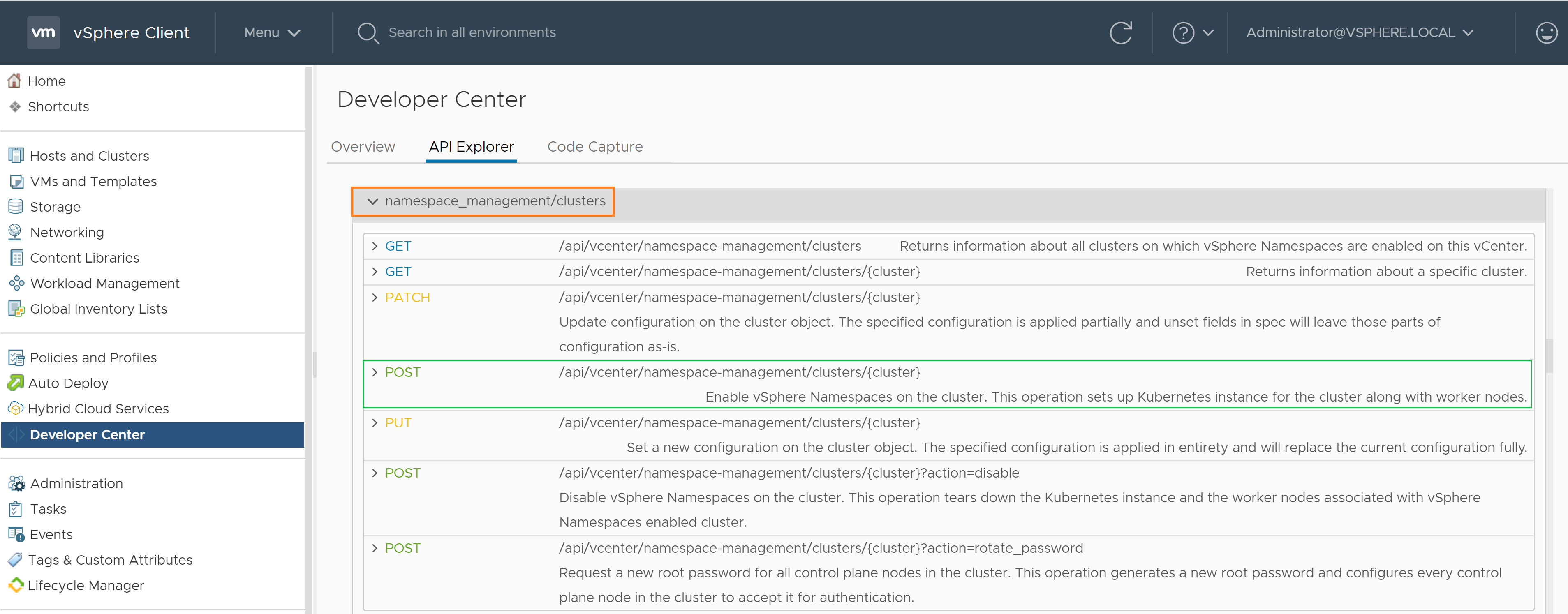
Most critical APIs are under “namespace_management/clusters ” section, where key APIs like enable/disable/update vSphere supervisor cluster are available. Below is how “enable” call looks like. i.e. configuring “Supervisor cluster”.
POST call
https://{server}/api/vcenter/namespace-management/clusters/{cluster}
server : vCenter IP/FQDN and cluster:cluster MOID

Same above operations can be done from H5C UI ( Menu –> “Workload Management” )
I hope, at this stage you got basic idea on where to start exploring these APIs. In my next couple of posts, I will have deep dive into critical APIs to manage “Supervisor cluster” on given cluster i.e. “enable/disable/update” Ops. For now lets invoke one of the basic API calls to see something cool in action.

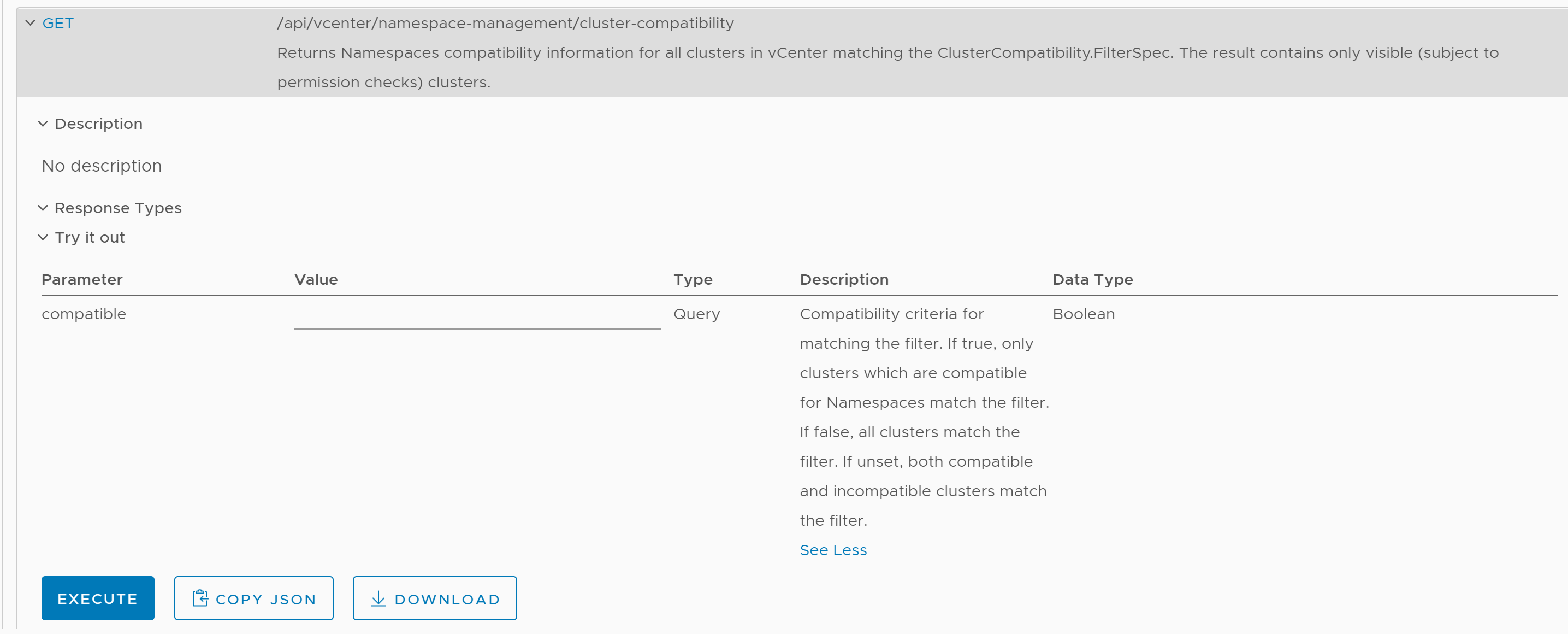
In my lab environment, I have 2 clusters in my vCenter server (in VCF term, 1 workload domain with 2 clusters), where “Supervisor cluster” is enabled on one and not enabled on second cluster. I chose to invoke an API, which gives us information on whether clusters in my vCenter inventory are compatible for enabling Supervisor cluster or not. As you know from my earlier posts this or this, this must be a GET call as follows


https://{server}/api/vcenter/namespace-management/cluster-compatibility


This is how you invoke it quickly from native API Explorer from within vSphere client (H5C)

https://vthinkbeyondvm.com/wp-content/uploads/2020/04/Cluster-compat.png

Below is what I got the response, pasted as it is

Response

[vcenter.namespace_management.cluster_compatibility.summary   {

},vcenter.namespace_management.cluster_compatibility.summary   {

  • “cluster”: “domain-c9”,
  • “compatible”: “true”,
  • “incompatibility_reasons”: [ ][]

},]

As you see, my first cluster (moid: domain-c19) is not compatible and API gives us nice info on what are the basic requirements not met such as HA is not enabled, DRS is either not enabled or not in fully automated mode and new NSX-T VDS (aka conversed VDS) is not configured as well. How cool is that! As expected second cluster (moid: domain-c19) is perfectly fine as Supervisor cluster is already enabled there.

I hope you enjoyed my first post on this amazing innovation. Here is my new post on how to manage Supervisor cluster using DCLI. Please stay tuned for my detailed post on its cool functional aspects. Also, here is the official documentation on “vSphere with K8s” for your further learning. I enjoyed providing my candid feedback on various aspect of this documentation last month, I am sure you will love reading it.

Once again I would like to remind you that “vSphere with Kubernetes” is available through VCF and once you have VCF workload domain ready, you would be re-directed to vCenter H5C to proceed for further ops on managing/enabling vSphere with Kubernetes.

Further reading:
1. REST API documentation & my new post on automating Supervisor cluster configuration or Automating supervisor cluster workflows using Java SDK
2. How to get vSphere with Kubernetes?
3. vSphere with Kubernetes 101 is here
4. Introduction to manage vSphere Supervisor Cluster
5. Official documentation for vSphere with Kubernetes is here