Category Archives: HOME

Want to vMotion a VM from one vCenter server to another vCenter using vSphere API?

As part of one of customers case, I was testing vMotion across two 6.0 vCenter servers those are connected to the same SSO domain. As we know already, when 2 vCenter servers are connected to the same SSO domain, you can manage both VCs using web client. Initially I tested vMotion from web client and later in order to automate bulk VMs migration across vCenter, I was looking for vSphere APIs and I could find below 2 vSphere APIs.

1. RelocateVM_Task() under VirtualMachine Managed object
2. placevm() under ClusterComputeResource managed object

I went through above vSphere API reference and I could see RelocateVM_Task() API was already there. However, in vSphere 6.0, it is improved greatly in order to support vMotion between 2 vCenters. On the other hand, placeVM() API was new brand API introduced in vSphere 6.0. Initially, I decided to try RelocateVM_Task() API for automating vMotion across 2 vCenters with same SSO domain. After automating this, I tested my java SDK script on vCenters with same SSO domain and it worked with no any issues. Later, I just thought lets give a try across vCenters those are connected to the different SSO domains and to my surprise, it worked like charm. is it not super cool? How easy it is now to migrate your workloads across data-centers/VCs/Clusters!.

So vMotion between 2 completely different vCenter is supported in vSphere 6.0 but there is NO UI support from web client at the moment. If you want to this functionality i.e. vMotion between 2 VCs with different SSO domains. vSphere API is the only way.

After successful vMotion across different SSO domains, I was really excited and thought to play with this little more by creating a DRS cluster in both VCs. I created a VM-VM affinity rule with couple of VMs in DRS cluster in VC1 as shown in below screenshot.
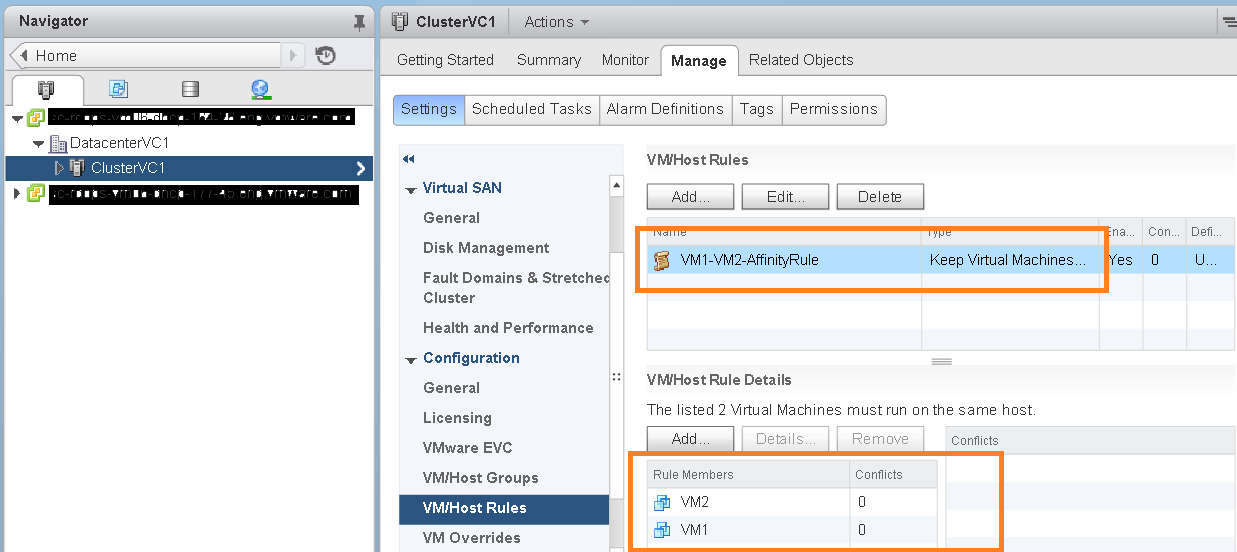
VC1_Rule_before_vMotion

Now I initiated vMotion from first VC to DRS cluster in second VC using same Java SDK script and I could see the DRS rule associated the migrated VM also got migrated as shown in below screen shot. How cool is that!
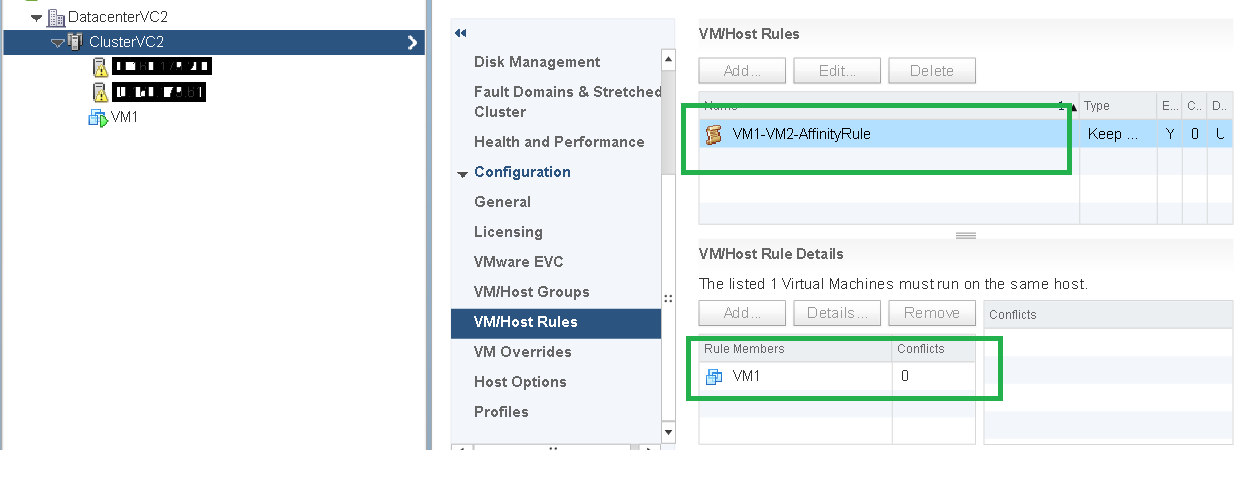
VC2_Rule_After_vMotion

Below is the complete code sample which can help you quickly to vMotion from a VC to other VC.

Note that this sample works fine with VCs with same SSO or VCs with different SSO. You do not even need to have shared storage between both VCs. This script will work fine within the same VC as well (with some change).

Same script is available on my git hub repository: ExVC_vMotion.java

[java]<code lang="java">
//:: # Author: Vikas Shitole
//:: # Website: www.vThinkBeyondVM.com
//:: # Product/Feature: vCenter Server/DRS/vMotion
//:: # Description: Extended Cross VC vMotion using RelocateVM_Task() API. vMotion between vCenters (with same SSO domain or different SSO domain)</code>

package com.vmware.yavijava;

import java.net.MalformedURLException;
import java.net.URL;
import com.vmware.vim25.ManagedObjectReference;
import com.vmware.vim25.ServiceLocator;
import com.vmware.vim25.ServiceLocatorCredential;
import com.vmware.vim25.ServiceLocatorNamePassword;
import com.vmware.vim25.VirtualDevice;
import com.vmware.vim25.VirtualDeviceConfigSpec;
import com.vmware.vim25.VirtualDeviceConfigSpecOperation;
import com.vmware.vim25.VirtualDeviceDeviceBackingInfo;
import com.vmware.vim25.VirtualEthernetCard;
import com.vmware.vim25.VirtualMachineMovePriority;
import com.vmware.vim25.VirtualMachineRelocateSpec;
import com.vmware.vim25.mo.ClusterComputeResource;
import com.vmware.vim25.mo.Datastore;
import com.vmware.vim25.mo.Folder;
import com.vmware.vim25.mo.HostSystem;
import com.vmware.vim25.mo.InventoryNavigator;
import com.vmware.vim25.mo.ServiceInstance;
import com.vmware.vim25.mo.VirtualMachine;

public class ExVC_vMotion {

public static void main(String[] args) throws Exception {
if(args.length!=7)
{
//Parameters you need to pass
System.out.println("Usage: ExVC_vMotion srcVCIP srcVCusername srcVCpassword destVCIP destVCusername destVCpassword destHostIP");
System.exit(-1);
}

URL url1 = null;
try
{
url1 = new URL("https://"+args[0]+"/sdk");
} catch ( MalformedURLException urlE)
{
System.out.println("The URL provided is NOT valid. Please check it.");
System.exit(-1);
}

String srcusername = args[1];
String srcpassword = args[2];
String DestVC=args[3];
String destusername=args[4];
String destpassword = args[5];
String destvmhost=args[6];

//Hardcoded parameters for simplification
String vmName="VM1"; //VM name to be migrated
String vmNetworkName="VM Network"; //destination vSphere VM port group name where VM will be migrated
String destClusterName="ClusterVC2"; //Destination VC cluster where VM will be migrated
String destdatastoreName="DS1"; //destination datastore where VM will be migrated
String destVCThumpPrint="c7:bc:0c:a3:15:35:57:bd:fe:ac:60:bf:87:25:1c:07:a9:31:50:85"; //SSL Thumbprint (SHA1) of the destination VC

// Initialize source VC
ServiceInstance vc1si = new ServiceInstance(url1, srcusername,
srcpassword, true);
URL url2 = null;
try
{
url2 = new URL("https://"+DestVC+"/sdk");
} catch ( MalformedURLException urlE)
{
System.out.println("The URL provided is NOT valid. Please check it.");
System.exit(-1);
}

// Initialize destination VC

ServiceInstance vc2si = new ServiceInstance(url2, destusername,
destpassword, true);
Folder vc1rootFolder = vc1si.getRootFolder();
Folder vc2rootFolder = vc2si.getRootFolder();

//Virtual Machine Object to be migrated
VirtualMachine vm = null;
vm = (VirtualMachine) new InventoryNavigator(vc1rootFolder)
.searchManagedEntity("VirtualMachine", vmName);

//Destination host object where VM will be migrated
HostSystem host = null;
host = (HostSystem) new InventoryNavigator(vc2rootFolder)
.searchManagedEntity("HostSystem", destvmhost);
ManagedObjectReference hostMor=host.getMOR();

//Destination cluster object creation
ClusterComputeResource cluster = null;
cluster = (ClusterComputeResource) new InventoryNavigator(vc2rootFolder)
.searchManagedEntity("ClusterComputeResource", destClusterName);

//Destination datastore object creation
Datastore ds=null;
ds = (Datastore) new InventoryNavigator(vc2rootFolder)
.searchManagedEntity("Datastore", destdatastoreName);
ManagedObjectReference dsMor=ds.getMOR();

VirtualMachineRelocateSpec vmSpec=new VirtualMachineRelocateSpec();
vmSpec.setDatastore(dsMor);
vmSpec.setHost(hostMor);
vmSpec.setPool(cluster.getResourcePool().getMOR());

//VM device spec for the VM to be migrated
VirtualDeviceConfigSpec vdcSpec=new VirtualDeviceConfigSpec();
VirtualDevice[] devices= vm.getConfig().getHardware().getDevice();
for(VirtualDevice device:devices){

if(device instanceof VirtualEthernetCard){

VirtualDeviceDeviceBackingInfo vddBackingInfo= (VirtualDeviceDeviceBackingInfo) device.getBacking();
vddBackingInfo.setDeviceName(vmNetworkName);
device.setBacking(vddBackingInfo);
vdcSpec.setDevice(device);
}

}

vdcSpec.setOperation(VirtualDeviceConfigSpecOperation.edit);
VirtualDeviceConfigSpec[] vDeviceConSpec={vdcSpec};
vmSpec.setDeviceChange(vDeviceConSpec);

//Below is code for ServiceLOcator which is key for this vMotion happen
ServiceLocator serviceLoc=new ServiceLocator();
ServiceLocatorCredential credential=new ServiceLocatorNamePassword();
((ServiceLocatorNamePassword) credential).setPassword(destpassword);
((ServiceLocatorNamePassword) credential).setUsername(destusername);
serviceLoc.setCredential(credential);

String instanceUuid=vc2si.getServiceContent().getAbout().getInstanceUuid();
serviceLoc.setInstanceUuid(instanceUuid);
serviceLoc.setSslThumbprint(destVCThumpPrint);
serviceLoc.setUrl("https://"+DestVC);
vmSpec.setService(serviceLoc);
System.out.println("VM relocation started….please wait");
boolean flag=false;
vm.relocateVM_Task(vmSpec, VirtualMachineMovePriority.highPriority);
flag=true;
if(flag){
System.out.println("VM is relocated to 2nd vCenter server");
}
vc1si.getServerConnection().logout();
vc2si.getServerConnection().logout();
}
}

[/java]

Notes:
– There is one imp parameter you need to pass into migration spec i.e. Destination VC Thumbprint. There are several ways to get it as shown here. I personally used below way to get the destination VC thumbprint.
From google chrome browser : URL box of the VC (besides https:// lock symbol)>>view site information >> Certificate information >> Details >> Scroll down till last as shown in below screenshot
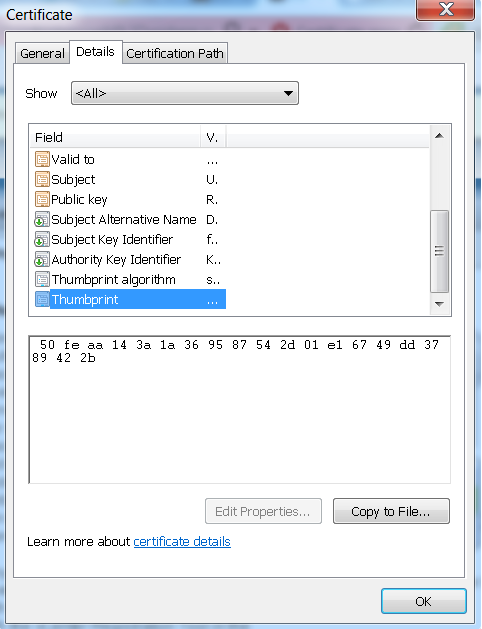
Thumbprint

– For the sake of simplicity, I have hard-coded some parameters, you can change it based on your environment.
– You can scale the same code to vMotion multiple VMs across vCenter server
– As I said, there is another API for vMotion across VCs, please take a look at this post on  placevm()

If you want to automate the same use case using PowerCLI, here is great post by William Lam.

If you have still not setup your YAVI JAVA Eclipse environment:Getting started tutorial

Important tutorials to start with: Part I & Part II

Emulate HDD as SSD and SSD as HDD: Sample API script

Recently I wanted to test vFRC (vSphere Flash Read Cache) feature interop with vSphere DRS and vSphere HA. I was figuring out ways to emulate my hosts local HDDs as SSD as I did not have real SSDs in my lab. There are couple of ways I used to fake/emulate local HDD as SSD earlier but this time I found other cool way to automate this quickly by using readily available API. The API that I am talking about is markAsSSD(). This API got introduced in vSphere 6.0. It is important to know why this API is made officially available. The reason this API primarily introduced is: Some time SSDs behind some controllers might not be recognized as SSD correctly. Other use cases for this API can be used to test VMware vSAN (just playing around), vFRC, flash host cache, interop testing etc. Of course, performance of real SSD is incomparable with fake SSD.

Below is the complete code sample which can help you quickly to Mark the local Lun of the host as SSD..

[java]
//:: # Author: Vikas Shitole
//:: # Website: www.vThinkBeyondVM.com
//:: # Product/Feature: vCenter Server/Storage
//:: # Description: Mark the local Lun of the host as SSD for testing purpose.

package com.vmware.yavijava;
import java.net.MalformedURLException;
import java.net.URL;
import com.vmware.vim25.ScsiLun;
import com.vmware.vim25.mo.Folder;
import com.vmware.vim25.mo.HostStorageSystem;
import com.vmware.vim25.mo.HostSystem;
import com.vmware.vim25.mo.InventoryNavigator;
import com.vmware.vim25.mo.ServiceInstance;
import com.vmware.vim25.mo.VirtualMachine;

public class MarkAsSSD {

public static void main(String[] args) throws Exception {
if(args.length!=4)
{
System.out.println("Usage: MarkAsSSD url username password hostip/fqdn");
System.exit(-1);
}

URL url = null;
try
{
url = new URL(args[0]);
} catch ( MalformedURLException urlE)
{
System.out.println("The URL provided is NOT valid. Please check it.");
System.exit(-1);
}
String username = args[1]; //vCenter username
String password = args[2]; //vCenter password
String hostname = args[3]; // host IP on which local HDD is available
String LunDisplayName="Local VMware Disk (mpx.vmhba1:C0:T2:L0)"; //Add the Display name of the lun that can be seen from VI client or NGC
// Initialize the system, set up web services
ServiceInstance si = new ServiceInstance(url, username,
password, true);

Folder rootFolder = si.getRootFolder();
HostSystem host = null;

host = (HostSystem) new InventoryNavigator(rootFolder)
.searchManagedEntity("HostSystem", hostname);

if (host == null) {
System.out.println("Host not found on vCenter");
si.getServerConnection().logout();
return;
}

HostStorageSystem hhostsystem = host.getHostStorageSystem();
ScsiLun[] scsilun = hhostsystem.getStorageDeviceInfo().getScsiLun();
boolean flag = false;
for (ScsiLun lun : scsilun) {
System.out.println("Display Name"+lun.getDisplayName());
if (lun.getDisplayName().equals(
LunDisplayName)) {
hhostsystem.markAsSsd_Task(lun.getUuid());
flag = true;
break;
// hhostsystem.markAsNonSsd_Task(lun.getUuid());

}

}
if (flag) {
System.out.println("LUN is marked as SSD successfully");

}else{
System.out.println("LUN is NOT marked as SSD, plz check if local lun is in use");

}

si.getServerConnection().logout();

}
}
[/java]

Notes:
– For the sake of simplicity, I have hard-coded LUN display name, you can change it based on your environment.
– You can scale the same code to mark all the local HDDs to SSDs in all the hosts across datacenter or multiple datacenter.
– I would like you to have your attention on other new useful/handy related vSphere 6.0 APIs such as “MarkAsNonSSD” , “MarkAsLocal”, “MarkAsNonLocal“. Same sample can be leveraged to automate these related APIs.

If you have still not setup your YAVI JAVA Eclipse environment:Getting started tutorial

Important tutorials to start with: Part I & Part II

How to get all DRS rules associated with each VM in a DRS cluster using API : Interesting API in vSphere 6.0

As we know, one VM can be associated with several DRS affinity rules. If your DRS cluster has several rules configured, it is really cumbersome to check what is the type of the rule  and how many rules are associated with each VM in a DRS cluster. There is a interesting method introduced in vSphere 6.0 which can address this pain point. New method that I am talking about is “findRulesForVm()”. This method is introduced in vSphere 6.0 under “ClusterComputeResource” managed object. It is mean that you need to have this managed object in order to call this useful method. i.e. findRulesForVm().

Note: This method can list all the VM-VM affinity/anti-affinity rules associated with particular VM. This method can not return the VM-Host affinity rules associated with the VM.

Below is the complete code sample which can help to get all the VM VM DRS rules associated with each VM in Cluster. Please do modify this sample as per your need.

[java]
//:: # Author: Vikas Shitole
//:: # Website: www.vThinkBeyondVM.com
//:: # Product/Feature: vCenter Server/DRS
//:: # Description: Script to find all the rules associated with all the VMs in the DRS cluster

package com.vmware.yavijava;

import java.net.MalformedURLException;
import java.net.URL;
import java.rmi.RemoteException;
import com.vmware.vim25.ArrayUpdateOperation;
import com.vmware.vim25.ClusterAffinityRuleSpec;
import com.vmware.vim25.ClusterAntiAffinityRuleSpec;
import com.vmware.vim25.ClusterConfigSpec;
import com.vmware.vim25.ClusterRuleInfo;
import com.vmware.vim25.ClusterRuleSpec;
import com.vmware.vim25.InvalidProperty;
import com.vmware.vim25.ManagedObjectReference;
import com.vmware.vim25.RuntimeFault;
import com.vmware.vim25.mo.ClusterComputeResource;
import com.vmware.vim25.mo.Folder;
import com.vmware.vim25.mo.InventoryNavigator;
import com.vmware.vim25.mo.ManagedEntity;
import com.vmware.vim25.mo.ServiceInstance;
import com.vmware.vim25.mo.VirtualMachine;
import com.vmware.vim25.mo.util.MorUtil;

public class FindRulesForVMsInCluster {

public static void main(String[] args) throws Exception {
if(args.length!=3)
{
System.out.println(&quot;Usage: FindRulesForVMInCluster url username password&quot;);
System.exit(-1);
}

URL url = null;
try
{
url = new URL(args[0]);
} catch ( MalformedURLException urlE)
{
System.out.println(&quot;The URL provided is NOT valid. Please check it.&quot;);
System.exit(-1);
}
String username = args[1];
String password = args[2];
String ClusterName = &quot;My-Cluster&quot;; //Your DRS cluster Name
ManagedEntity vms[] = null;

// Initialize the system, set up web services
ServiceInstance si = new ServiceInstance(url, username,
password, true);

Folder rootFolder = si.getRootFolder();

ClusterComputeResource cluster = null;
cluster = (ClusterComputeResource) new InventoryNavigator(rootFolder)
.searchManagedEntity(&quot;ClusterComputeResource&quot;, ClusterName);

System.out.println(&quot;Cluster name::&quot;+cluster.getName());

vms = (ManagedEntity[]) new InventoryNavigator(cluster)
.searchManagedEntities(&quot;VirtualMachine&quot;);

for(ManagedEntity vm:vms){
//New vSphere 6.0 method to find the VM affinity rules associated with particular VM
ClusterRuleInfo[] rules=cluster.findRulesForVm((VirtualMachine) vm);
System.out.println(&quot;Rules assciated with VM &quot;+vm.getName()+&quot; are::&quot;);
for(ClusterRuleInfo rule:rules){
System.out.println(rule.getName()+&quot;:&quot; + rule.getEnabled());
}
System.out.println(&quot;================================&quot;);
}
si.getServerConnection().logout();
}
}

[/java]

Note:
– For the sake of simplicity, I have hard-coded DRS cluster name, you can change it based on your environment.
– You can scale the same code to all the clusters in a datacenter or multiple datacenter.

If you have still not setup your YAVI JAVA Eclipse environment:Getting started tutorial

Important tutorials to start with: Part I & Part II

How to quickly get vSphere Cluster resource usage( cpu, mem, storage) using API: cool API in vSphere 6.0

Some time back, I wanted to get the cluster resource usage (cpu, memory, storage)for one of my project requirements. I was exploring the ways to get cluster resource usage and to my surprise, vSphere 6.0 has introduced new API which can fetch detailed cluster resource usage. It was tricky to get this info earlier and now single API call will help to get this. How cool it is! If you are not using vSphere HA/DRS, this API is super life saver for you in order to keep the track of the cluster resources and monitor these resources on all the cluster across vCenter. New method that I am talking about is “getResourceUsage()”. This method is introduced in vSphere 6.0 under “ClusterComputeResource” managed object. It is mean that you need to have this managed object to call this useful method. i.e. getResourceUsage(). This API can fetch not only the resource capacity but also current resource usage.

Below is the complete code sample which can help you quickly to get Cluster resource usage (cpu,memory and storage)..

[java]

//:: # Author: Vikas Shitole
//:: # Website: www.vThinkBeyondVM.com
//:: # Product/Feature: vCenter Server/DRS
//:: # Description: Script to quickly get Cluster resource usage (cpu,memory and storage).

package com.vmware.yavijava;

import java.net.MalformedURLException;
import java.net.URL;
import java.rmi.RemoteException;
import com.vmware.vim25.ClusterResourceUsageSummary;
import com.vmware.vim25.InvalidProperty;
import com.vmware.vim25.RuntimeFault;
import com.vmware.vim25.mo.ClusterComputeResource;
import com.vmware.vim25.mo.Folder;
import com.vmware.vim25.mo.InventoryNavigator;
import com.vmware.vim25.mo.ServiceInstance;

public class GetClusterResourceUsage {

public static void main(String[] args) throws Exception {
if(args.length!=3)
{
System.out.println("Usage: GetClusterResourceUsage url username password");
System.exit(-1);
}

URL url = null;
try
{
url = new URL(args[0]);
} catch ( MalformedURLException urlE)
{
System.out.println("The URL provided is NOT valid. Please check it…");
System.exit(-1);
}
String username = args[1];
String password = args[2];
String ClusterName = "Cluster1"; //Your cluster Name

// Initialize the system, set up web services
ServiceInstance si = new ServiceInstance(url, username,
password, true);
Folder rootFolder = si.getRootFolder();

ClusterComputeResource cluster = null;
cluster = (ClusterComputeResource) new InventoryNavigator(rootFolder)
.searchManagedEntity("ClusterComputeResource", ClusterName);

System.out.println();
System.out.println("Resource Usagae Summary for cluster::"+cluster.getName());
//Get the Cluster resource summary object
ClusterResourceUsageSummary resourceSummary= cluster.getResourceUsage();
System.out.println("CPU Capacity::"+resourceSummary.getCpuCapacityMHz()+" MHz");
System.out.println("CPU used::"+resourceSummary.getCpuUsedMHz()+" MHz");
System.out.println("Memory Capacity::"+resourceSummary.getMemCapacityMB()+" MB");
System.out.println("Memory used::"+resourceSummary.getMemUsedMB()+" MB");
System.out.println("Storage Capacity::"+resourceSummary.getStorageCapacityMB()+" MB");
System.out.println("Storage used::"+resourceSummary.getStorageUsedMB()+" MB");
si.getServerConnection().logout();
}
}

[/java]

Note:
– For the sake of simplicity, I have hard-coded DRS cluster name, you can change it based on your environment.
– You can scale the same code to all the clusters in a datacenter or multiple datacenter.

If you have still not setup your YAVI JAVA Eclipse environment:Getting started tutorial

Important tutorials to start with: Part I & Part II

VMware Rock Stars I get motivation from since I joined VMware

Recently I was going through some of the VMworld 2015 videos and I came across this interesting new concept this year i.e. VMware Rock Stars. I was very happy to see Duncan’s and William’s interview under this new concept as VMware Rock stars. For me both are the rock stars soon after I joined VMware around 2.5+ years back. I really enjoyed both the interviews and I thought it is worth to share with you all. I am sure, you will enjoy as well.

1. Duncan Epping, Chief Technologist

2. William Lam, Staff Engineer II

For all other super cool VMware related videos : CLICK HERE