Since the vSphere 5.5 got released, all VMware users were facing one major pain point i.e. Editing VM settings for VMs with HW version 10 using C# client. This was one of the hot topics on VMTN community as well. Feedback from VMware users was really spot on & it forced VMware to seriously take this issue forward. Yesterday vSphere 5.5 Update 2 got released & this pain point is addressed in vSphere 5.5 Update 2 C# client. (aka VI/Desktop/Thick client)
With older C# client when you try to edit VM with HW version 10 using VI client, it was prompting to use web client & was blocking users to manage VMs using VI client.
Now with vSphere 55 U2 VI client, when you try to edit VM with HW version 10 (Right click VM >> Edit settings), it shows below warning message
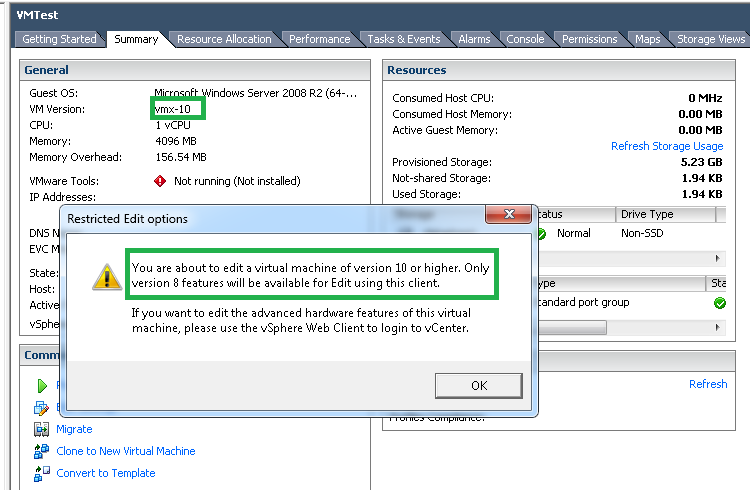
Above message shows that you only can edit features up to HW version 8 & to edit all new features you will have to use web client or you will have to edit new features by using vSphere APIs (VI Java, PowerCLI etc.).
I just tried editing memory, cpu, network & disks as shown in below screenshot. It worked fine for me.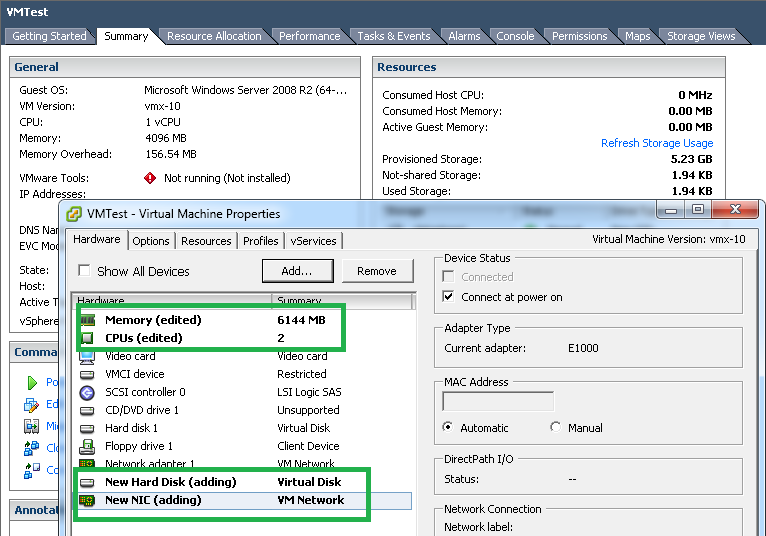
What are the pain points addressed by vSphere 5.5 U2 C# Client?
1. You can edit basic functionality of the HW version 10 VM using latest VI client if vCenter server itself is down. When vCenter is down, web client would be down too.
2. There are many customers with small VMware environment those do not want to spend additional cost on vCenter licenses just for web client. Now with this fix, they can use latest HW version & edit basic functionality of the VM as well using VI client by directly connecting to the ESXi host.
In order to leverage this VI client functionally immediately, you just need to upgrade older C# client to latest, you need not to upgrade all vCenter components immediately. You can plan upgrading other vCenter components as per your company policy/schedule.
Not sure whether new features will be supported on VI client in future releases, hope for the best BUT at the moment, I liked step in right direction by VMware on this issue. I am really happy, are you ?
Download latest C# client from here:vSphere 55 U2 C# Client

Vikas Shitole is a Senior Tech Lead at VMware by Broadcom, VCF division, India, where he leads system test efforts—including scale, stress, and resiliency testing—and drives product quality across VMware Cloud Foundation (VCF), Broadcom’s flagship private cloud platform. He is an AI and Kubernetes enthusiast, and is passionate about VMware customers and automation around vSphere and VCF. Vikas has been honoured as a vExpert for 13 consecutive years (2014–2026) for his sustained technical contributions and community leadership. He is the author of two VMware Flings, holds multiple industry certifications including VCF admin 9.0, and is one of the top contributors to the VMware API Sample Exchange, where his automation scripts have been downloaded over 50,000 times. Vikas has shared his expertise as a speaker at international conferences such as VMworld Europe and VMworld USA, and was selected as an official VMworld 2018 blogger. He also served as lead technical reviewer for the Packt-published books vSphere Design and VMware Virtual SAN Essentials. Beyond tech, Vikas is a dedicated cricketer, cycling enthusiast, and a lifelong learner in fitness and nutrition, with the personal goal of completing an Ironman 70.3