In desktop client (aka VI client) we do not have option to schedule DRS, also scheduling DPM in desktop client we have only option i.e. ON or OFF DPM through “Change cluster power settings” scheduled task. Recently I was exploring DRS & DPM scheduled task web client workflows & I should say DRS/DPM scheduled task web client workflow has been enhanced greatly. Now we can schedule a task for both DRS & DPM not only just to set ON or OFF but also to configure its automation level & threshold. This is going to simplify admin efforts in maintaining DRS & DPM. Is not it great? As everybody probably knows basics of DRS & DPM so I am not going to explain how DRS & DPM works. This post is about how to configure DRS/DPM scheduled tasks by using web client, as DPM is part of DRS, we can configure both DRS & DPM scheduled task in single window pane. Here is where you can get DRS schedule configuration tab.
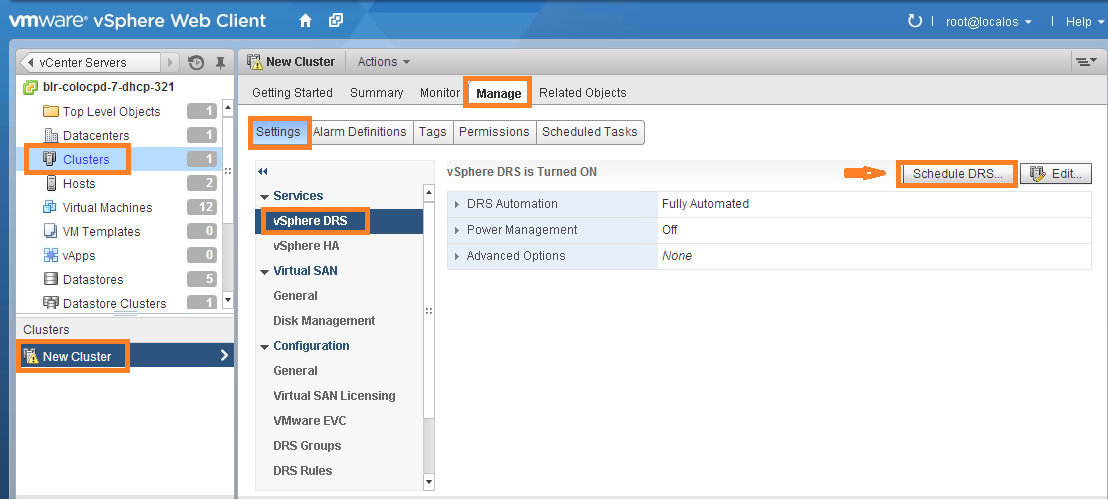
Once you click on Schedule DRS tab, we will get the UI page where we can configure DRS & DPM.
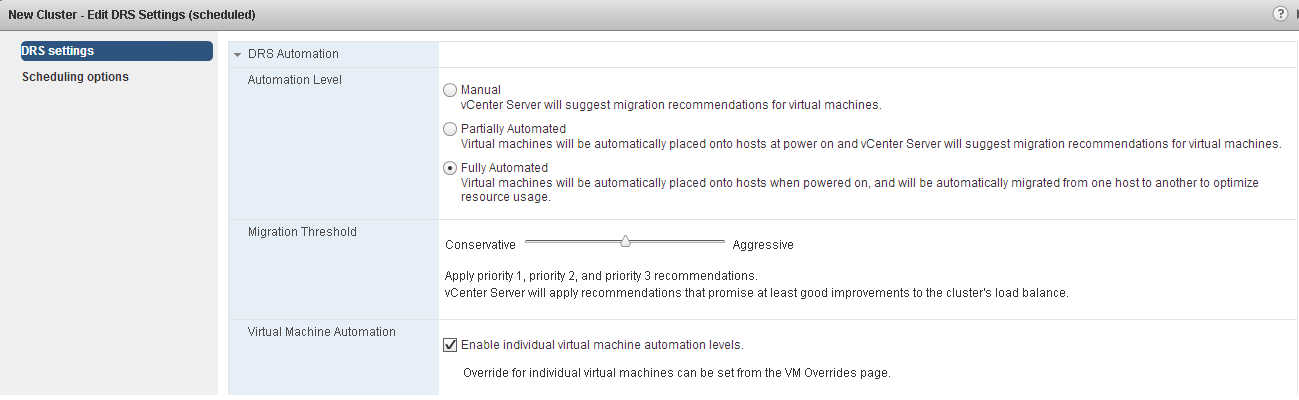
DRS configuration:You can set Automation level, migration threshold & VM automation level as per requirement as below
DPM configuration: In off hours now you can keep DPM in fully automated mode & make DPM threshold aggressive, these settings will lead DPM to put as many as hosts into standby mode & will generate power ON host recommendation only when it is absolutely required. 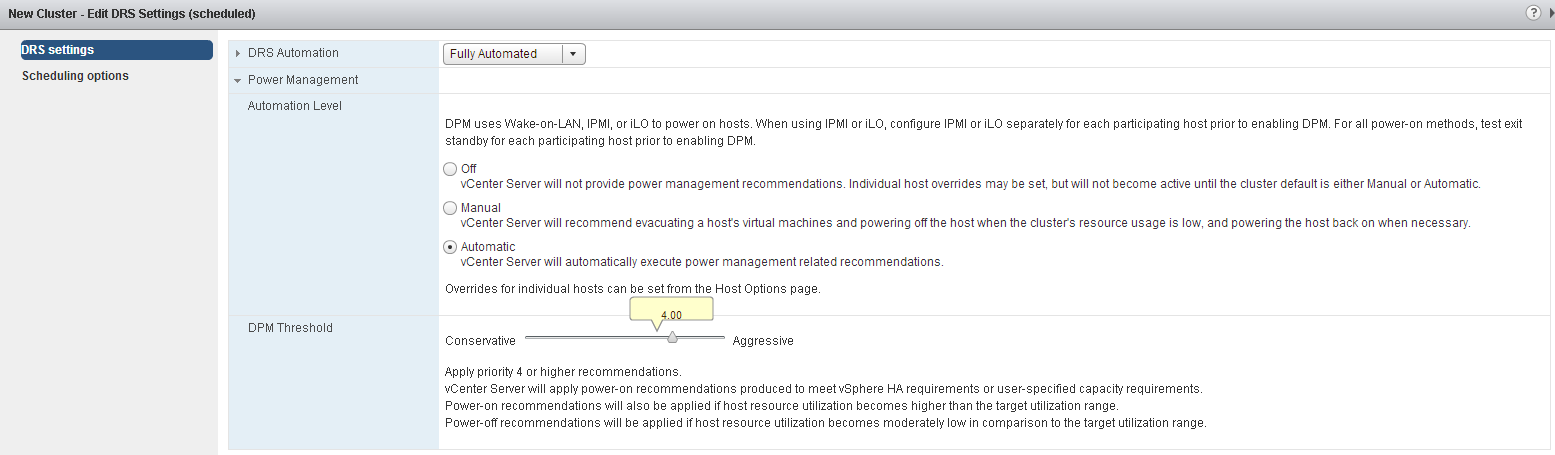 Once the configuration is over as per the requirement, next important setting is to set time at which schedule needs to be executed to take configuration in effect. It is better if you choose schedule to execute on daily basis in off hours as shown in below UI, this will avoid schedule management efforts.
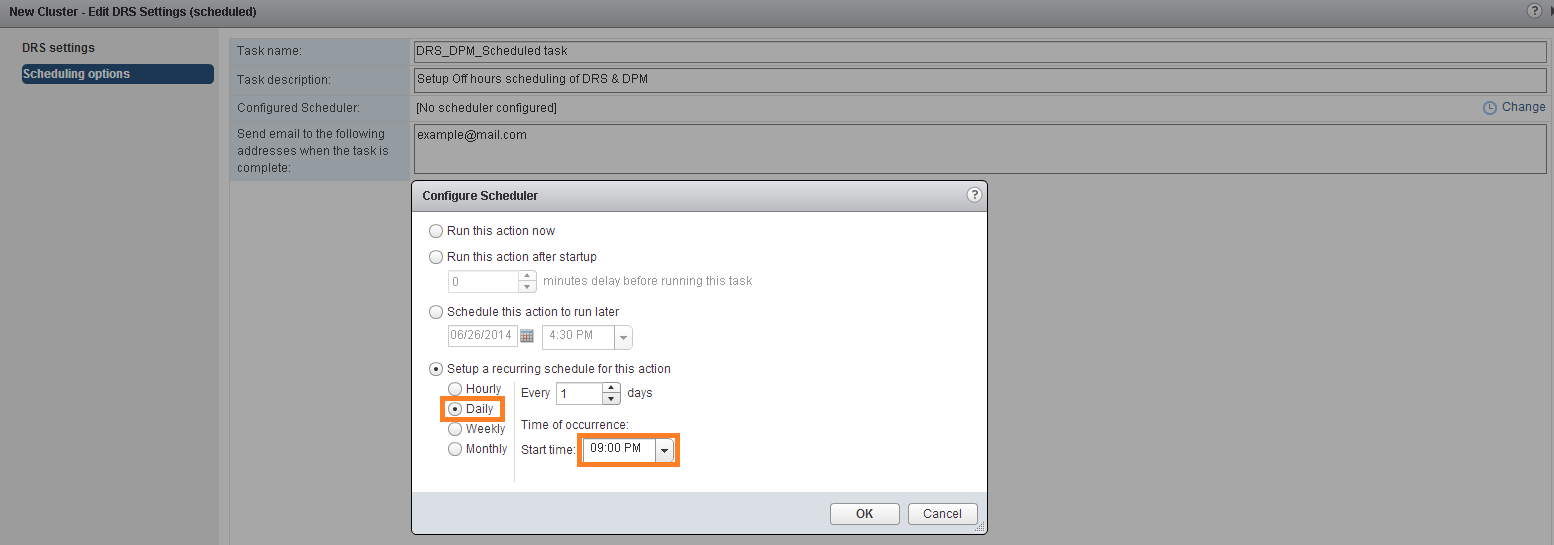 You could see in above UI, you have various options to set the timings for schedule to be executed.
Note: Please note that you need to schedule one more scheduled tasks in order to change DRS/DPM settings before peak hours starts.
Here is one more useful blog post by “Frank” on DPM schedule tasks using desktop client.

Vikas Shitole is a Senior Tech Lead at VMware by Broadcom, VCF division, India, where he leads system test efforts—including scale, stress, and resiliency testing—and drives product quality across VMware Cloud Foundation (VCF), Broadcom’s flagship private cloud platform. He is an AI and Kubernetes enthusiast, and is passionate about VMware customers and automation around vSphere and VCF. Vikas has been honoured as a vExpert for 13 consecutive years (2014–2026) for his sustained technical contributions and community leadership. He is the author of two VMware Flings, holds multiple industry certifications including VCF admin 9.0, and is one of the top contributors to the VMware API Sample Exchange, where his automation scripts have been downloaded over 50,000 times. Vikas has shared his expertise as a speaker at international conferences such as VMworld Europe and VMworld USA, and was selected as an official VMworld 2018 blogger. He also served as lead technical reviewer for the Packt-published books vSphere Design and VMware Virtual SAN Essentials. Beyond tech, Vikas is a dedicated cricketer, cycling enthusiast, and a lifelong learner in fitness and nutrition, with the personal goal of completing an Ironman 70.3