There are a couple of crucial bug fixes on Storage DRS (Storage Distributed Resource Scheduler) in vCenter Server 5.5 U2. I thought it is worth to have article on the same. Here we go on first fix.
Issue is as follows:
1. When Virtual Machine level backup is in progress, by design, backup vendors leverage 2 important VDDK( Virtual Disk Development Kit) APIs in order to inform vCenter managed host about backup is in progress.
2. PrepareForAccess() VDDK API is used to disable storage vMotion operation on the VM to be backed & EndAccess() VDDK API is used to enable storage vMotion operation once the backup is over. Refer: VDDK APIs to disable_Enable storage vMotion
3. When VM is NOT managed by SDRS or when SDRS is disabled on VM to be backed, there was not any issue and vCenter was working as expected on disabling and enabling storage vMotion when VM level backup is in progress.
4. BUT when VM is managed by SDRS cluster & even though backup solution was successfully invoking PrepareForAccess() VDDK API to disable storage vMotion, SDRS was not honoring the disabled storage vMotion and it was automatically starting storage vMotion may be based on space/IO load , affinity rule constraints or Maintenance mode operations. Due to this, backup in progress for that VM was getting failed and orphaned virtual machine disks (VMDKs) were getting created in virtual machine folder. Note that SDRS will automatically apply the storage vMotion recommendations when set at Fully Automated mode.
5. Even manual storage vMotion was allowed for the VM to be backed up from VI client “Migrate” Option and Web client “Move to” Option. This was also leading to same issue.
Resolution :
When VM is managed by SDRS cluster, below are the scenarios in which VM can be storage vMotion to other datastore in SDRS cluster.
1. Manual storage migration scenario.
2. Enter SDRS maintenance mode scenario.
3. Scenario around initial placement.
4. All run time placement scenarios.
5. All scenarios around SDRS affinity/anti-affinity rules.
With the fix, in any of above scenarios , SDRS & you are NOT allowed to storage vMotion VM from a datastore to other datastore (inside or outside SDRS cluster) when backup is in progress. Now apart from backup, even though storage vMotion is disabled for some other purpose, SDRS& you are not allowed to storage vMotion the VM.
My testing:
Note: Instead of using actual backup solution, I directly used above specified VDDK APIs to disable/enable storage vMotion on the input VM as same APIs are being used by backup solutions.
- I tested this fix and I could see fix is working perfectly fine with NO any issue. Here is where (refer below screen shot) you can verify whether storage vMotion is disabled or not using MOB i.e. Managed Object Browser. (Refer:How to navigate MOB)
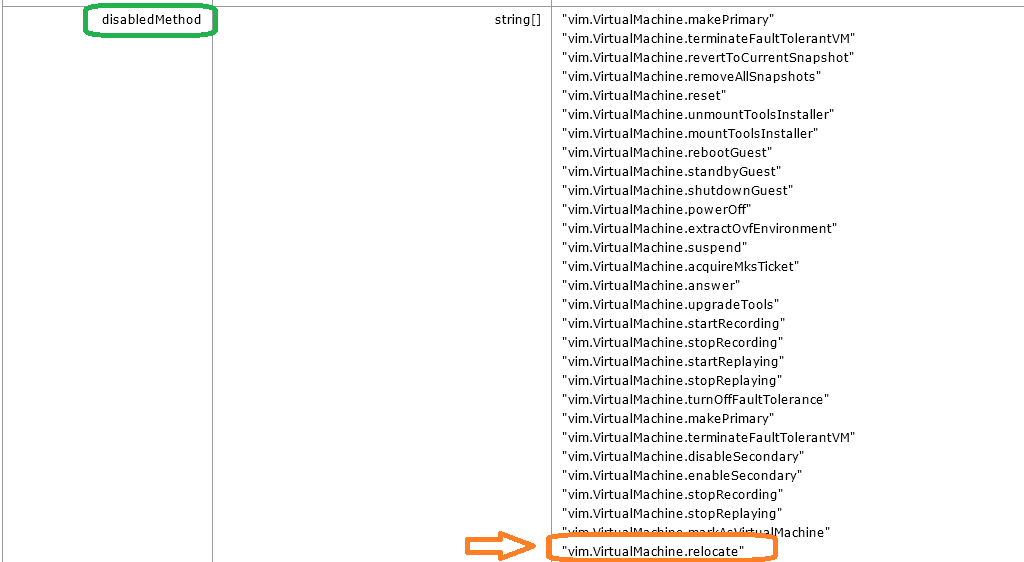
“vim.VirtualMachine.relocate” method is leveraged by storage vMotion.
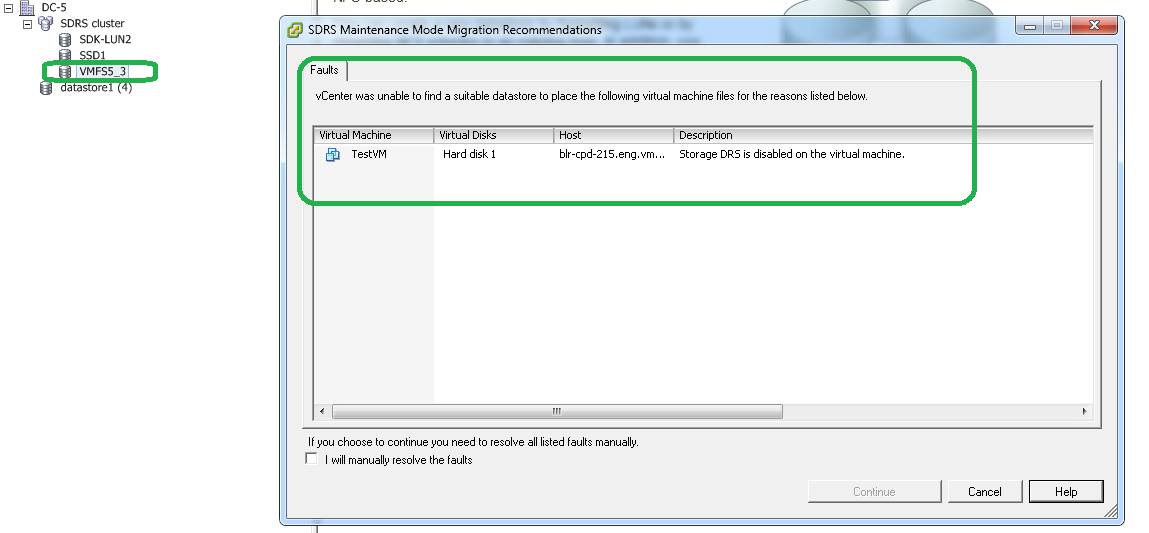
- I tried putting datastore where VM is placed in maintenance mode (from SDRS cluster), I was not allowed to put DS in maintenance mode as expected. (Refer: below screenshot)
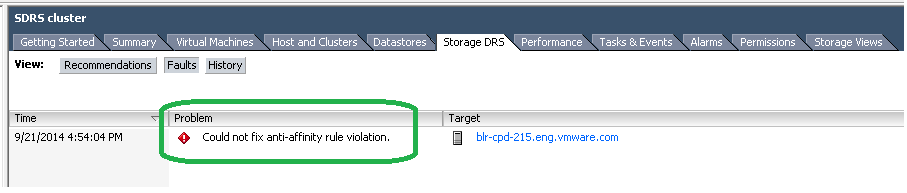
- I added one more VMDK to the VM and created SDRS VMDK anti-affinity rule on VM which is being backed up. Ideally in order to satisfy SDRS VMDK anti-affinity rule, one of VMDKs SDRS should storage vMotion to other datastore in SDRS cluster but SDRS throws fault as expected (refer: below screenshot)
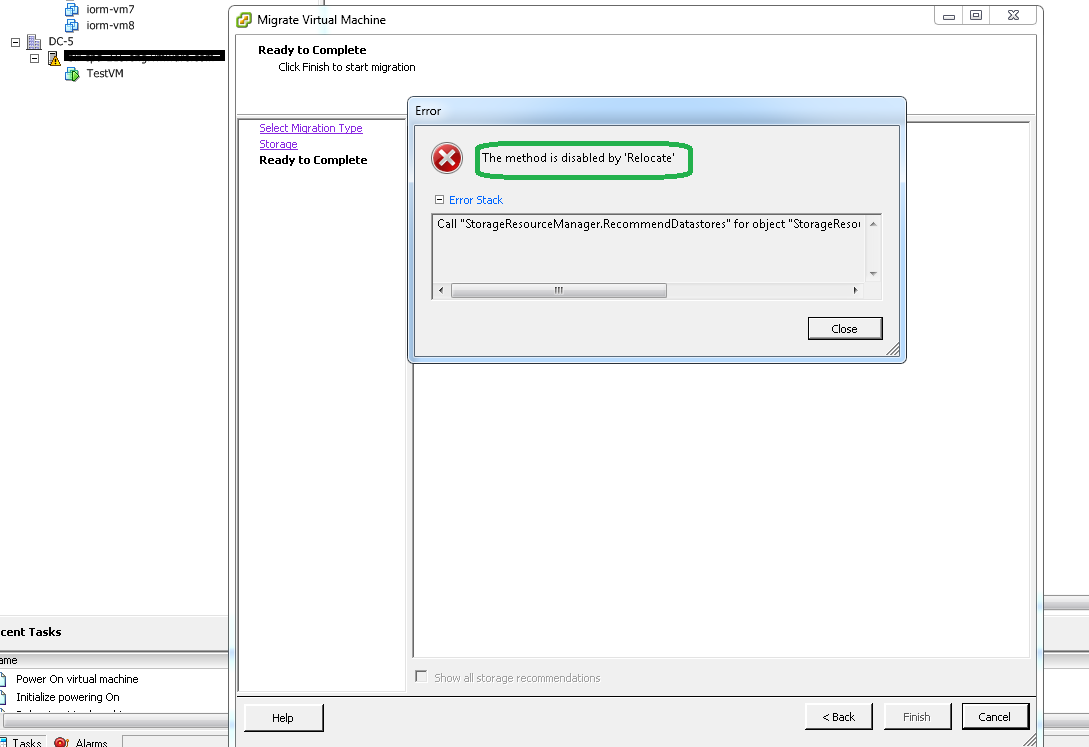
- I tried manual storage vMotion of the VM to be backed up but my attempt failed as expected. (Refer: below screenshot)
If you want to avoid such issue in your environment, you will have to upgrade to vCenter server 5.5 U2 . Download :vCenter 5.5 U2

Vikas Shitole is a Senior Tech Lead at VMware by Broadcom, VCF division, India, where he leads system test efforts—including scale, stress, and resiliency testing—and drives product quality across VMware Cloud Foundation (VCF), Broadcom’s flagship private cloud platform. He is an AI and Kubernetes enthusiast, and is passionate about VMware customers and automation around vSphere and VCF. Vikas has been honoured as a vExpert for 13 consecutive years (2014–2026) for his sustained technical contributions and community leadership. He is the author of two VMware Flings, holds multiple industry certifications including VCF admin 9.0, and is one of the top contributors to the VMware API Sample Exchange, where his automation scripts have been downloaded over 50,000 times. Vikas has shared his expertise as a speaker at international conferences such as VMworld Europe and VMworld USA, and was selected as an official VMworld 2018 blogger. He also served as lead technical reviewer for the Packt-published books vSphere Design and VMware Virtual SAN Essentials. Beyond tech, Vikas is a dedicated cricketer, cycling enthusiast, and a lifelong learner in fitness and nutrition, with the personal goal of completing an Ironman 70.3