On high level there are 2 types of DRS rules, one is VM-VM affinity rules and other is VM-Host affinity rules. Today in Part I, I will brief on what are the VM-Host affinity rules DRS has & what are the use cases where VM-Host rules can be used. However more focus would be on how to create VM-Host rules on ESXi cluster using vSphere API. In general, VM-Host rules will allow us to run particular group of VMs on specific group of ESXi hosts or away from specific group of ESXi hosts.
Update: Part II is published as well on creation of VM-VM affinity rules using vSphere API
What are the DRS VM-Host rules we can create on ESXi host cluster.
1. VM-Host must affinity rule : It is mandatory rule where specific group of VMs must run on specific group of hosts.
2. VM-Host must anti-affinity rule : It is mandatory rule where specific group of VMs must not run on specific group of hosts.
3. VM-Host should affinity rule : It is soft rule where specific group of VMs should run on specific group of hosts. DRS or user can violate this rule whenever required. But DRS will make best effort to correct the violation in the next DRS invocation.
4. VM-Host should anti-affinity rule : It is soft rule where specific group of VMs should not run on specific group of hosts. DRS or user can violate this rule whenever required. But DRS will make best effort to correct the violation in the next DRS invocation.
What are the use cases where we can use these rules
1. There are some products their licenses are based on ESXi host CPUs, it is mean that you need to apply licenses on these ESXi host to run the VMs. Classic example is Oracle licensing for databases. In this case, we can configure VM-Host must affinity rule so that oracle DB VMs will only run on set of hosts with oracle license.
2. VM host anti-affinity rule can be used to increase the availability of the VM. i.e. Running some critical VMs on set of hosts with different power supplies than rest of the host in the cluster so that even when there is power failure, some critical VMs can be still running on set of host with different power supplies.
I strongly suggest you to read my blog post is vSphere HA aware of DRS rules in order to understand impact of the DRS rules on vSphere HA.
Now it is time to look into creating these rules using vSphere APIs. Before jumping on developing code, It would be great if you get familiar with ClusterConfigSpecEx data object required for creating VM-Host rules. Specifically focus on data object properties high-lighted in below screenshot.

Below code is for creating VM-Host must affinity rule, I will explain how to leverage this code to create other 3 rules. It is really very simple.
[java]
package com.vmware.vijava;
import java.net.URL;
import com.vmware.vim25.ArrayUpdateOperation;
import com.vmware.vim25.ClusterConfigSpecEx;
import com.vmware.vim25.ClusterGroupInfo;
import com.vmware.vim25.ClusterGroupSpec;
import com.vmware.vim25.ClusterHostGroup;
import com.vmware.vim25.ClusterRuleSpec;
import com.vmware.vim25.ClusterVmGroup;
import com.vmware.vim25.ClusterVmHostRuleInfo;
import com.vmware.vim25.ManagedObjectReference;
import com.vmware.vim25.mo.ClusterComputeResource;
import com.vmware.vim25.mo.Folder;
import com.vmware.vim25.mo.HostSystem;
import com.vmware.vim25.mo.InventoryNavigator;
import com.vmware.vim25.mo.ServiceInstance;
import com.vmware.vim25.mo.VirtualMachine;
import com.vmware.vim25.mo.util.MorUtil;
public class VMHOSTrule {
public static void main(String[] args) throws Exception {
if (args.length != 3) {
System.out.println("Usage: java SearchDatastore [url] "
+ "[username] [password]");
return;
}
ServiceInstance si = new ServiceInstance(new URL(args[0]), args[1],
args[2], true);
/*
* you need to pass 3 parameters 1. https://x.y.z.r/sdk 2. username 3.
* password. Plz connect to vCenter Server
*/
String vmGroupName = "vmGroup_1";
String hostGroupName = "HostGroup_1";
Folder rootFolder = si.getRootFolder();
ClusterComputeResource clu = null;
clu = (ClusterComputeResource) new InventoryNavigator(rootFolder)
.searchManagedEntity("ClusterComputeResource", "India_Cluster");
ManagedObjectReference ClusterMor = clu.getMOR();
HostSystem host1 = (HostSystem) new InventoryNavigator(rootFolder)
.searchManagedEntity("HostSystem", "10.10.1.1");
HostSystem host2 = (HostSystem) new InventoryNavigator(rootFolder)
.searchManagedEntity("HostSystem", "10.10.1.2");
ManagedObjectReference hostMor1 = host1.getMOR();
ManagedObjectReference hostMor2 = host2.getMOR();
VirtualMachine vm1 = (VirtualMachine) new InventoryNavigator(rootFolder)
.searchManagedEntity("VirtualMachine", "CentOS6_x64_2GB_1");
VirtualMachine vm2 = (VirtualMachine) new InventoryNavigator(rootFolder)
.searchManagedEntity("VirtualMachine", "CentOS6_x64_2GB_2");
ManagedObjectReference vmMor1 = vm1.getMOR();
ManagedObjectReference vmMor2 = vm2.getMOR();
ClusterComputeResource ccr = (ClusterComputeResource) MorUtil
.createExactManagedEntity(si.getServerConnection(), ClusterMor);
ManagedObjectReference[] vmMors = new ManagedObjectReference[] {
vmMor1, vmMor2 };
ManagedObjectReference[] hostMors = new ManagedObjectReference[] {
hostMor1, hostMor2 };
ClusterGroupInfo vmGroup = new ClusterVmGroup();
((ClusterVmGroup) vmGroup).setVm(vmMors);
vmGroup.setUserCreated(true);
vmGroup.setName(vmGroupName);
ClusterGroupInfo hostGroup = new ClusterHostGroup();
((ClusterHostGroup) hostGroup).setHost(hostMors);
hostGroup.setUserCreated(true);
hostGroup.setName(hostGroupName);
ClusterVmHostRuleInfo vmHostAffRule = new ClusterVmHostRuleInfo();
vmHostAffRule.setEnabled(new Boolean(true));
vmHostAffRule.setName("VMHOSTAffinityRule");
vmHostAffRule.setAffineHostGroupName("HostGrp_1");
vmHostAffRule.setVmGroupName("VMGrp_1");
vmHostAffRule.setMandatory(true);
ClusterGroupSpec groupSpec[] = new ClusterGroupSpec[2];
groupSpec[0] = new ClusterGroupSpec();
groupSpec[0].setInfo(vmGroup);
groupSpec[0].setOperation(ArrayUpdateOperation.add);
groupSpec[0].setRemoveKey(null);
groupSpec[1] = new ClusterGroupSpec();
groupSpec[1].setInfo(hostGroup);
groupSpec[1].setOperation(ArrayUpdateOperation.add);
groupSpec[1].setRemoveKey(null);
/* RulesSpec for the rule populated here */
ClusterRuleSpec ruleSpec[] = new ClusterRuleSpec[1];
ruleSpec[0] = new ClusterRuleSpec();
ruleSpec[0].setInfo(vmHostAffRule);
ruleSpec[0].setOperation(ArrayUpdateOperation.add);
ruleSpec[0].setRemoveKey(null);
ClusterConfigSpecEx ccs = new ClusterConfigSpecEx();
ccs.setRulesSpec(ruleSpec);
ccs.setGroupSpec(groupSpec);
ccr.reconfigureComputeResource_Task(ccs, true);
System.out.println("VM Host Rule created successfully");
}
}
[/java]
Line 22-29: Refer my this blog post on ServiceInstance data object to understand these lines.
Line 41-54: Refer my this blog post on Inventory Navigator to understand these lines.
Line 64-72: We are populating VMGroup i.e. Set of VMs of those will be part of rule. & HostGroup i.e. set of hosts those will be part of rule. These groups will be pinned with GroupSpec in line 80-88.
Line 74-78: Creation of ClusterVmHostRuleInfo data object which helps to identify which host group and VM Group is associated with this rule as there can be several other host and VM groups associated with other rules already exists or planned to configure. Note that line 77 is responsible in deciding whether rule is affinity or anti affinity.
Line 80-88: Here we are populating GroupSpec required for creating VM & Host group on cluster based on the line 64-72.
Line 90-95: Here we are populating RuleSpec based on line 74-78.
Line 96-98: Populating ClusterConfigSpecEx data object with RuleSpec and GroupSpec which will be passed to reconfigureComputeResource_Task method which actually re-configures cluster with created VM-Host must affinity rule.
Here is the created VM-Host rule view from vSphere Client.
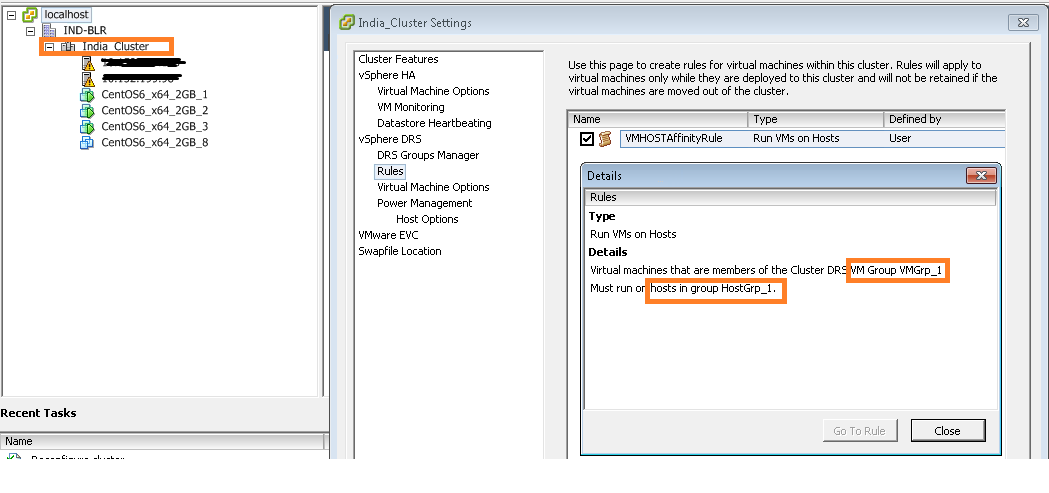
Noteworthy points:
1. For the sake of simplicity we have hard-coded some IPs, cluster, host & VMs names. Please do make changes if you are using this in production environment.
2. In order to create anti-affinity rule, you will just need to replace line 77 to vmHostAffRule.setAntiAffineHostGroupName(“HostGrp_1”); is it not too simple?.
3.In order to make this rule soft, just replace line 79 to vmHostAffRule.setMandatory(false); Note that default rule created is soft rule(i.e. If we do not set the property).
I hope you enjoyed this post, please take a look at Part II on VM-VM affinity rules creation.
Learn more on VM-Host rules here.
If you have still not setup your Eclipse environment:Getting started tutorial

Vikas Shitole is a Senior Tech Lead at VMware by Broadcom, VCF division, India, where he leads system test efforts—including scale, stress, and resiliency testing—and drives product quality across VMware Cloud Foundation (VCF), Broadcom’s flagship private cloud platform. He is an AI and Kubernetes enthusiast, and is passionate about VMware customers and automation around vSphere and VCF. Vikas has been honoured as a vExpert for 13 consecutive years (2014–2026) for his sustained technical contributions and community leadership. He is the author of two VMware Flings, holds multiple industry certifications including VCF admin 9.0, and is one of the top contributors to the VMware API Sample Exchange, where his automation scripts have been downloaded over 50,000 times. Vikas has shared his expertise as a speaker at international conferences such as VMworld Europe and VMworld USA, and was selected as an official VMworld 2018 blogger. He also served as lead technical reviewer for the Packt-published books vSphere Design and VMware Virtual SAN Essentials. Beyond tech, Vikas is a dedicated cricketer, cycling enthusiast, and a lifelong learner in fitness and nutrition, with the personal goal of completing an Ironman 70.3