This post is motivated by this VMTN thread , also I wanted to start with small tutorials on vSphere APIs using JAVA, I thought lets start with answering this query which can cover tutorial on DatastoreSummary data object as well. I hope you have already setup your eclipse environment by referring my Getting started blog post. Here we go.
Query on VMTN was: How to get datastore type connected to ESXi programmatically using vSphere APIs. As datastore type is part of DatastoreSummary data object, lets see how to get datastore summary (Datastore Name, Datastore Type, Datastore Capacity, Datastore free capacity etc.)
DatastoreSummary Data Object Description:
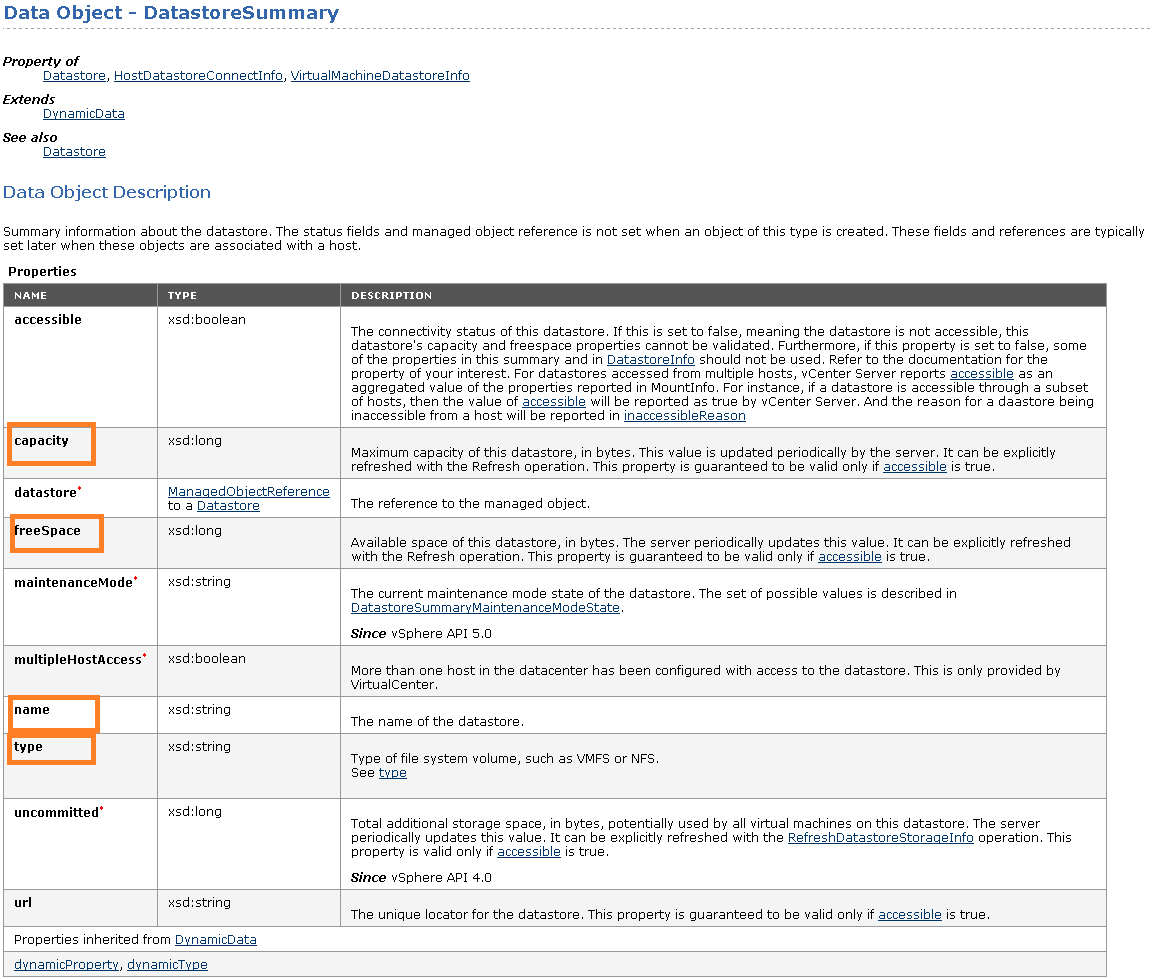
Complete code :
[java]
package com.vmware.vim25.mo.Samples.cluster;
import java.net.URL;
import com.vmware.vim25.mo.Datastore;
import com.vmware.vim25.mo.Folder;
import com.vmware.vim25.mo.HostDatastoreBrowser;
import com.vmware.vim25.mo.HostSystem;
import com.vmware.vim25.mo.InventoryNavigator;
import com.vmware.vim25.mo.ServiceInstance;
public class DatastoreSummary {
public static void main(String[] args) throws Exception {
if (args.length != 3) {
System.out.println("Usage: java SearchDatastore "
+ "username password");
return;
}
/*
* you need to pass 3 parameters
* 1. https://ESXi_IP/sdk
* 2. username
* 3. password
*/
ServiceInstance si = new ServiceInstance(new URL(args[0]), args[1],
args[2], true);
String hostname = "XYZ.vmware.com"; //Pass the FQDN i.e. DNS name of the ESXi host, ESXi host IP will not work
Folder rootFolder = si.getRootFolder();
HostSystem host = null;
host = (HostSystem) new InventoryNavigator(rootFolder)
.searchManagedEntity("HostSystem", hostname);
if (host == null) {
System.out.println("Host not found");
si.getServerConnection().logout();
return;
}
HostDatastoreBrowser hdb = host.getDatastoreBrowser();
System.out.println("Datastore Summary connected to ESXi host");
System.out.println();
Datastore[] ds = hdb.getDatastores();
for (int i = 0; ds != null && i < ds.length; i++) {
System.out.println("DatastoreName:" + ds[i].getName() + " "
+ "DSType:" + ds[i].getSummary().getType() + " "
+ "TotalCapacity(in GB):"
+ (ds[i].getSummary().getCapacity()) / (1024 * 1024 * 1024)
+ " " + "FreeSpace (in GB): "
+ (ds[i].getSummary().getFreeSpace())
/ (1024 * 1024 * 1024) + " ");
System.out.println();
}
si.getServerConnection().logout();
}
}
[/java]
Program Output::
Datastore Summary connected to host
DatastoreName:Local Datastore DSType:VMFS TotalCapacity(in GB):131 FreeSpace (in GB): 130
DatastoreName:Shared DS_3 DSType:VMFS TotalCapacity(in GB):24 FreeSpace (in GB): 8
DatastoreName:Shared DS_1 DSType:VMFS TotalCapacity(in GB):49 FreeSpace (in GB): 8
DatastoreName:Shared DS_4 DSType:VMFS TotalCapacity(in GB):49 FreeSpace (in GB): 13
DatastoreName:Shared DS_2 DSType:VMFS TotalCapacity(in GB):49 FreeSpace (in GB): 15
Compare output with datastore summary from VI client

You could see output is matching with screenshot from VI client, is not it cool?
Refer: vSphere API reference documentation I highly recommend you to spend some time on getting familiarize with vSPhere API reference.
Stay tuned for more specific/basic tutorials. please let me know if you want specific tutorial on vSphere API

Vikas Shitole is a Senior Tech Lead at VMware by Broadcom, VCF division, India, where he leads system test efforts—including scale, stress, and resiliency testing—and drives product quality across VMware Cloud Foundation (VCF), Broadcom’s flagship private cloud platform. He is an AI and Kubernetes enthusiast, and is passionate about VMware customers and automation around vSphere and VCF. Vikas has been honoured as a vExpert for 13 consecutive years (2014–2026) for his sustained technical contributions and community leadership. He is the author of two VMware Flings, holds multiple industry certifications including VCF admin 9.0, and is one of the top contributors to the VMware API Sample Exchange, where his automation scripts have been downloaded over 50,000 times. Vikas has shared his expertise as a speaker at international conferences such as VMworld Europe and VMworld USA, and was selected as an official VMworld 2018 blogger. He also served as lead technical reviewer for the Packt-published books vSphere Design and VMware Virtual SAN Essentials. Beyond tech, Vikas is a dedicated cricketer, cycling enthusiast, and a lifelong learner in fitness and nutrition, with the personal goal of completing an Ironman 70.3
freespace is showing different value with different esxi hosts. could you please explain why it happens so
do you mean as follows?
Datastore is shared with multiple hosts and when you get datastore free space connecting to 1st host is different from when retrieved the free space for same datastore but connecting from 2nd host? Let me know what version of VC/ESXi you are using as well.