Category Archives: vSphere API

posts on vSphere API/SDK samples/scripts

How to get all DRS rules associated with each VM in a DRS cluster using API : Interesting API in vSphere 6.0

As we know, one VM can be associated with several DRS affinity rules. If your DRS cluster has several rules configured, it is really cumbersome to check what is the type of the rule  and how many rules are associated with each VM in a DRS cluster. There is a interesting method introduced in vSphere 6.0 which can address this pain point. New method that I am talking about is “findRulesForVm()”. This method is introduced in vSphere 6.0 under “ClusterComputeResource” managed object. It is mean that you need to have this managed object in order to call this useful method. i.e. findRulesForVm().

Note: This method can list all the VM-VM affinity/anti-affinity rules associated with particular VM. This method can not return the VM-Host affinity rules associated with the VM.

Below is the complete code sample which can help to get all the VM VM DRS rules associated with each VM in Cluster. Please do modify this sample as per your need.

[java]
//:: # Author: Vikas Shitole
//:: # Website: www.vThinkBeyondVM.com
//:: # Product/Feature: vCenter Server/DRS
//:: # Description: Script to find all the rules associated with all the VMs in the DRS cluster

package com.vmware.yavijava;

import java.net.MalformedURLException;
import java.net.URL;
import java.rmi.RemoteException;
import com.vmware.vim25.ArrayUpdateOperation;
import com.vmware.vim25.ClusterAffinityRuleSpec;
import com.vmware.vim25.ClusterAntiAffinityRuleSpec;
import com.vmware.vim25.ClusterConfigSpec;
import com.vmware.vim25.ClusterRuleInfo;
import com.vmware.vim25.ClusterRuleSpec;
import com.vmware.vim25.InvalidProperty;
import com.vmware.vim25.ManagedObjectReference;
import com.vmware.vim25.RuntimeFault;
import com.vmware.vim25.mo.ClusterComputeResource;
import com.vmware.vim25.mo.Folder;
import com.vmware.vim25.mo.InventoryNavigator;
import com.vmware.vim25.mo.ManagedEntity;
import com.vmware.vim25.mo.ServiceInstance;
import com.vmware.vim25.mo.VirtualMachine;
import com.vmware.vim25.mo.util.MorUtil;

public class FindRulesForVMsInCluster {

public static void main(String[] args) throws Exception {
if(args.length!=3)
{
System.out.println("Usage: FindRulesForVMInCluster url username password");
System.exit(-1);
}

URL url = null;
try
{
url = new URL(args[0]);
} catch ( MalformedURLException urlE)
{
System.out.println("The URL provided is NOT valid. Please check it.");
System.exit(-1);
}
String username = args[1];
String password = args[2];
String ClusterName = "My-Cluster"; //Your DRS cluster Name
ManagedEntity vms[] = null;

// Initialize the system, set up web services
ServiceInstance si = new ServiceInstance(url, username,
password, true);

Folder rootFolder = si.getRootFolder();

ClusterComputeResource cluster = null;
cluster = (ClusterComputeResource) new InventoryNavigator(rootFolder)
.searchManagedEntity("ClusterComputeResource", ClusterName);

System.out.println("Cluster name::"+cluster.getName());

vms = (ManagedEntity[]) new InventoryNavigator(cluster)
.searchManagedEntities("VirtualMachine");

for(ManagedEntity vm:vms){
//New vSphere 6.0 method to find the VM affinity rules associated with particular VM
ClusterRuleInfo[] rules=cluster.findRulesForVm((VirtualMachine) vm);
System.out.println("Rules assciated with VM "+vm.getName()+" are::");
for(ClusterRuleInfo rule:rules){
System.out.println(rule.getName()+":" + rule.getEnabled());
}
System.out.println("================================");
}
si.getServerConnection().logout();
}
}

[/java]

Note:
– For the sake of simplicity, I have hard-coded DRS cluster name, you can change it based on your environment.
– You can scale the same code to all the clusters in a datacenter or multiple datacenter.

If you have still not setup your YAVI JAVA Eclipse environment:Getting started tutorial

Important tutorials to start with: Part I & Part II

How to quickly get vSphere Cluster resource usage( cpu, mem, storage) using API: cool API in vSphere 6.0

Some time back, I wanted to get the cluster resource usage (cpu, memory, storage)for one of my project requirements. I was exploring the ways to get cluster resource usage and to my surprise, vSphere 6.0 has introduced new API which can fetch detailed cluster resource usage. It was tricky to get this info earlier and now single API call will help to get this. How cool it is! If you are not using vSphere HA/DRS, this API is super life saver for you in order to keep the track of the cluster resources and monitor these resources on all the cluster across vCenter. New method that I am talking about is “getResourceUsage()”. This method is introduced in vSphere 6.0 under “ClusterComputeResource” managed object. It is mean that you need to have this managed object to call this useful method. i.e. getResourceUsage(). This API can fetch not only the resource capacity but also current resource usage.

Below is the complete code sample which can help you quickly to get Cluster resource usage (cpu,memory and storage)..

[java]

//:: # Author: Vikas Shitole
//:: # Website: www.vThinkBeyondVM.com
//:: # Product/Feature: vCenter Server/DRS
//:: # Description: Script to quickly get Cluster resource usage (cpu,memory and storage).

package com.vmware.yavijava;

import java.net.MalformedURLException;
import java.net.URL;
import java.rmi.RemoteException;
import com.vmware.vim25.ClusterResourceUsageSummary;
import com.vmware.vim25.InvalidProperty;
import com.vmware.vim25.RuntimeFault;
import com.vmware.vim25.mo.ClusterComputeResource;
import com.vmware.vim25.mo.Folder;
import com.vmware.vim25.mo.InventoryNavigator;
import com.vmware.vim25.mo.ServiceInstance;

public class GetClusterResourceUsage {

public static void main(String[] args) throws Exception {
if(args.length!=3)
{
System.out.println("Usage: GetClusterResourceUsage url username password");
System.exit(-1);
}

URL url = null;
try
{
url = new URL(args[0]);
} catch ( MalformedURLException urlE)
{
System.out.println("The URL provided is NOT valid. Please check it…");
System.exit(-1);
}
String username = args[1];
String password = args[2];
String ClusterName = "Cluster1"; //Your cluster Name

// Initialize the system, set up web services
ServiceInstance si = new ServiceInstance(url, username,
password, true);
Folder rootFolder = si.getRootFolder();

ClusterComputeResource cluster = null;
cluster = (ClusterComputeResource) new InventoryNavigator(rootFolder)
.searchManagedEntity("ClusterComputeResource", ClusterName);

System.out.println();
System.out.println("Resource Usagae Summary for cluster::"+cluster.getName());
//Get the Cluster resource summary object
ClusterResourceUsageSummary resourceSummary= cluster.getResourceUsage();
System.out.println("CPU Capacity::"+resourceSummary.getCpuCapacityMHz()+" MHz");
System.out.println("CPU used::"+resourceSummary.getCpuUsedMHz()+" MHz");
System.out.println("Memory Capacity::"+resourceSummary.getMemCapacityMB()+" MB");
System.out.println("Memory used::"+resourceSummary.getMemUsedMB()+" MB");
System.out.println("Storage Capacity::"+resourceSummary.getStorageCapacityMB()+" MB");
System.out.println("Storage used::"+resourceSummary.getStorageUsedMB()+" MB");
si.getServerConnection().logout();
}
}

[/java]

Note:
– For the sake of simplicity, I have hard-coded DRS cluster name, you can change it based on your environment.
– You can scale the same code to all the clusters in a datacenter or multiple datacenter.

If you have still not setup your YAVI JAVA Eclipse environment:Getting started tutorial

Important tutorials to start with: Part I & Part II

Getting started with opensource JAVA SDK for VMware vSphere : Step by step guide for beginners

You might have read my last post on YAVI JAVA. In this post I am going to take you through setting up eclipse environment in order to get started with YAVI JAVA. This post is written by keeping not only existing VMware users in mind but also college students.

There are 4 ways listed here to get started with YAVI JAVA, one of the most used,easiest and quickest one is the first one i.e. obtaining YAVI JAVA package from Maven central repository. Here we go.

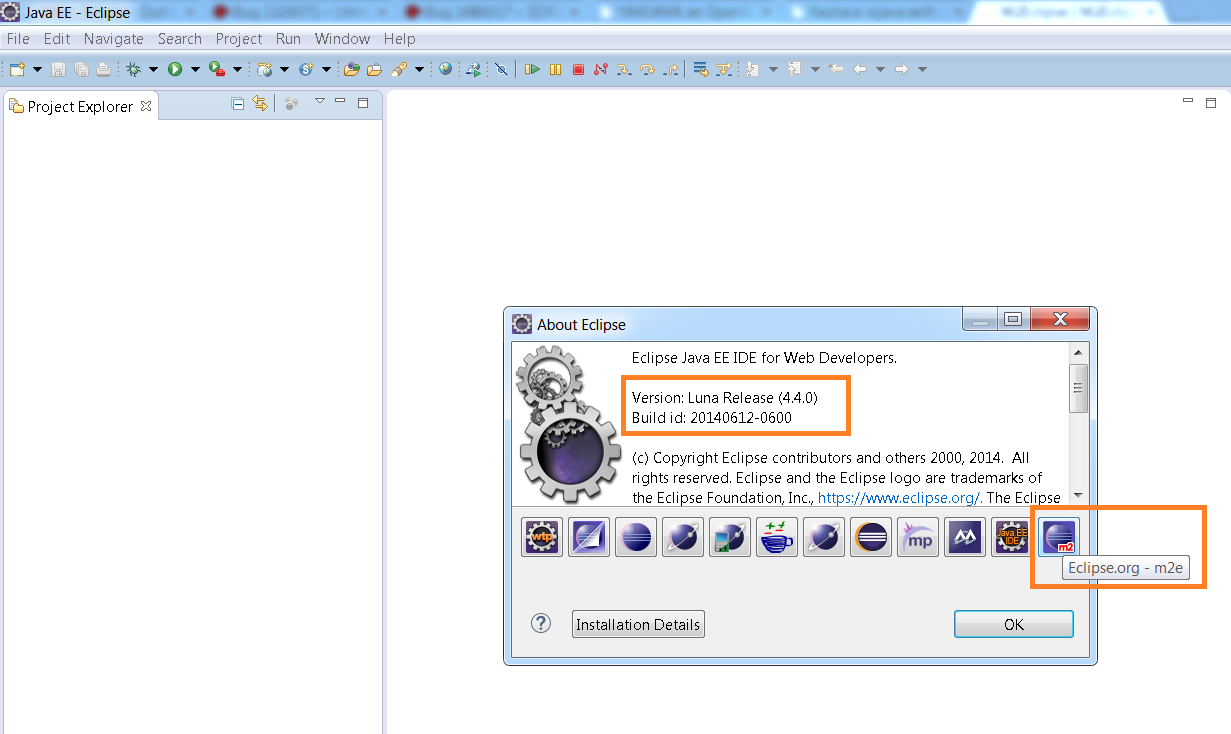
Step 1:: Download the Eclipse that has built in Maven integration. However, Maven is integrated with other IDEs such as NetBeans, Intelli IDEA etc. I like Eclipse so I am going to show you steps for eclipse, you could follow the same for other IDEs, it should work fine. Below is the Eclipse version I have downloaded which has Maven built in.
MavenEclipse

For getting started with YAVI JAVA, you are not required to be expert in Maven, even it is OK if you do not know anything about Maven. If you are interested, do read what is Maven here.

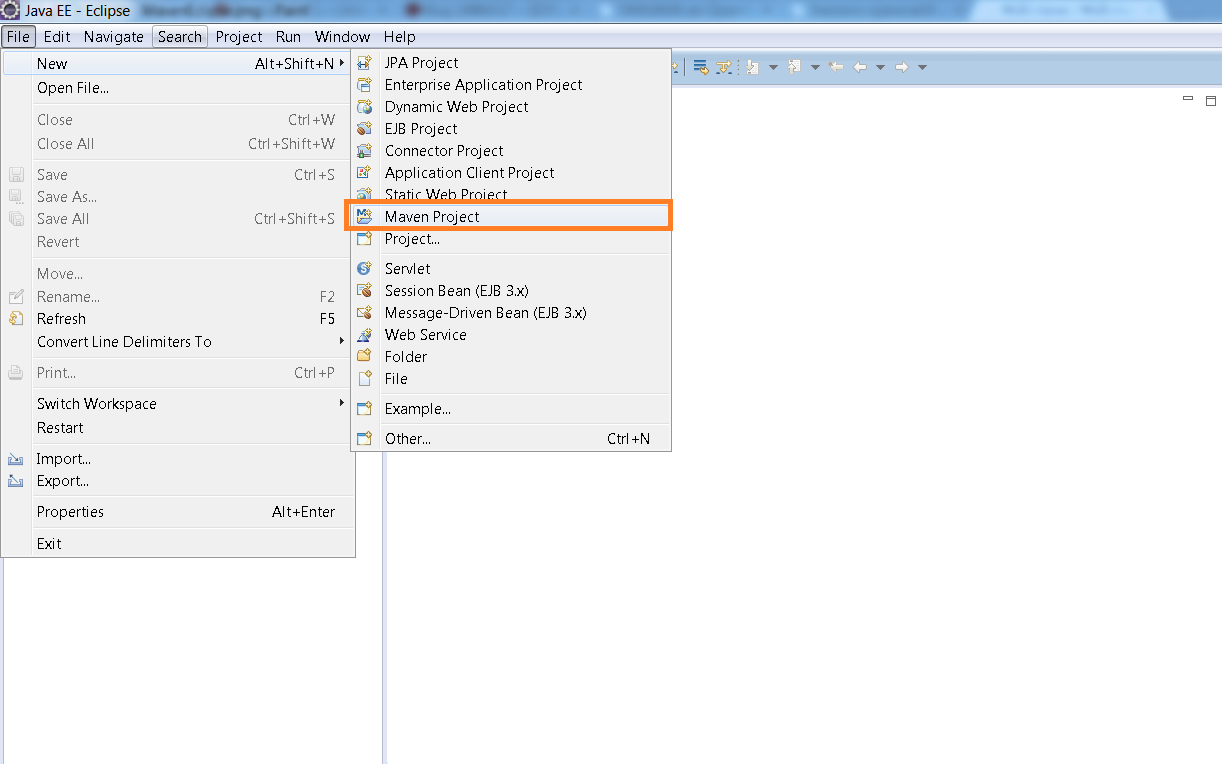
Step 2: Create a Maven project as shown in below screenshot.

Maven project

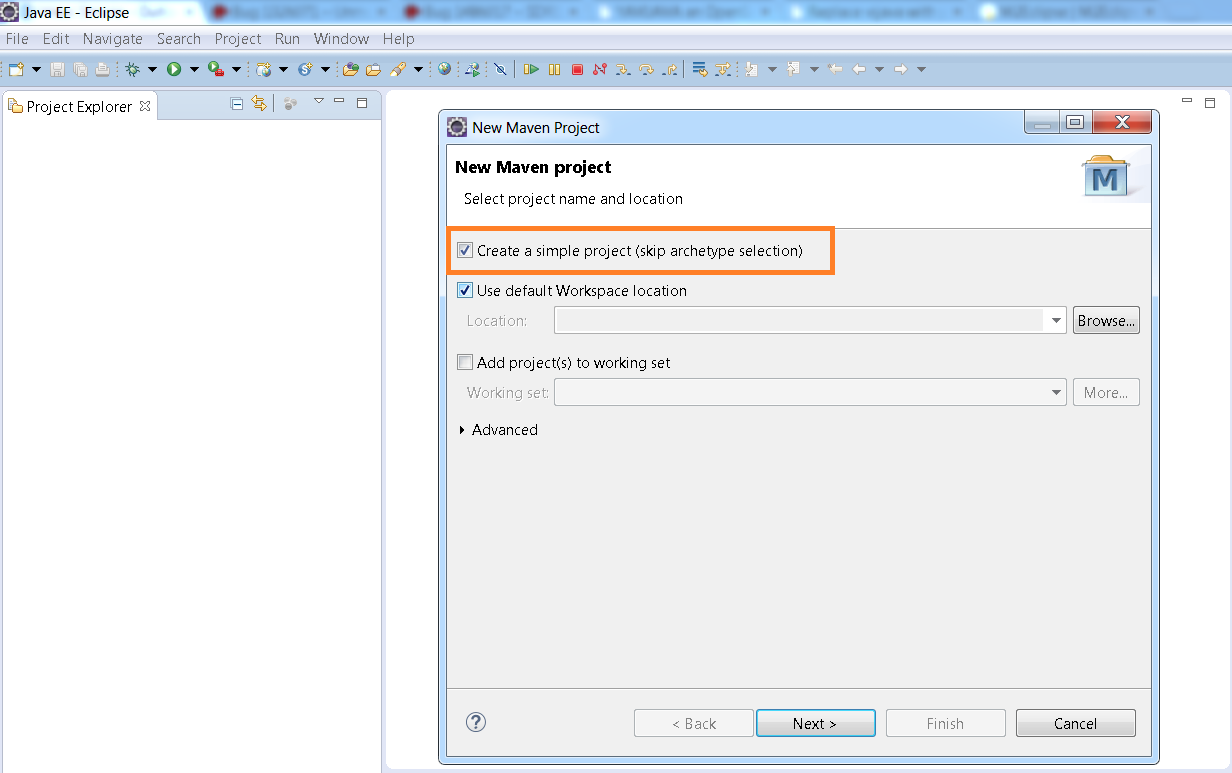
Step 3: Select the “Create Simple project” as shown below.

Maven_2

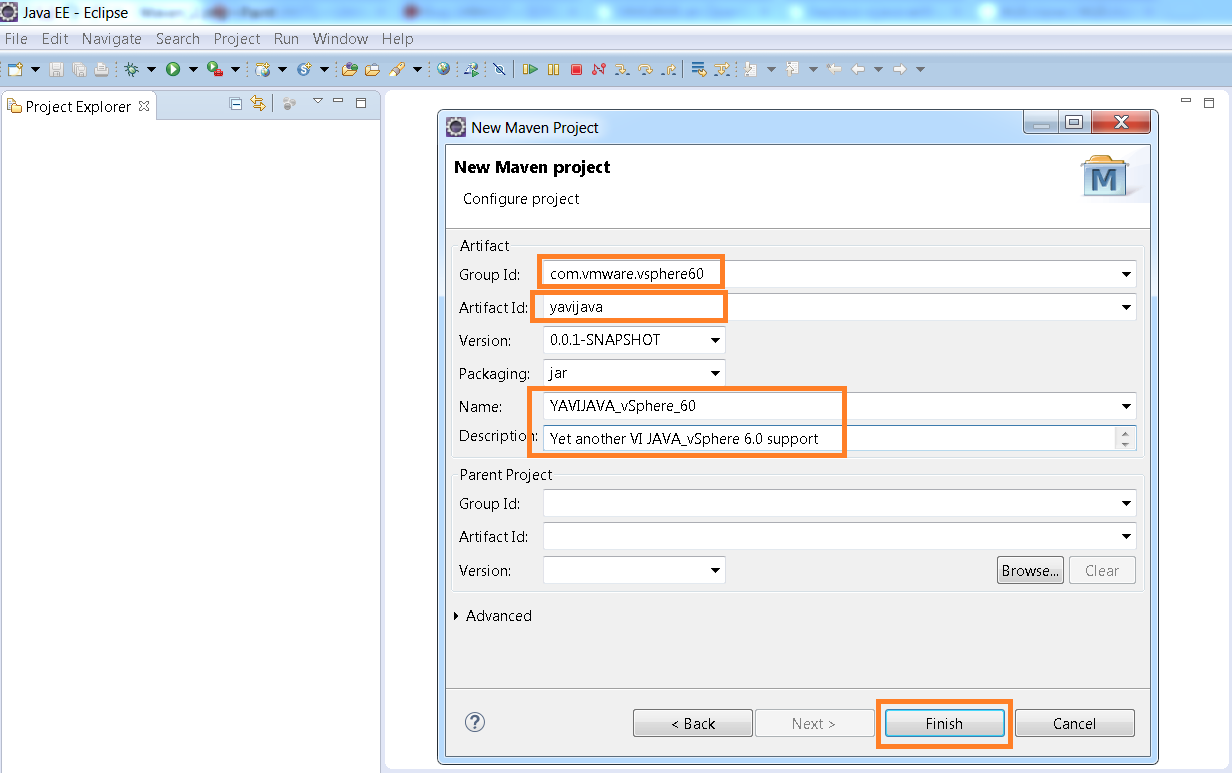
Step 4 : Next is to specify the Group id, Artifact id, version, Name etc. This can be anything of your choice as shown below and click on Finish.

Maven_3

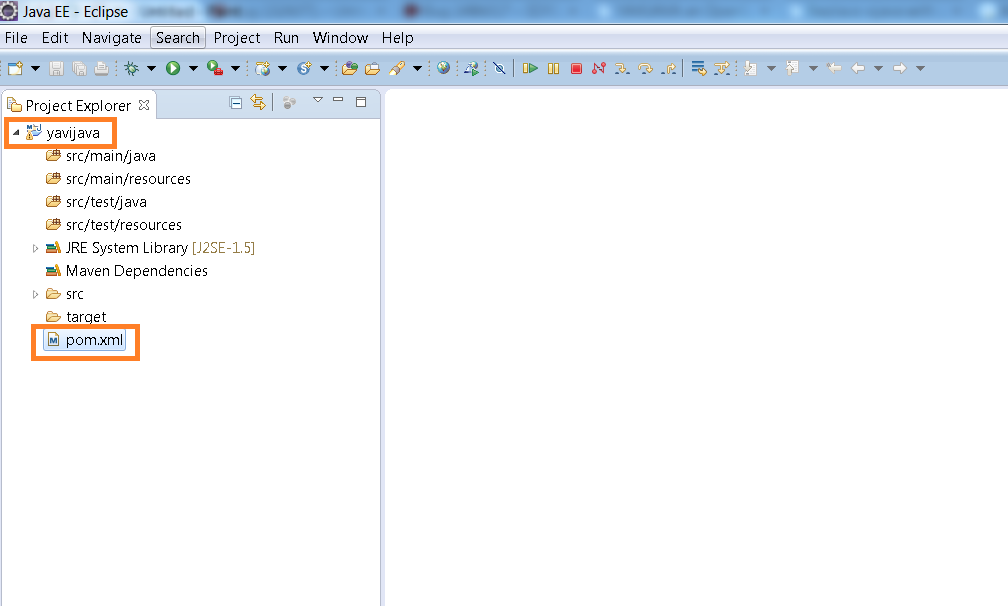
Once clicked on FINISH, below is how it looks like when Maven project is created.

Maven_4

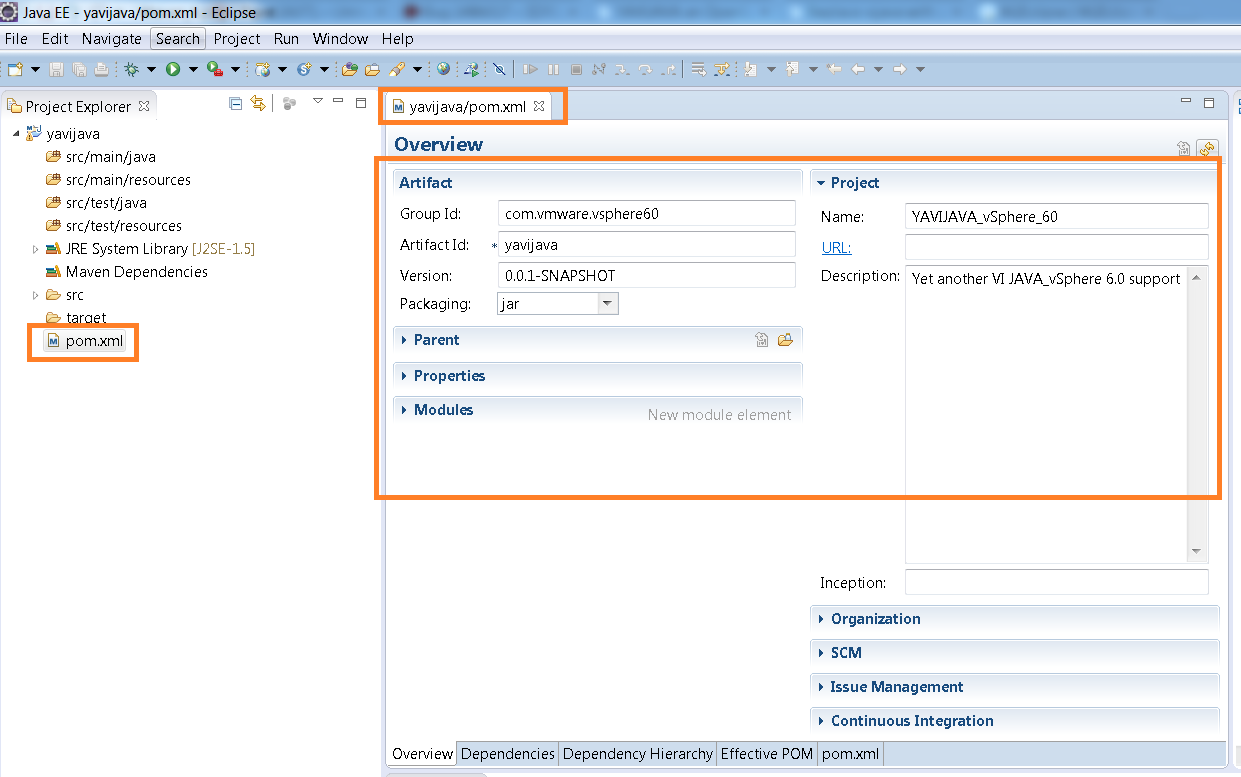
Step 5: Next we need to modify the POM.xml file. With every Maven project, one POM.xml file gets generated. Below is the overview of the existing POM.xml file got created when we created the project. POM.xml file is the one which tracks/resolves all the dependencies required for your project.

Maven_5

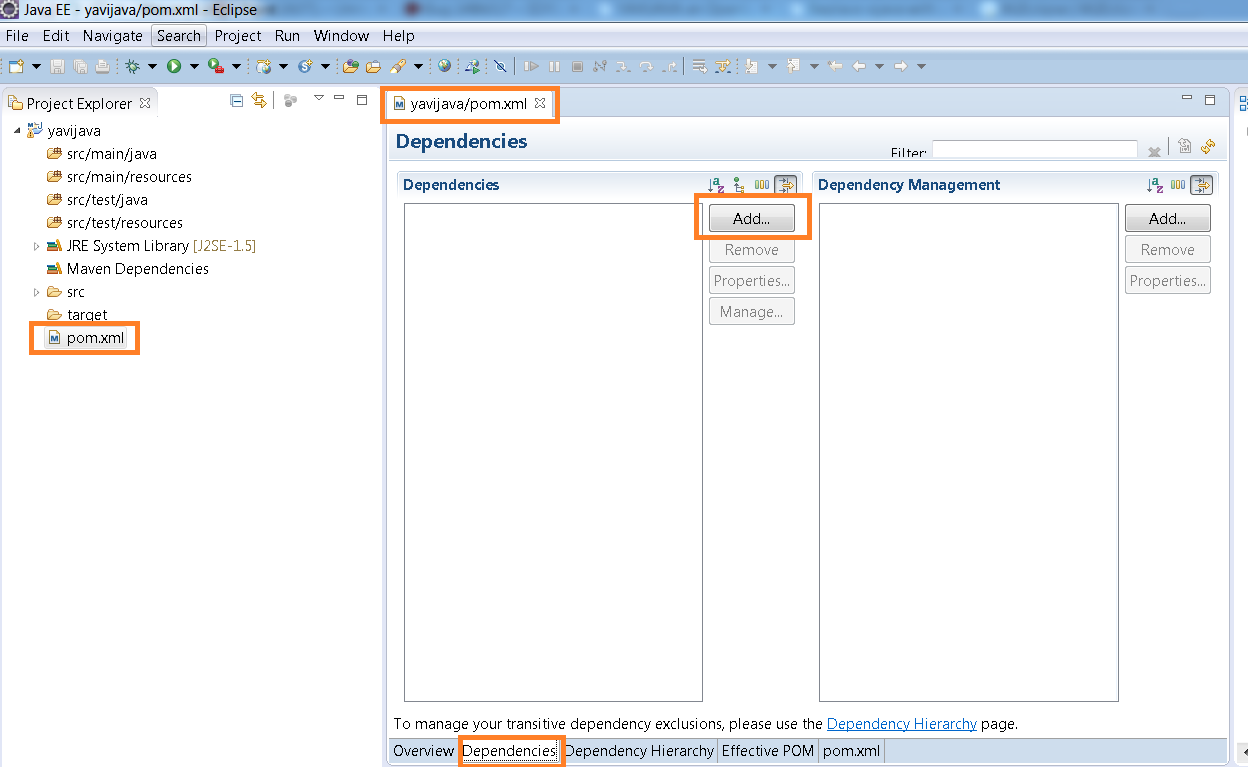
Step 6: Click on the dependencies tab in the bottom as shown below screenshot.

Maven_6

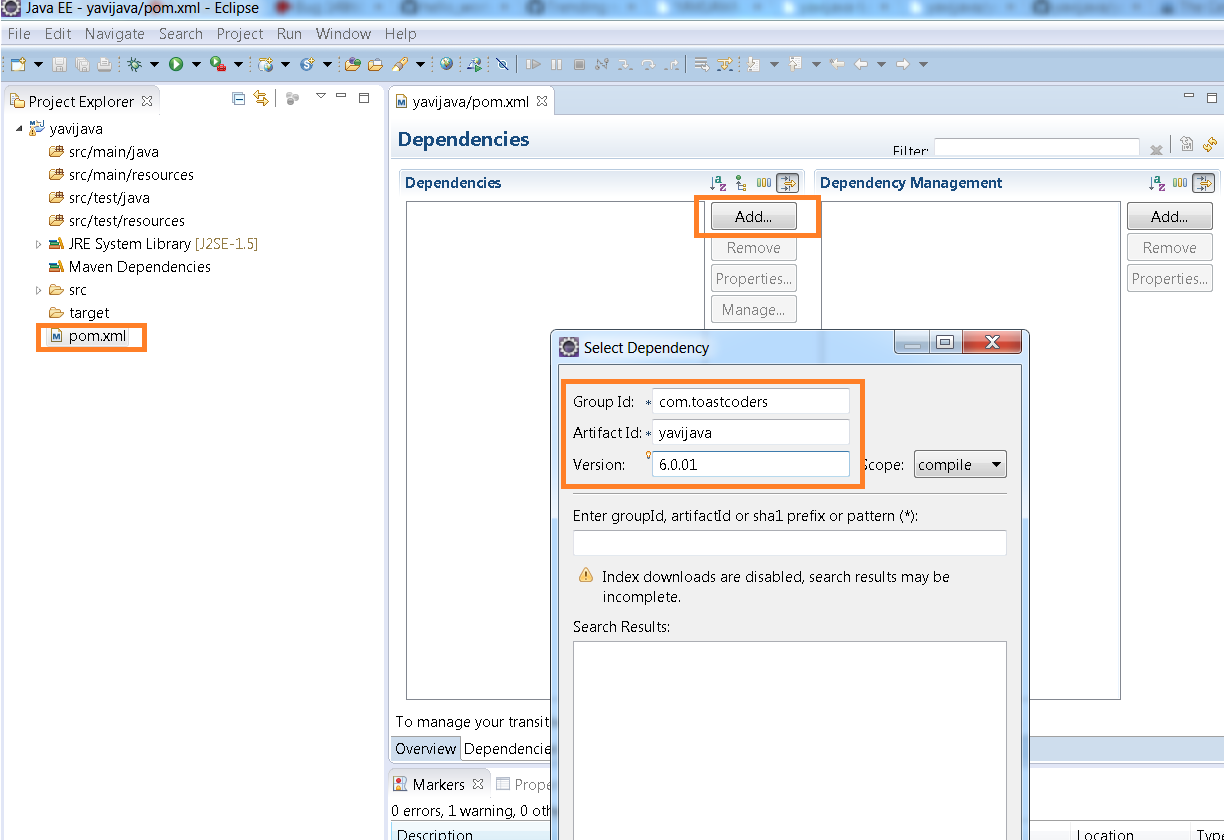
Now click on ADD button and enter the YAVI JAVA Maven group id, artifact id and version as shown in below screenshot
groupId : com.toastcoders
artifactId: yavijava
version :6.0.01 (or any YAVI JAVA version of your choice): Recommendation is to use latest available version on Maven central repository
Maven_9

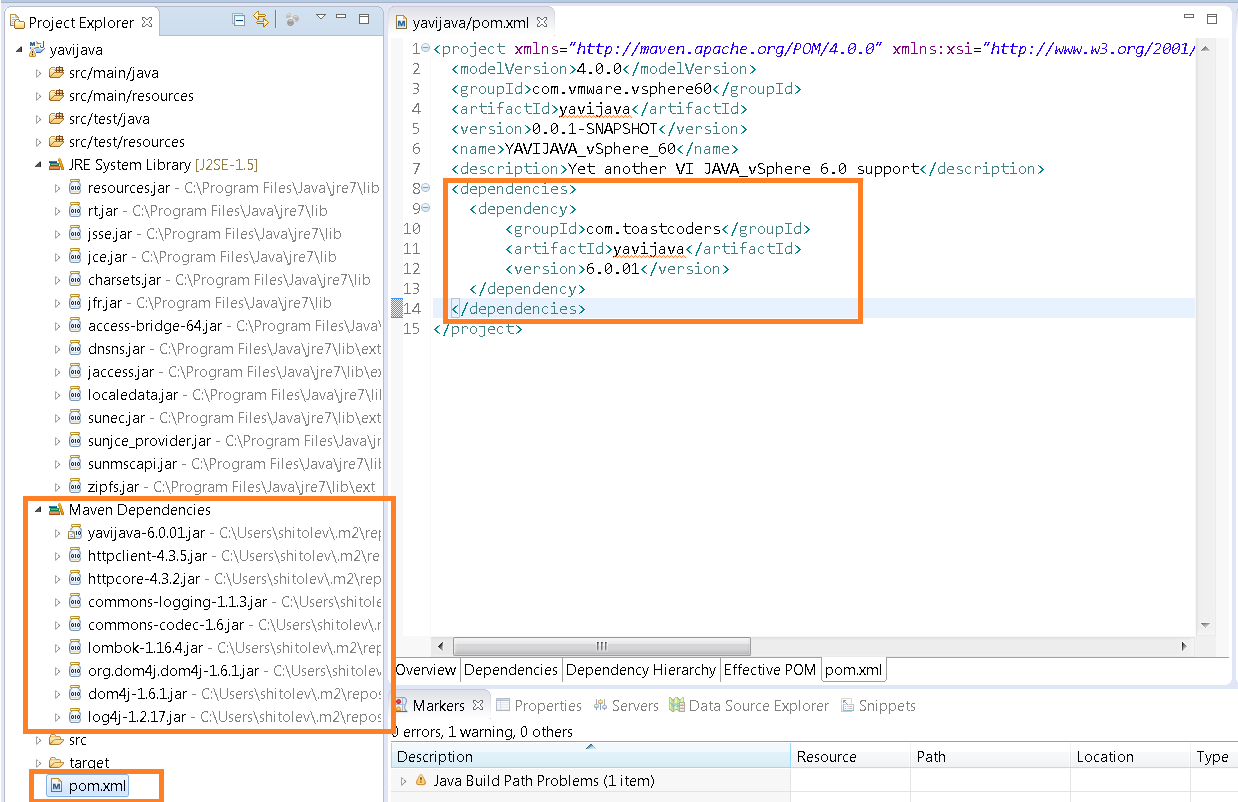
Step 7: As soon as you click on OK in above step, make sure you can see entry in POM.xml file and required Maven dependencies jars as shown below.

Maven_10

That’s all. Now you are all set to play with new APIs introduced in vSphere 6.0. Let me know if you face any issues.

All the samples and tutorials specified in this post will work just fine.

Note: YAVI JAVA supports VMware vSphere 4.0 and above (4.1, 5.0, 5.1, 5.5, 6.0).

Please do stay tuned for all the interesting samples on new features introduced in vSphere 6.0.

How to edit DRS affinity rules using vSphere API: Bit tricky solution

Recently I got a question through mail on how to edit DRS affinity rules (VM VM rules)? It is bit tricky to edit VM VM rules and vSphere API beginners are likely to get bit confused. Hence I thought its better write a program on the same which can be used as sample when anybody would like to edit DRS affinity rules.

Below is the complete code sample for the same. Please do modify this sample as per your need.

[java]

//:: # Author: Vikas Shitole
//:: # Website: www.vThinkBeyondVM.com
//:: # Product/Feature: vCenter Server/DRS
//:: # Description: Script to edit VM VM affinity rules

package com.vmware.yavijava;

import java.util.Arrays;
import org.apache.commons.lang.ArrayUtils;

import java.net.MalformedURLException;
import java.net.URL;
import java.rmi.RemoteException;

import com.vmware.vim25.ArrayUpdateOperation;
import com.vmware.vim25.ClusterAffinityRuleSpec;
import com.vmware.vim25.ClusterAntiAffinityRuleSpec;
import com.vmware.vim25.ClusterConfigInfoEx;
import com.vmware.vim25.ClusterConfigSpec;
import com.vmware.vim25.ClusterRuleInfo;
import com.vmware.vim25.ClusterRuleSpec;
import com.vmware.vim25.InvalidProperty;
import com.vmware.vim25.ManagedObjectReference;
import com.vmware.vim25.RuntimeFault;
import com.vmware.vim25.mo.ClusterComputeResource;
import com.vmware.vim25.mo.Folder;
import com.vmware.vim25.mo.InventoryNavigator;
import com.vmware.vim25.mo.ServiceInstance;
import com.vmware.vim25.mo.VirtualMachine;
import com.vmware.vim25.mo.util.MorUtil;

public class EditVmVmDrsRule {

public static void main(String[] args) throws InvalidProperty,
RuntimeFault, RemoteException, MalformedURLException {
ServiceInstance si = new ServiceInstance(new URL(args[0]), args[1],
args[2], true); // Pass 3 argument as vCenterIP/username/password
String ClusterName = "Cluster"; // Cluster Name
String VMToBeRemoved="VM1";
String VMToBeAdded="VM3";
Folder rootFolder = si.getRootFolder();
VirtualMachine vm1 = (VirtualMachine) new InventoryNavigator(rootFolder)
.searchManagedEntity("VirtualMachine", VMToBeRemoved);
VirtualMachine vm2 = (VirtualMachine) new InventoryNavigator(rootFolder)
.searchManagedEntity("VirtualMachine", VMToBeAdded);
ManagedObjectReference vmMor1 = vm1.getMOR();
ManagedObjectReference vmMor2 = vm2.getMOR();

ClusterComputeResource cluster = null;
cluster = (ClusterComputeResource) new InventoryNavigator(rootFolder)
.searchManagedEntity("ClusterComputeResource", ClusterName);

// Number of rules in a cluster
ClusterRuleInfo[] ruleinfo = ((ClusterConfigInfoEx) cluster
.getConfigurationEx()).getRule();

if (ruleinfo == null || ruleinfo.length == 0) {
System.out.println("There is no DRS rule in the cluster:: "
+ cluster.getName());
}

for (ClusterRuleInfo rule : ruleinfo) {
if (((rule instanceof ClusterAffinityRuleSpec)) && (rule.getName().equals("VM VM Rule"))){
ManagedObjectReference[] vms=((ClusterAffinityRuleSpec) rule).getVm();
for(ManagedObjectReference vm:vms){
if(vm.getVal().equals(vmMor1.getVal())){
//Removed the VM from rule
vms=(ManagedObjectReference[]) ArrayUtils.removeElement(vms, vm );
break;
}

}
//Added the new VM to the rule
vms=(ManagedObjectReference[]) ArrayUtils.add(vms, vmMor2 );

ClusterAffinityRuleSpec cars=(ClusterAffinityRuleSpec) rule;
cars.setVm(vms);

ClusterRuleSpec crs1 = new ClusterRuleSpec();
crs1.setInfo(cars);
crs1.setOperation(ArrayUpdateOperation.edit);

ClusterConfigSpec ccs = new ClusterConfigSpec();
ccs.setRulesSpec(new ClusterRuleSpec[]{crs1} );

cluster.reconfigureCluster_Task(ccs, true);
System.out.println("Rule reconfigured successfully ");

}
}

}
}

[/java]

Note:
– For the sake of simplicity, I have hard-coded VM names, you can change those based on your environment.
– Also you need resolve the dependency on apache.commons.lang in your java project. Let me know if you have any more doubts.

If you have still not setup your VI JAVA Eclipse environment:Getting started tutorial
Important tutorials to start with: Part I & Part II

One more exciting news: VI JAVA open source project is forked into YA VIJAVA(Yet another VI JAVA), it will have support to all the new APIs introduced in vSphere 6.0. VI JAVA itself works fine even on vSphere 6.0 (except the new features in vSphere 6.0).

Great news: YAVI JAVA : fork of VI JAVA open source project : Supports VMware vSphere 6.0

Since last stable vSphere 5.5 release of VI JAVA open source project , for more than 15+ months there was not any update on VI java, no any questions on the community were getting answered. There was lot of uncertainty among VI JAVA users on the future of the VI JAVA, discussions were picking up among VI JAVA on how to mitigate the impact if VI JAVA becomes dead and Michael Rice came to the rescue and puts the end to this speculation. He forked the VI JAVA project into YAVI JAVA (Yet Another VI JAVA) in order to give new life to this project which is for sure asset to many VMware users. I really appreciate the great proactive work done by Michael, YAVI JAVA is result of Machael’s dedication & passion for contributing to open source community. I am sure so many VI JAVA users have reason to celebrate this. I would like to thank other contributors as well. At the same time we just can not forget awesome work done by Steve Jin by leading VI JAVA project for several past releases. YAVI JAVA now available on GIT HUB and community contribution is getting increased. I would recommend all of you to spread the word about this project, start contributing, using and help in making this project a great success. Without community contribution, no open source project can become great. Along with supporting VMware vSphere 6.0, there are several new features added to YAVI JAVA, great thing about this project is: your old projects those developed using VI JAVA will work just fine. how cool it is!

Below are some of important hyperlinks about YAVI JAVA links, releases, tutorials, samples etc.

1. YAVI JAVA website

2. GIT HUB repository

3. Basic tutorials

4. All the releases of YAVI JAVA

5. All the Samples : Do not worry as I specified all these samples will just work fine on YAVI JAVA as well. Please stay tuned for my blogs on sample wrt to new APIs introduced in vSphere 6.0

Please do stay tuned for step by step getting started guide on YAVI JAVA.