Category Archives: vSphere API

posts on vSphere API/SDK samples/scripts

How to get datastore UUID across all the datastores in a vCenter server using vSphere APIs

There are several vSphere API which requires datastore UUID as one of its important properties. Some examples of such APIs are MountVmfsVolume(),mountVmfsVolumeEx(), UnmountForceMountedVmfsVolume(), unmapVmfsVolumeEx(), DeleteVmfsVolumeState(), unmountVmfsVolumeEx & unmountVmfsVolume(). Without vmfsUUID we can NOT operate on any of these APIs. Now question is how to get/know the datastore UUID of the VMFS datastores connected to hosts using vSphere APIs. I thought its better to write the vSphere API script to solve this. The script that I am sharing is going to get all hosts and all of its associated datastores and each datastore and its associated UUID. Here we go.

[java]
package com.vmware.vijava;
import java.net.URL;
import java.util.HashMap;
import java.util.Map;
import java.util.Map.Entry;
import com.vmware.vim25.DatastoreInfo;
import com.vmware.vim25.VmfsDatastoreInfo;
import com.vmware.vim25.mo.Datastore;
import com.vmware.vim25.mo.Folder;
import com.vmware.vim25.mo.HostDatastoreBrowser;
import com.vmware.vim25.mo.HostSystem;
import com.vmware.vim25.mo.InventoryNavigator;
import com.vmware.vim25.mo.ManagedEntity;
import com.vmware.vim25.mo.ServiceInstance;
import com.vmware.vim25.mo.VirtualMachine;

public class findVMFSUUIDs {
public static void main(String[] args) throws Exception {
ServiceInstance si = new ServiceInstance(new URL(
"https://10.120.30.40/sdk"), "administrator@vsphere.local",
"Administrator!23", true);
// Get the rootFolder
Folder rootFolder = si.getRootFolder();

// Get all the hosts in the vCenter server
ManagedEntity[] hosts = new InventoryNavigator(rootFolder)
.searchManagedEntities("HostSystem");

if (hosts == null) {
System.out.println("Host not found on vCenter");
si.getServerConnection().logout();
return;
}

// Map to store the datastore name as key and its UUID as the value
Map< String , String> vmfsdatastoreUUIDs = new HashMap< String , String>();

// Map to store host as key and all of its datastores as the value
Map< ManagedEntity , Datastore[]> hostDatastores = new HashMap< ManagedEntity , Datastore[]>();
for (ManagedEntity hostSystem : hosts) {
HostDatastoreBrowser hdb = ((HostSystem) hostSystem)
.getDatastoreBrowser();
Datastore[] ds = hdb.getDatastores();
hostDatastores.put(hostSystem, ds);
}

System.out.println("Hosts and all of its associated datastores");
for (Map.Entry < ManagedEntity , Datastore[]> datastores : hostDatastores
.entrySet()) {
System.out.println("");
System.out.print("[" + datastores.getKey().getName() + "::");
for (Datastore datastore : datastores.getValue()) {
System.out.print(datastore.getName() + ",");
DatastoreInfo dsinfo = datastore.getInfo();
if (dsinfo instanceof VmfsDatastoreInfo) {
VmfsDatastoreInfo vdinfo = (VmfsDatastoreInfo) dsinfo;
vmfsdatastoreUUIDs.put(datastore.getName(), vdinfo
.getVmfs().getUuid());
}

}
System.out.print("]");
}
System.out.println(" ");
System.out.println("Datastore and its UUID");
for (Map.Entry< String , String> dsuuid : vmfsdatastoreUUIDs.entrySet()) {
System.out.println("[" + dsuuid.getKey() + "::" + dsuuid.getValue()
+ "]");
}

}
}
[/java]

Program Output::

Hosts and all of its associated datastores

[192.168.1.1::DS3,DS2,Local DS,DS4,NFS1,]
[192.168.1.2::LocalDS2,LocalDS1,LocalDS3,]

Datastore and its UUID

[LocalDS1::55d9b324-bad019fa-147a-f04da20356f7]
[Local DS::55b5dee1-ebd2895d-1263-002219574957]
[DS2::51e3e9f7-8ab3eac5-4715-00221957495d]
[LocalDS2::5592e051-da224dfc-ad16-f04da20356f7]
[LocalDS3::55d9b367-d145aef6-dcfe-f04da20356f7]
[DS3::51398f9b-e591008a-1b35-002219574a65]
[DS4::55cc410f-604db805-6fc0-002219574a65]
[/java]

Now you could enhance this code to operate on any vSphere API that requires VMFS UUID as one of parameters. Please do comment if you have any doubts or need any help.

If you have still not setup your VI JAVA Eclipse environment:Getting started tutorial
Important tutorials to start with: Part I & Part II

Note: VI JAVA open source project is forked into YA VIJAVA(Yet another VI JAVA), it will have support to all the new APIs introduced in vSphere 6.0. VI JAVA itself works fine even on vSphere 6.0 (except the new features in vSphere 6.0). Please do stay tuned my post on YA VIJAVA.

vSphere API using Java : Getting started/Samples consolidated

Want to get started quickly with vSphere API using Java SDK coding but not getting easy to understand samples/tutorials? Want to get quick insight into vSphere APIs ? If you have these questions, this post is for you.

Some time back I had written 6 blog articles @vSphere API using Java SDK for VMware users and academic students. I thought to consolidate all the blog posts together in one short post so that it will be a one stop shop@vSphere API learning.

I recommend you to refer these 6 blog articles in below sequence. Blogs are written in a way that 1st year Engineering student should also understand easily.

Getting started with vSphere API using Java: How to quickly setup your eclipse environment (5-10 min)

Tutorial 1: How to initialize connection with ESXi host or vCenter server using vSphere API.

Tutorial 2:How to access/navigate vCenter server or ESXi host inventory using vSphere API

Sample 1: How to get datastore summary for all the datastores connected to a ESXi host.

Sample 2: How to create VM-Host DRS affinity rules using vSphere API

Sample 3: How to create VM-VM DRS affinity rules using vSphere API

You may also want to share these article with friends/students/customers. It will help them in their projects related to VMware. This also can be a trigger to start learning@VMware.

vSphere 6.0 : How SIOC works with Storage IO reservation

Storage IO control(aka SIOC) is one of the cool vSphere features since it got introduced in vSphere 4.1. As we know, whenever there is IO resource contention on shared storage, Storage IO control (SIOC) balances IOPS across the VMs based on the IOPS shares allocated to each VMDK on the VM. As IOPS distribution done by SIOC was only based on IOPS shares , in case of IO contention, there was not IOPS distribution guarantee for mission critical VMs. Also it was hard for admins to understand IO intensive worklaods and set the appropriate IOPS shares, in some cases even admin needs to re-calculate IOPS shares allocation based on workloads. Already there is increasing trend of moving tier-1 applications (which requires guaranteed performance) to vSphere. In order to take this trend of moving tier-1 applications on vSphere platform to the next level, it was very critical that SIOC also should consider storage IO reservation to satisfy service level agreements. I am really excited that VMware has added this feature as part of vSphere 6.0, with vSphere 6.0, SIOC is going to obey the storage IO reservation as well in terms of IOPS whenever there is IO contention. This is going to ensure the guaranteed performance in terms of IOPS. As part of vSphere beta program, I got chance to play with this feature & I would say this feature also going to ensure the greater level of IO performance isolation when admin puts more number of VMDKs per LUN. Now in addition to shares & limit, we have “reservation” as well to manage tier-1 IO(disk) intensive workloads using SIOC. It is important again to note that SIOC will only get invoked when there is IO contention ( based on set IO threshold in terms of latency)

In this post we will see couple of examples on how Storage IO reservation works with Storage IO control (SIOC).

Example 1:
Initial setup
-Say, We have 2 ESXi hosts (H1,H2) with 1 VM per host i.e. H1-VM1 & H2-VM2. Both host are attached to shared datastore DS1. i.e. Both VMs are on the datastore DS1( SIOC is enabled).

IOPS Shares/Reservation Configuration
-Initially each VM takes default share values i.e. Normal (say 1000). Hence VM1 & VM2 will have 1000 shares per VM.
-Consider max IOPS capacity of the shared datastore DS1 is 100 & we set IOPS reservation on VM1 as 60 and IOPS reservation on VM2 is NOT set.

How SIOC will behave
-In case IO contention, based on shares VM1 and VM2 will get 50 IOPS each as their shares are 1000 each but if we notice bit closer IOPS reservation set on the VM1 itself is 60, what happens now? When IOPS distribution based on shares per VM is less than the IO reservation set on the VM (this is our case), IOPS distributed to the VM will be based on IOPS reservation. Hence in our case, VM1 will get 60 IOPS and VM2 will get remaining IOPS i.e. 40.
– If reservation would not have there, each VM would have got IOPS in 1:1 ratio based on shares.

Example 2:
Initial setup is same as that of Example 1.

IOPS Shares/Reservation Configuration
– Share value set on VM1 is 500 & VM2 is 2000.
-Consider max IOPS capacity of the shared datastore DS1 is 100 & we set IOPS reservation on VM1 as 50 and IOPS reservation on VM2 is NOT set.

How SIOC will behave
-In case IO contention, based on shares VM1 will get IOPS distribution as 20 & and VM2 will get 80 but if we notice bit closer IOPS reservation set on the VM1 itself is 50, what happens now? When IOPS distribution based on shares per VM is less than the IO reservation set on the VM (this is our case), IOPS distributed to the VM will be based on IOPS reservation. Hence in our case, VM1 will get 50 IOPS and VM2 will get remaining IOPS i.e. 50.

My additional observations:
-When IOPS reservation set across VMs is more than the max IOPS capacity of the shared datastore, In case of IO contention, IOPS gets distributed in the ratio of set IOPS reservation.
-If IOPS calculation for particular VM based on share is more than the IOPS limit set on the same VM, that will IOPS upto limit set. SIOC will make sure IOPS distribution can not be more than the IOPS limit set on the VM.
-We can not set IOPS reservation more than the IOPS limit.

This is how, in case of IO contention, SIOC will make sure IOPS distribution across VM is guaranteed. I hope you enjoyed reading this post. Stay tuned for my next post on how to configure SIOC and storage IO reservation from vSphere API or web client.

In order to understand SIOC in detail, please refer SIOC detailed insight

DRS rules PART II: How to create VM-VM affinity rules using vSphere API.

In my last post we learned how to create VM-Host DRS affinity rules using vSphere API. Now today in PART II, we will see how to create VM-VM affinity rules using vSphere API. Before jumping on API coding, I would like to list out what VM-VM affinity rules are there and when we should use these rules.

What are the DRS VM-VM rules we can create on ESXi host cluster.

1. VM-VM affinity rule: This rule will keep the 1 or more VMs together on a host. i.e. DRS will make sure these VMs are running together on the same host all the time. Note that, this rule is soft rule, it is mean that, DRS can violate this rule if required in order to balance the cpu/memory load on the cluster. However, DRS will try its best to resolve this rule violation in next DRS invocation(Default DRS invocation is 5 mins).

Use cases:
1. If there is a group of VMs in DRS cluster those communicate frequently with each other, it would make sense to keep these VMs together on the same host to save some network bandwidth & increase the performance. If we keep such VMs on separate hosts, network traffic should exit from external physical network & will impact network latency.
2. If there is group of VMs in DRS cluster with same GuestOS, Apps or user data, we can keep these VMs together on same host to take advantage of Transparent Page Sharing (TPS) memory reclamation technique, so that host memory will be efficiently shared wherever there is opportunity.
Both of above use-cases can be satisfied by using VM-VM affinity rule

2. VM-VM anti-affinity rule: This rule is exactly opposite to above rule. Here this rule will keep 2 or more VMs away from each other. As per this rule, all the VMs involved in this rule should run on separate hosts. Again this rule is soft rule and DRS can violate this rule if required.
Use case:
If you want to make 2 critical VMs highly available, it makes sense to configure VM-VM anti-affinity rule on these 2 critical VMs. If one host goes down, second VM will be still running.

I strongly suggest you to read my blog post is HA aware of DRS rules in order to understand impact of above DRS rules on vSphere HA.

Note: All DRS rules are very popular among VMware admin but it is important to note that, if there are multiple rules configured on DRS cluster, it can impose constraint on DRS load balancing ability as DRS has to think on satisfying configured rules on cluster. It reduces DRS migration options. Hence please make use of these rules if absolutely required.

Creating these rules using vSphere API
Now with above basic fundamentals on DRS rules, we are ready to deal with creating these rules using vSphere APIs. I assume now you are familiar with vSphere API reference, go through below pointed data-object in detail so that you will understand code yourself. (Click on image to enlarge)
VMVMrules Dataobject
Refer: ClusterRuleInfo data object API reference

Below program creates both VM-VM affinity rule and VM-VM anti-affinity rule
[java]
package com.vmware.vijava;
import java.net.MalformedURLException;
import java.net.URL;
import java.rmi.RemoteException;
import com.vmware.vim25.ArrayUpdateOperation;
import com.vmware.vim25.ClusterAffinityRuleSpec;
import com.vmware.vim25.ClusterAntiAffinityRuleSpec;
import com.vmware.vim25.ClusterConfigSpec;
import com.vmware.vim25.ClusterRuleSpec;
import com.vmware.vim25.InvalidProperty;
import com.vmware.vim25.ManagedObjectReference;
import com.vmware.vim25.RuntimeFault;
import com.vmware.vim25.mo.ClusterComputeResource;
import com.vmware.vim25.mo.Folder;
import com.vmware.vim25.mo.InventoryNavigator;
import com.vmware.vim25.mo.ServiceInstance;
import com.vmware.vim25.mo.VirtualMachine;
import com.vmware.vim25.mo.util.MorUtil;

public class DRSVMVMRules {

public static void main(String[] args) throws InvalidProperty,
RuntimeFault, RemoteException, MalformedURLException {
ServiceInstance si = new ServiceInstance(new URL(args[0]), args[1],
args[2], true); // Pass 3 argument as vCenterIP/username/password
String ClusterName = "BLR-NTP"; // Cluster Name
String affineVM1 = "CentOS6_x64_2GB_1"; // First VM for affinity rule
String affineVM2 = "CentOS6_x64_2GB_2"; // Second VM for affinity rule
String anti_affineVM1 = "CentOS6_x64_2GB_3"; // First VM for anti-affinity rule
String anti_affineVM2 = "CentOS6_x64_2GB_4"; // Second VM for anti-affinity rule
Folder rootFolder = si.getRootFolder();

ClusterComputeResource cluster = null;
cluster = (ClusterComputeResource) new InventoryNavigator(rootFolder)
.searchManagedEntity("ClusterComputeResource", ClusterName);
ManagedObjectReference ClusterMor = cluster.getMOR();
ClusterComputeResource ccr = (ClusterComputeResource) MorUtil
.createExactManagedEntity(si.getServerConnection(), ClusterMor);

// VM-VM affinity rule configuration
ClusterConfigSpec ccs = new ClusterConfigSpec();
ClusterAffinityRuleSpec cars = null;
VirtualMachine vm1 = (VirtualMachine) new InventoryNavigator(rootFolder)
.searchManagedEntity("VirtualMachine", affineVM1);
VirtualMachine vm2 = (VirtualMachine) new InventoryNavigator(rootFolder)
.searchManagedEntity("VirtualMachine", affineVM2);
ManagedObjectReference vmMor1 = vm1.getMOR();
ManagedObjectReference vmMor2 = vm2.getMOR();
ManagedObjectReference[] vmMors1 = new ManagedObjectReference[] {
vmMor1, vmMor2 };
cars = new ClusterAffinityRuleSpec();
cars.setName("VM-VM Affinity Rule");
cars.setEnabled(true);
cars.setVm(vmMors1);
ClusterRuleSpec crs1 = new ClusterRuleSpec();
crs1.setOperation(ArrayUpdateOperation.add);
crs1.setInfo(cars);

// VM-VM Anti-affinity rule configuration
ClusterAntiAffinityRuleSpec caars = null;
VirtualMachine vm3 = (VirtualMachine) new InventoryNavigator(rootFolder)
.searchManagedEntity("VirtualMachine", anti_affineVM1);
VirtualMachine vm4 = (VirtualMachine) new InventoryNavigator(rootFolder)
.searchManagedEntity("VirtualMachine", anti_affineVM2);
ManagedObjectReference vmMor3 = vm3.getMOR();
ManagedObjectReference vmMor4 = vm4.getMOR();
ManagedObjectReference[] vmMors2 = new ManagedObjectReference[] {
vmMor3, vmMor4 };
caars = new ClusterAntiAffinityRuleSpec();
caars.setName("VM-VM Anti-Affinity Rule");
caars.setEnabled(true);
caars.setVm(vmMors2);
ClusterRuleSpec crs2 = new ClusterRuleSpec();
crs2.setOperation(ArrayUpdateOperation.add);
crs2.setInfo(caars);

// Passing the rule spec
ccs.setRulesSpec(new ClusterRuleSpec[] { crs1, crs2 });
// Reconfigure the cluster
ccr.reconfigureCluster_Task(ccs, true);
System.out.println("Rules are created with no issues:");

}
}
[/java]

Code itself is self explanatory, just map the code with data-objects in vSphere API reference. Note that for the sake of simplicity, I have hard-coded VM/Cluster name , do make changes according to your environment. Please do leave the comment if you have any doubt.

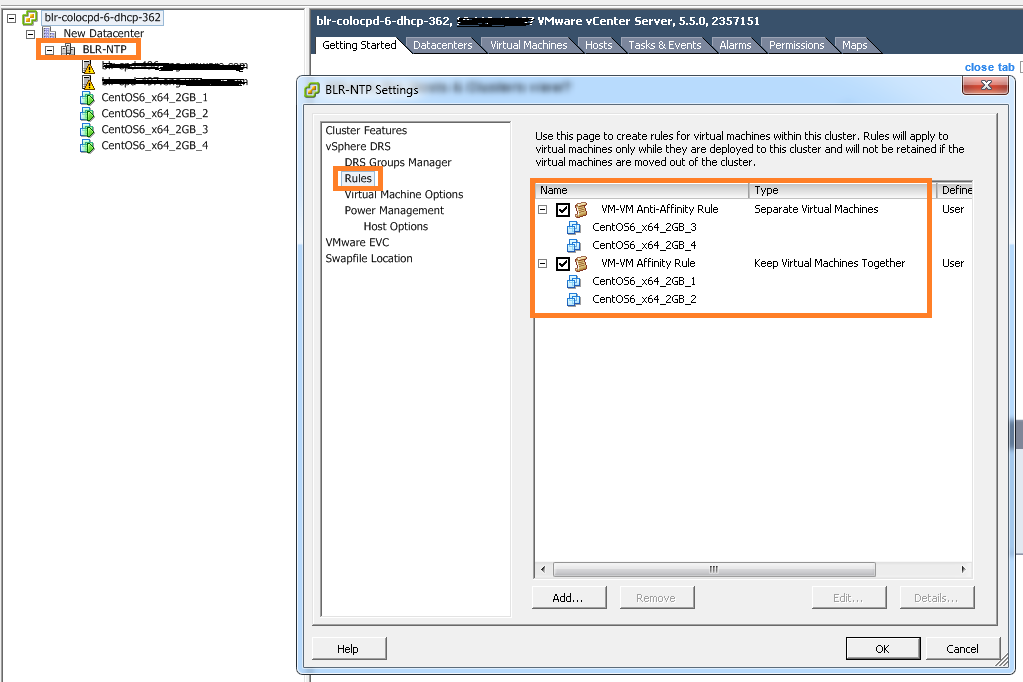
Below is the VI client view of created VM-VM DRS rules using above code.
VM-VM Rules

If you have still not setup your VI JAVA Eclipse environment:Getting started tutorial
Important tutorials to start with: Part I & Part II

DRS rules PART I: How to create VM-Host affinity rules using vSphere API

On high level there are 2 types of DRS rules, one is VM-VM affinity rules and other is VM-Host affinity rules. Today in Part I, I will brief on what are the VM-Host affinity rules DRS has & what are the use cases where VM-Host rules can be used. However more focus would be on how to create VM-Host rules on ESXi cluster using vSphere API. In general, VM-Host rules will allow us to run particular group of VMs on specific group of ESXi hosts or away from specific group of ESXi hosts.

Update: Part II is published as well on creation of VM-VM affinity rules using vSphere API

What are the DRS VM-Host rules we can create on ESXi host cluster.
1. VM-Host must affinity rule : It is mandatory rule where specific group of VMs must run on specific group of hosts.
2. VM-Host must anti-affinity rule : It is mandatory rule where specific group of VMs must not run on specific group of hosts.
3. VM-Host should affinity rule : It is soft rule where specific group of VMs should run on specific group of hosts. DRS or user can violate this rule whenever required. But DRS will make best effort to correct the violation in the next DRS invocation.
4. VM-Host should anti-affinity rule : It is soft rule where specific group of VMs should not run on specific group of hosts. DRS or user can violate this rule whenever required. But DRS will make best effort to correct the violation in the next DRS invocation.

What are the use cases where we can use these rules
1. There are some products their licenses are based on ESXi host CPUs, it is mean that you need to apply licenses on these ESXi host to run the VMs. Classic example is Oracle licensing for databases. In this case, we can configure VM-Host must affinity rule so that oracle DB VMs will only run on set of hosts with oracle license.
2. VM host anti-affinity rule can be used to increase the availability of the VM. i.e. Running some critical VMs on set of hosts with different power supplies than rest of the host in the cluster so that even when there is power failure, some critical VMs can be still running on set of host with different power supplies.
I strongly suggest you to read my blog post is vSphere HA aware of DRS rules in order to understand impact of the DRS rules on vSphere HA.

Now it is time to look into creating these rules using vSphere APIs. Before jumping on developing code, It would be great if you get familiar with ClusterConfigSpecEx data object required for creating VM-Host rules. Specifically focus on data object properties high-lighted in below screenshot.
RuleSpec_GroupSpec

Below code is for creating VM-Host must affinity rule, I will explain how to leverage this code to create other 3 rules. It is really very simple.
[java]
package com.vmware.vijava;
import java.net.URL;
import com.vmware.vim25.ArrayUpdateOperation;
import com.vmware.vim25.ClusterConfigSpecEx;
import com.vmware.vim25.ClusterGroupInfo;
import com.vmware.vim25.ClusterGroupSpec;
import com.vmware.vim25.ClusterHostGroup;
import com.vmware.vim25.ClusterRuleSpec;
import com.vmware.vim25.ClusterVmGroup;
import com.vmware.vim25.ClusterVmHostRuleInfo;
import com.vmware.vim25.ManagedObjectReference;
import com.vmware.vim25.mo.ClusterComputeResource;
import com.vmware.vim25.mo.Folder;
import com.vmware.vim25.mo.HostSystem;
import com.vmware.vim25.mo.InventoryNavigator;
import com.vmware.vim25.mo.ServiceInstance;
import com.vmware.vim25.mo.VirtualMachine;
import com.vmware.vim25.mo.util.MorUtil;

public class VMHOSTrule {

public static void main(String[] args) throws Exception {
if (args.length != 3) {
System.out.println("Usage: java SearchDatastore [url] "
+ "[username] [password]");
return;
}

ServiceInstance si = new ServiceInstance(new URL(args[0]), args[1],
args[2], true);
/*
* you need to pass 3 parameters 1. https://x.y.z.r/sdk 2. username 3.
* password. Plz connect to vCenter Server
*/
String vmGroupName = "vmGroup_1";
String hostGroupName = "HostGroup_1";
Folder rootFolder = si.getRootFolder();

ClusterComputeResource clu = null;

clu = (ClusterComputeResource) new InventoryNavigator(rootFolder)
.searchManagedEntity("ClusterComputeResource", "India_Cluster");
ManagedObjectReference ClusterMor = clu.getMOR();

HostSystem host1 = (HostSystem) new InventoryNavigator(rootFolder)
.searchManagedEntity("HostSystem", "10.10.1.1");
HostSystem host2 = (HostSystem) new InventoryNavigator(rootFolder)
.searchManagedEntity("HostSystem", "10.10.1.2");
ManagedObjectReference hostMor1 = host1.getMOR();
ManagedObjectReference hostMor2 = host2.getMOR();
VirtualMachine vm1 = (VirtualMachine) new InventoryNavigator(rootFolder)
.searchManagedEntity("VirtualMachine", "CentOS6_x64_2GB_1");
VirtualMachine vm2 = (VirtualMachine) new InventoryNavigator(rootFolder)
.searchManagedEntity("VirtualMachine", "CentOS6_x64_2GB_2");
ManagedObjectReference vmMor1 = vm1.getMOR();
ManagedObjectReference vmMor2 = vm2.getMOR();
ClusterComputeResource ccr = (ClusterComputeResource) MorUtil
.createExactManagedEntity(si.getServerConnection(), ClusterMor);
ManagedObjectReference[] vmMors = new ManagedObjectReference[] {
vmMor1, vmMor2 };
ManagedObjectReference[] hostMors = new ManagedObjectReference[] {
hostMor1, hostMor2 };

ClusterGroupInfo vmGroup = new ClusterVmGroup();
((ClusterVmGroup) vmGroup).setVm(vmMors);
vmGroup.setUserCreated(true);
vmGroup.setName(vmGroupName);

ClusterGroupInfo hostGroup = new ClusterHostGroup();
((ClusterHostGroup) hostGroup).setHost(hostMors);
hostGroup.setUserCreated(true);
hostGroup.setName(hostGroupName);

ClusterVmHostRuleInfo vmHostAffRule = new ClusterVmHostRuleInfo();
vmHostAffRule.setEnabled(new Boolean(true));
vmHostAffRule.setName("VMHOSTAffinityRule");
vmHostAffRule.setAffineHostGroupName("HostGrp_1");
vmHostAffRule.setVmGroupName("VMGrp_1");
vmHostAffRule.setMandatory(true);
ClusterGroupSpec groupSpec[] = new ClusterGroupSpec[2];
groupSpec[0] = new ClusterGroupSpec();
groupSpec[0].setInfo(vmGroup);
groupSpec[0].setOperation(ArrayUpdateOperation.add);
groupSpec[0].setRemoveKey(null);
groupSpec[1] = new ClusterGroupSpec();
groupSpec[1].setInfo(hostGroup);
groupSpec[1].setOperation(ArrayUpdateOperation.add);
groupSpec[1].setRemoveKey(null);
/* RulesSpec for the rule populated here */
ClusterRuleSpec ruleSpec[] = new ClusterRuleSpec[1];

ruleSpec[0] = new ClusterRuleSpec();
ruleSpec[0].setInfo(vmHostAffRule);
ruleSpec[0].setOperation(ArrayUpdateOperation.add);
ruleSpec[0].setRemoveKey(null);
ClusterConfigSpecEx ccs = new ClusterConfigSpecEx();
ccs.setRulesSpec(ruleSpec);
ccs.setGroupSpec(groupSpec);

ccr.reconfigureComputeResource_Task(ccs, true);
System.out.println("VM Host Rule created successfully");

}

}

[/java]
Line 22-29: Refer my this blog post on ServiceInstance data object to understand these lines.
Line 41-54: Refer my this blog post on Inventory Navigator to understand these lines.
Line 64-72: We are populating VMGroup i.e. Set of VMs of those will be part of rule. & HostGroup i.e. set of hosts those will be part of rule. These groups will be pinned with GroupSpec in line 80-88.
Line 74-78: Creation of ClusterVmHostRuleInfo data object which helps to identify which host group and VM Group is associated with this rule as there can be several other host and VM groups associated with other rules already exists or planned to configure. Note that line 77 is responsible in deciding whether rule is affinity or anti affinity.
Line 80-88: Here we are populating GroupSpec required for creating VM & Host group on cluster based on the line 64-72.
Line 90-95: Here we are populating RuleSpec based on line 74-78.
Line 96-98: Populating ClusterConfigSpecEx data object with RuleSpec and GroupSpec which will be passed to reconfigureComputeResource_Task method which actually re-configures cluster with created VM-Host must affinity rule.

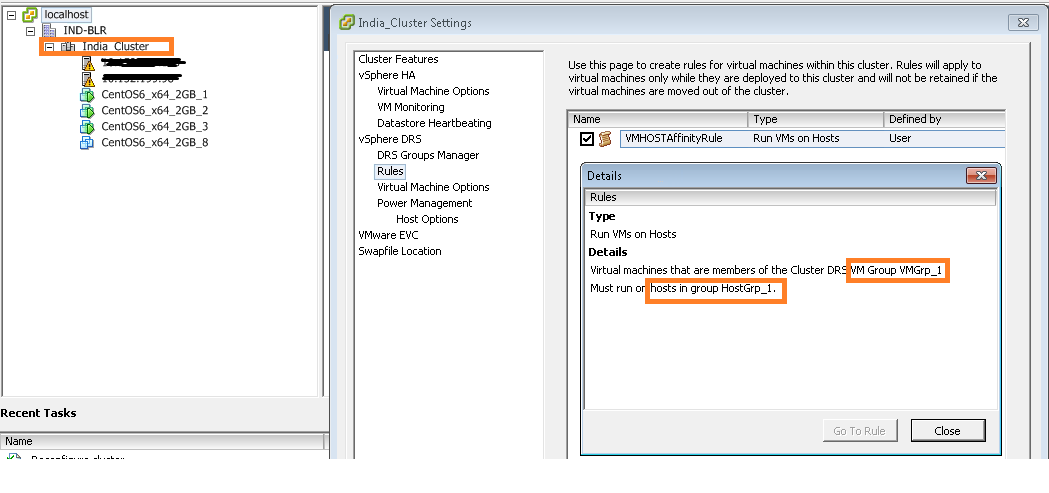
Here is the created VM-Host rule view from vSphere Client.
VM Host Rule

Noteworthy points:
1. For the sake of simplicity we have hard-coded some IPs, cluster, host & VMs names. Please do make changes if you are using this in production environment.
2. In order to create anti-affinity rule, you will just need to replace line 77 to vmHostAffRule.setAntiAffineHostGroupName(“HostGrp_1”); is it not too simple?.
3.In order to make this rule soft, just replace line 79 to vmHostAffRule.setMandatory(false); Note that default rule created is soft rule(i.e. If we do not set the property).

I hope you enjoyed this post, please take a look at Part II on VM-VM affinity rules creation.

Learn more on VM-Host rules here.
If you have still not setup your Eclipse environment:Getting started tutorial